

Bitget Sign Up: Referral Code, Verification and First Deposit
Signing up on Bitget takes about five minutes: email or phone, a password, a code from your inbox, and an optional "Referral code" field. After that you need KYC with an ID and a selfie, because Bitget will not let you deposit or trade without it. Check your country first: the US, Canada and many others are prohibited, and new Indian sign-ups have been paused since February 2026.
Contents
Sign up through the link and the referral code is filled into the form automatically.
Sign up on BitgetBGGAPKEJThe code can only be entered during sign-up.
Before you sign up: is Bitget open in your country?
This matters more than the sign-up form. You can usually create an account from anywhere, but KYC checks your country of residence and documents, and Bitget's Terms of Use (last updated 20 October 2026) prohibit the US, Canada, Japan, Singapore, Hong Kong, Malaysia, Thailand, Russia, Belarus and others. Using a VPN to get around this breaks clause 8.6 and can get the account frozen.
- Nigeria – not on the prohibited list, with an active NGN P2P market.
- India – new registrations for Indian residents and Indian KYC documents paused from 6 February 2026; existing users kept access.
- Philippines – not on Bitget's own list, but the SEC named Bitget as unregistered in August 2025 and local ISPs began blocking it.
- Kenya, South Africa, Pakistan, Bangladesh, Vietnam, Indonesia – not on the prohibited list as of October 2026; still read the Terms before depositing.
Confirm your country against Bitget's current Terms of Use before you start; a finished account is useless if KYC will not accept your residence.
How to sign up on Bitget, step by step
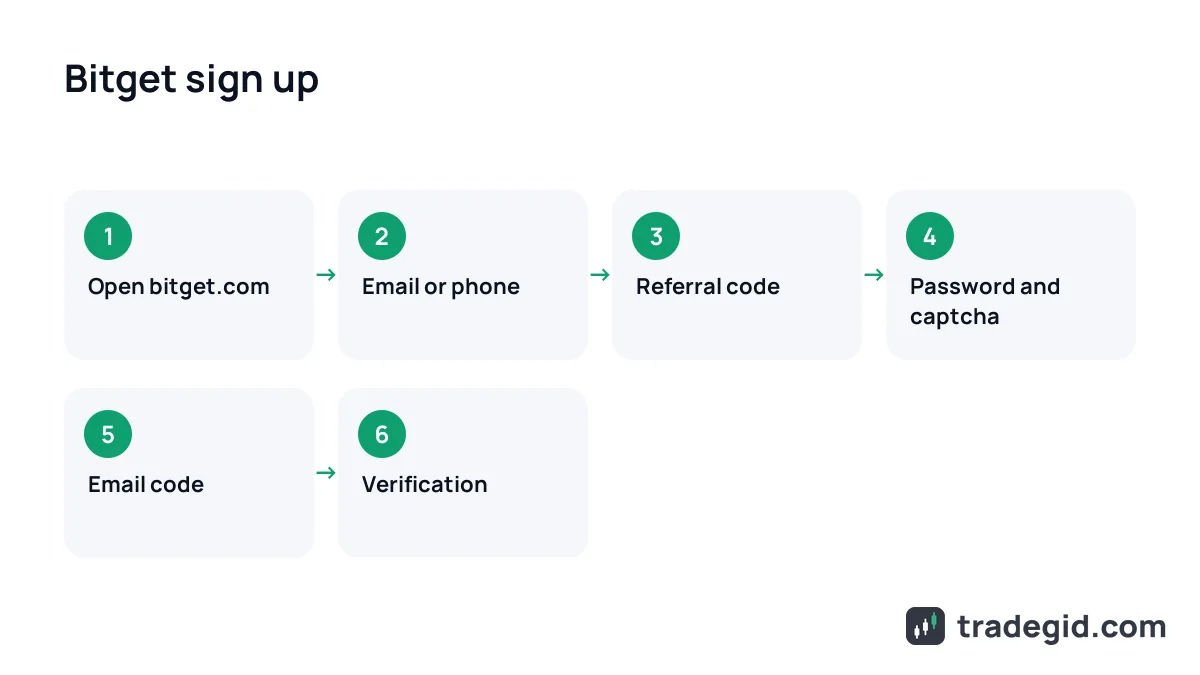
This is the actual screen order on bitget.com. The app follows the same steps with the Sign Up button on the start screen. Click through the interactive version below.
- Email or phoneUse the one you will never lose access to. You can link the other later in security settings.
- PasswordUnique, not your email password. Save it in a password manager.
- Referral codeEntered during sign-up. Adding a code to an existing account through the profile is generally not possible.
- Verification codeValid for a few minutes. If it expires, tap Resend.
The form itself is four fields and a code. The step people miss is the referral field, and it usually cannot be added once the account exists.
Where to enter the Bitget referral code
The field is labelled "Referral code" and sits on the first sign-up screen, right under the email or phone field. It is optional, so plenty of people skip past it. Our code is BGGAPKEJ; if you use the button on this page it is filled in for you.
- Website: sign-up form → "Referral code (optional)" line under the email field.
- App: sign-up screen → the same line under the email or phone field.
- Google or Telegram sign-up: look for the code field before you confirm; if you cannot see it, signing up by email is the safer route.
- After sign-up the code generally cannot be attached. You can ask support, but do not count on it.
The referral code is linked at the moment of sign-up, so check the field before you click Next.
Bitget sign-up bonus: what to expect
Bitget runs a new-user rewards section with tasks (often called Reward Hub). The tasks and amounts change almost monthly and depend on your country, so I am not quoting numbers here: check them inside your account after sign-up. Read the terms carefully. Most rewards are trading or futures vouchers, not cash you can withdraw, and the large "up to X USDT" figures seen on Reddit and YouTube usually require very high deposits and trading volume.
Bitget KYC (identity verification)
Since 1 January 2024, deposits, trading and P2P on Bitget all require verification. There is one check: your ID and your face. Most reviews finish within an hour; the help center says up to 4 hours, and up to one business day in harder cases.
- Profile icon (top right) → Identity Verification → Verify under Individual Verification.
- Pick your country of residence, issuing country and document type: passport or national ID, depending on the country.
- Type your full name exactly as on the document. Middle names go with the first name.
- Photograph the document, ideally on your phone (the website shows a QR code for this). Passport: photo page. ID card: both sides.
- Do the face check: turn your head, blink. No glasses, hat or mask, and good light.
- Submit. Status changes to Under Review and the result arrives by email.
KYC takes five minutes of your time and up to a few hours of waiting; nearly every rejection comes down to photo quality or a name mismatch.
No account yet? Sign up through the link, then come back to verification.
Sign up on BitgetBGGAPKEJThe code can only be entered during sign-up.
Common verification problems
| Problem | Usual cause | Fix |
|---|---|---|
| Document photo rejected | Glare, blur, cropped corners, black-and-white scan | Retake in daylight on a dark background with all four corners in frame |
| Name mismatch | Typo or different spelling | Type it exactly as on the document; if already submitted, contact support |
| Face check fails | Glasses, hat, backlight, poor camera | Face a window, remove glasses, try another phone |
| Document type not accepted | Not supported for your country | Switch to a passport, or the other ID type in the dropdown |
| Country not available | Residence on the prohibited list, or Indian KYC during the sign-up pause | Verification will not pass; use another exchange |
| "Document already in use" | Linked to another Bitget account | Log into the old account or ask support for a reset |
| Review over 4 hours | Manual review or queue | Open a support ticket with your UID |
As of October 2026, based on Bitget's identity verification help articles. You get up to 5 attempts per 24 hours, so fix the cause before retrying.
One person, one verified main account. Sub-accounts inherit the main account's verification and do not need separate KYC.
Turn on 2FA right after sign-up
Bitget suffered a major hot wallet hack in September 2026. The exchange covered user balances, but protecting your own login is on you. It takes ten minutes under profile → Security.
- Google Authenticator or similar – safer than SMS, which can be hijacked through a SIM swap.
- Anti-phishing code – a phrase that appears in every genuine Bitget email. No phrase means a fake.
- Withdrawal whitelist – funds can only go to addresses you added in advance.
- Fund password, if your Security page offers one – it is requested for withdrawals and P2P.
An authenticator plus a withdrawal whitelist blocks nearly every account-theft scenario, even if your password leaks.
Your first deposit on Bitget
After KYC, Assets → Deposit unlocks. There are three main routes, and which is best depends on where you live.
| Method | How it works | Watch out for |
|---|---|---|
| Crypto transfer | Copy your Bitget deposit address and send USDT or another coin from an exchange or wallet | Network must match on both sides: TRC20 to TRC20, BEP20 to BEP20 |
| P2P | Buy USDT from another user for NGN, INR, PHP or another local currency; coins sit in escrow | Pay only from an account in your name; never release coins before the money lands |
| Card or bank transfer | Buy Crypto section with a payment partner | Currencies and partners vary by country; compare the rate with P2P |
As of October 2026. Available fiat methods depend on your country; the live list appears under Buy Crypto after verification.
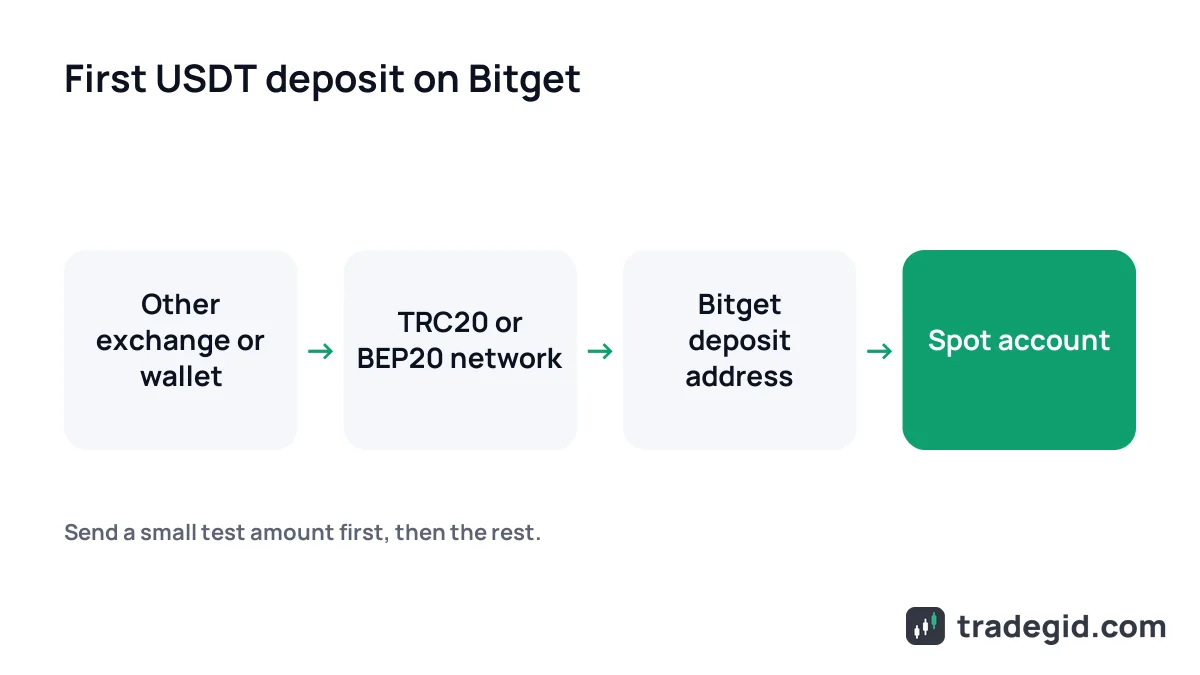
I always send 10–20 USDT first, wait for it to land, then send the rest. The extra network fee is nothing next to coins sent on the wrong network. In Nigeria P2P is the usual on-ramp, and Bitget charges NGN takers nothing; more on that in our P2P section.