

OKX sign-up: referral code, verification and first deposit
Signing up on OKX takes about 5 minutes and KYC review takes up to 24 hours. The referral code goes in on the first sign-up screen and cannot be added later. If you came through our link, the code K2FMEIJ3 is already in the field.
Contents
Open sign-up through the link – the code is filled in, you only need to check it on the first screen.
Sign up on OKXK2FMEIJ3The code can only be entered during sign-up.
Check your country first
Before anything else, make sure OKX serves your country. As of October 2026 India, Canada, Japan, Hong Kong, Malaysia, Nepal and Uzbekistan are fully restricted, the global platform is closed to US residents, and the UK cannot use derivatives or P2P. In the Philippines OKX is not on the restricted list but is not registered with the SEC, and the trading app has been removed from Google Play there. Nigeria is not restricted, and local media reported access restored in 2026.
What you need before signing up
- An email or phone number you will still control a year from now. Recovering an account without it is slow.
- A valid passport, national ID or driving licence. The exact list of accepted documents for your country is shown on the verification screen.
- A phone with an authenticator app: Google Authenticator, Microsoft Authenticator or similar.
- Good light and 10 unhurried minutes for the selfie and ID photos.
The documents and email must be yours: OKX checks identity, and one person can have only one account.
How to sign up on OKX step by step
This is the current screen order on okx.com. The app follows the same steps, just with buttons in different places.
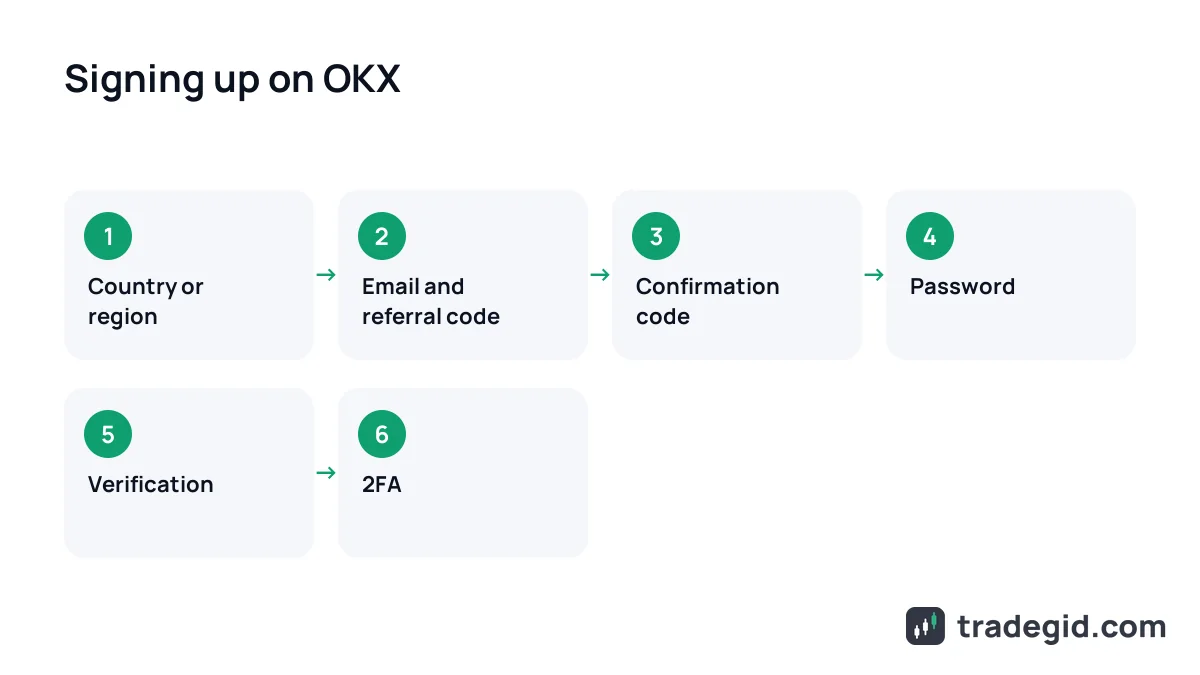
- Open sign-up through the referral linkUse the link in the card above, or go to okx.com and tap Sign up. Through the link the referral code is filled in automatically.
- Choose your country or regionThe first screen asks for your location. Pick your country of residence: it decides which products you get and how KYC works.
- Enter email or phone and check the codeThe same screen has the referral code field. Make sure it shows K2FMEIJ3, or type it in. You can also continue with Google, Apple or Telegram.
- Confirm your email or phoneEnter the 6-digit code from the email or SMS. No email? Check spam and the Promotions tab.
- Create a passwordOKX requires a mix of upper and lower case letters, numbers and special characters. Do not reuse your email password.
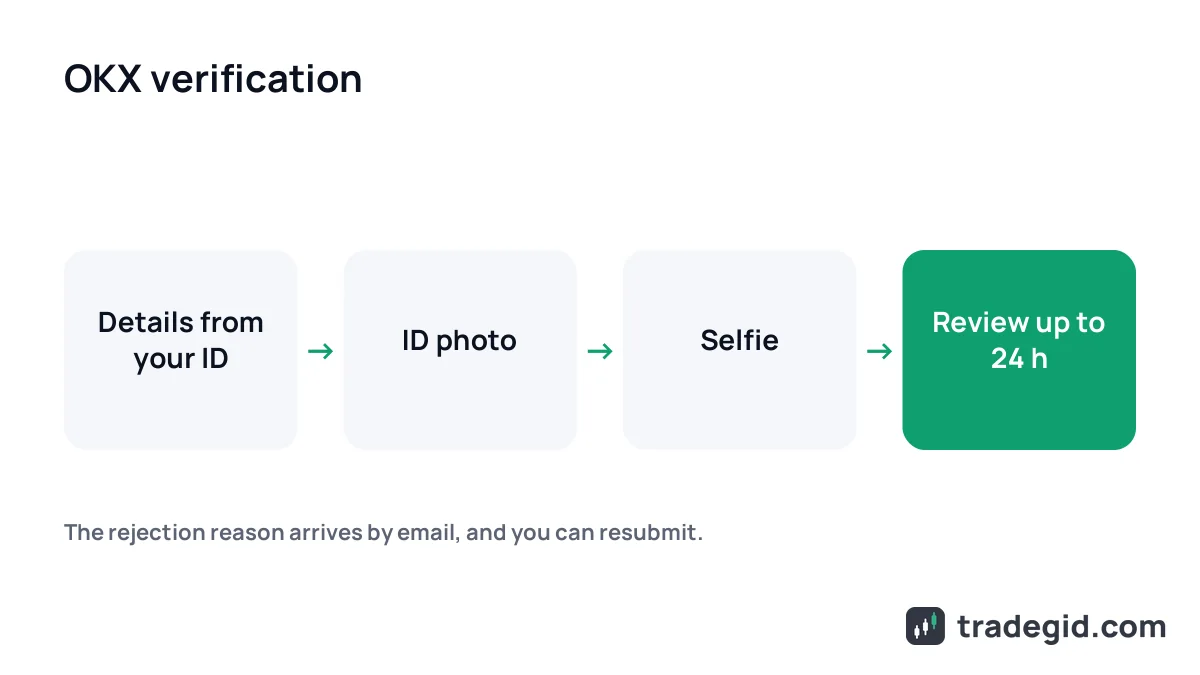
- Complete verificationProfile → Verification → Individual account. Personal details, ID photo and a selfie. Review usually takes up to 24 hours.
- Turn on 2FAProfile → Security → Authenticator app. Write the backup key down on paper.
The first screen matters most: that is where you pick the country and enter the referral code. Everything else can be changed later; those two cannot.
Signing up in the OKX app
Download the app only from the link on okx.com or an official store, and check the developer name. Fake apps with a similar icon are a common way to steal logins. In the Philippines the trading app is no longer on Google Play, which is exactly when copycat APKs appear, so be careful with any download link shared in groups.
Where to enter the OKX referral code
The OKX referral code goes on the screen where you enter your email or phone. If you arrived through a link, the field is already filled. If you start from a blank page, look for the referral code line under the email field; sometimes it is collapsed and opens when you tap it.
- The code is bound when the account is created; it cannot be added or changed after sign-up.
- The link may show the code in lower case and the field in upper case; it is the same code.
- If the field is empty and you wanted a code, close the tab and start again before you confirm the email.
- You cannot register again with the same documents: OKX rejects duplicate identities.
Check the code before you tap Next. Once the email is confirmed, the binding is final.
OKX sign-up bonus
OKX welcome rewards are separate campaigns: rewards for a first deposit, trading volume or completing tasks. Amounts and terms depend on your country and change often, so the figures you see in search results or on Reddit may not apply to you. Check the current offers under My rewards and the campaign center after you log in.
Not signed up yet? Use the link – the code K2FMEIJ3 will be in the field on the first screen.
Sign up on OKXK2FMEIJ3The code can only be entered during sign-up.
OKX verification: documents and timing
Without verification you cannot trade, deposit or withdraw on OKX. On the website it is in the profile menu under Verification. In the app it is Menu → Account settings → Identity verification. OKX says it reviews applications within 24 hours; in practice it is often faster.
- Basic details: country of residence, nationality, full name, date of birth, ID type and number, address.
- ID: passport or driving licence, or another government ID if your country supports it. Original only, not a copy or screenshot, not expired.
- A selfie or face scan through your phone camera.
- Proof of address if asked: issued within the last 3 months, or 6 months for EEA residents.
Your form details must match the ID letter for letter, otherwise the check fails or goes to manual review.
Common verification problems
| Problem | Cause | Fix |
|---|---|---|
| Selfie failed | Face outside the oval, glasses, mask, shadow | Remove glasses and hat, face the light |
| ID not recognised | Glare, cut-off corners, blurry photo | Put the ID on a dark table, no flash, all corners in frame |
| Invalid ID | Expired, or the ID type is not supported | Use a valid passport or national ID |
| Duplicate identity | An OKX account already exists for this ID | Recover the old account through support |
| Country not supported | Residence in a restricted location such as India | Verification will not pass; use a platform licensed in your country |
| Review over 24 hours | Manual review or a long queue | Message support from the in-app chat |
As of October 2026, based on the OKX help center and Risk and Compliance Disclosure. OKX emails the rejection reason, and you can resubmit from the verification page.
Protect the account: 2FA and anti-phishing code
SMS is weak protection because a SIM can be swapped. Connect an authenticator app under Security first. Write the backup key the app shows during setup on paper and store it safely. Without it, recovering access after losing your phone takes days.
Second, the anti-phishing code. It is a word OKX adds to every email it sends you. If an email that looks like OKX arrives without that word, it is fake – do not click anything in it.
First deposit on OKX
There are two practical ways to fund an OKX account outside the EU and US:
- Transfer USDT from another wallet or exchange. In OKX open Assets → Deposit, pick USDT and the network. The network must match on both sides, or the coins are lost.
- P2P in local currency. In October 2026 there were active ads in Nigerian naira (bank transfer, OPay, PalmPay) and Philippine pesos (GCash, Maya, GoTyme). OKX charges no P2P fee.
- Test first. Send a small amount, wait for it to arrive, then send the rest.
Moving USDT in from another wallet is the most predictable route. P2P is handy where local ads are active, but check your bank's rules on crypto payments.
How P2P works and how to cash out again is covered in our guides on P2P and withdrawing USDT to a card. For what the exchange itself offers, see the OKX review.