

How to Sign Up on Bybit: Referral Code, KYC and First Deposit
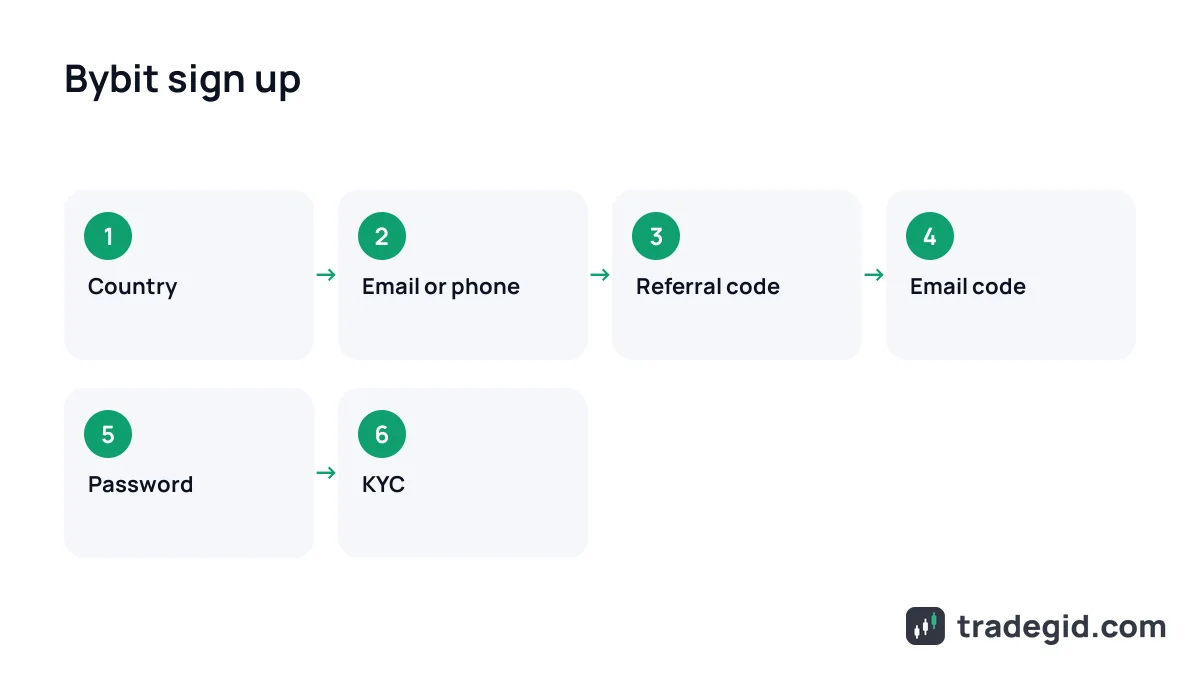
Signing up on Bybit takes 3–5 minutes: country, email or phone, referral code, verification code and password. The referral code goes in on the first screen – Bybit doesn't let you add or change it after the account exists. Then comes mandatory Standard KYC: a photo ID and a face check, usually done in about 15 minutes.
Contents
Sign up through the link and code J8NKMG fills in automatically. If you opened the site directly, copy the code and paste it in yourself.
Sign up on BybitJ8NKMGThe code can only be entered during sign-up.
What to have ready before you sign up
- An email address, not just a phone number. Bybit itself recommends email: withdrawals need an email code plus Google Authenticator. Gmail, iCloud or ProtonMail work best.
- A physical ID: passport, national ID card, residence permit or driving licence – the exact list for your country appears at the document step. Scans, e-copies and photos of a screen are rejected.
- A phone with a camera for the face check and an authenticator app.
- Your real country of residence. It decides which platform you land on and what products you get.
A physical document and your real country are the two things that matter. Most stuck verifications go wrong on one of them.
Bybit sign up, step by step
The flow is the same on the website and in the app – I've done both. The steps below match Bybit's own Help Center article, updated in August 2026.
- Sign-up pageVia the link or the Sign Up button. Check the address bar: bybit.com only. "Mirror" sites from ads and chats are phishing.
- Country and loginCountry of residence, then email or phone. Each email and number can only be tied to one account.
- Referral codeThe field at the bottom of the form. Make sure the code is there before you click the button.
- Code and passwordreCAPTCHA, the email or SMS code, a password. Done.
The sign-up itself is four screens. The only step you can't fix later is the referral code.
Bybit referral code: where to enter it
A referral code tells Bybit who invited you. The field is on the sign-up form under your login and is labelled "Referral Code (Optional)". If you came through a link, it's already filled in. If you opened Bybit yourself, paste J8NKMG manually.
Bybit's Help Center is explicit: once the account is created, the code can't be added, changed or removed. So "Bybit referral code after registration" has only one answer – a new account on a different email, and a second account with the same ID won't pass KYC anyway.
Bybit sign-up bonus
Bybit almost always runs new-user tasks in its Rewards Hub: complete KYC, make a deposit, place a first trade – each unlocks coupons. Amounts and conditions change every few weeks and differ by country, so I won't quote a fixed "20 USDT" or "up to 30,000 USDT". Check the live list in your account after signing up.
Bybit KYC: levels and documents
Standard verification is mandatory for every product: without it you can't trade, fund with fiat or use P2P. Checks usually take about 15 minutes, sometimes up to 48 hours.
| Level | What you need | Daily withdrawal limit |
|---|---|---|
| No verification | Nothing | 20,000 USDT (100,000 USDT a month), withdrawals only |
| Standard | Photo ID and face check | Up to 1,000,000 USDT |
| Advanced | Plus proof of address: utility bill, bank statement, lease of 6+ months | Up to 2,000,000 USDT |
| Pro | Enhanced due diligence, proof of income | Individual |
As of October 2026, per Bybit's individual KYC FAQ. Proof of address must be dated within the last three months.
- Profile icon → Account → in the Identity Verification row click Verify Now.
- Choose your country of residence. Changing it later triggers extra checks.
- Pick the issuing country and document type: passport, ID card, residence permit or driving licence.
- Photograph the document so your full name and date of birth are clear – no glare, no fingers over the edges.
- Do the face check with your laptop camera, or scan the QR code and finish on your phone.
- If asked, fill in the short questionnaire (account purpose, source of funds).
It's six screens and about five minutes of your time. The rest is waiting for Bybit's review.
No account yet? Sign up through the link first, then come back to verification.
Sign up on BybitJ8NKMGThe code can only be entered during sign-up.
Common Bybit verification problems
| Problem | Why it happens | Fix |
|---|---|---|
| Document rejected | Scan, screenshot, glare, cropped edge | Reshoot the physical document in daylight, all four corners visible |
| Face check won't load | No camera permission, old browser | Allow camera access or switch to phone via the QR code; if it still fails, wait 30 minutes |
| Name mismatch | Name typed differently from the ID | Type it exactly as on the document; name corrections take up to one working day |
| Wrong document country | ID from one country, living in another | Select your real country of residence; Advanced proof of address may be needed |
| Address rejected | Older than three months, or a mobile phone bill | Use a recent bank statement or utility bill |
| Stuck over 48 hours | Manual review | Submit a support case; Bybit says it replies within one working day |
Per Bybit Help Center, October 2026. Domestic passports and student, work or travel visas are not on the accepted list.
Secure your account: 2FA and anti-phishing code
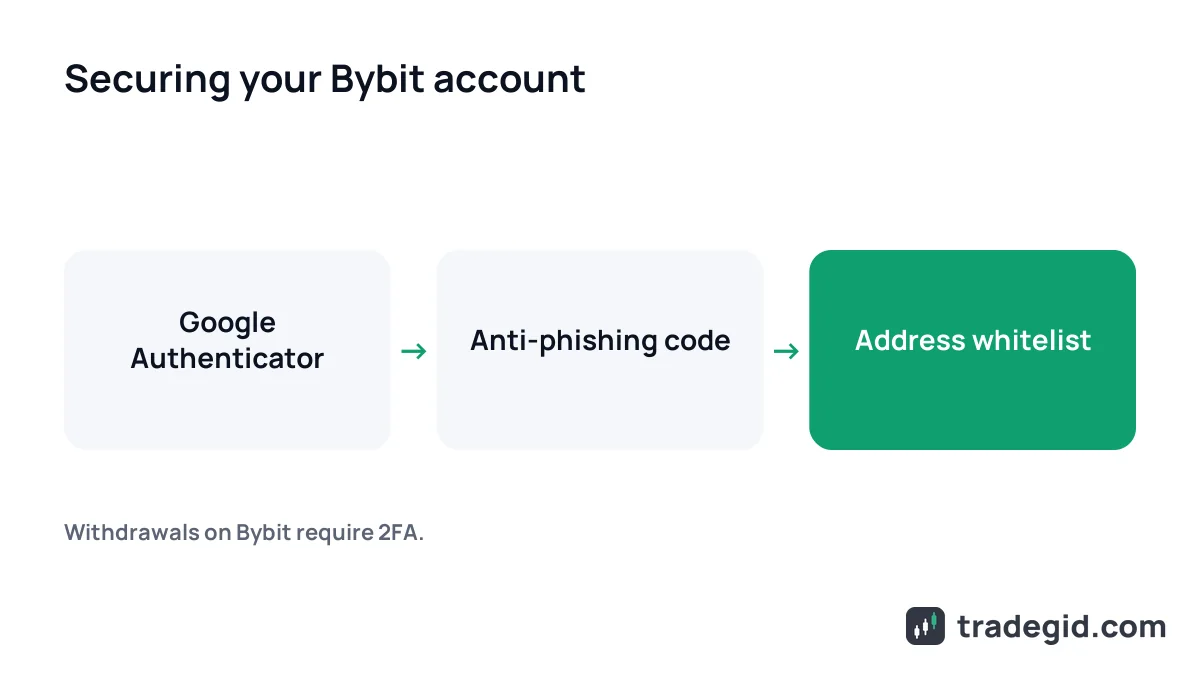
Right after signing up I turn on three things. Without Google Authenticator Bybit won't let you withdraw anyway, so do it now rather than the day you urgently need your money.
- Google Authenticator (or any TOTP app) – Account → Security. Write the backup key down on paper.
- Anti-phishing code – a word Bybit adds to every genuine email. No word, not Bybit.
- Withdrawal address whitelist – withdrawals only to wallets you've added in advance.
These three settings close off almost every theft scenario: a hijacked email, a phishing message and a swapped address.
Your first deposit: P2P, card or crypto transfer
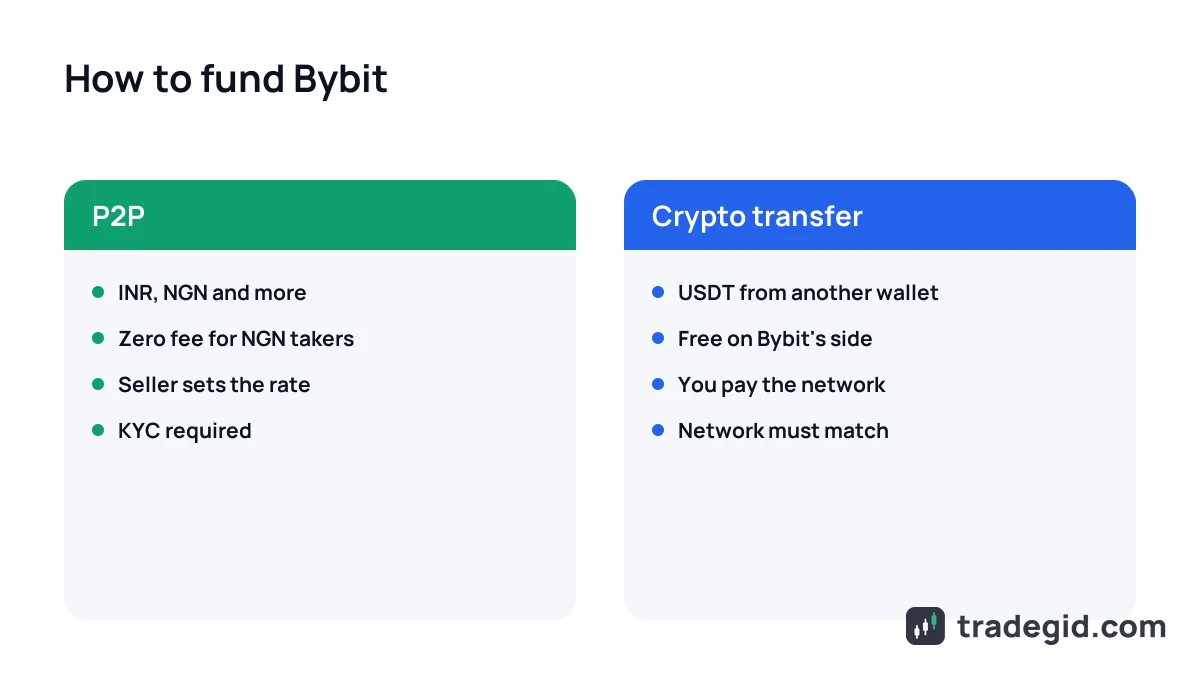
P2P with INR, NGN or other local currency
In India and Nigeria P2P is the usual way in. Go to Buy Crypto → P2P Trading, choose USDT, your currency and payment method (bank transfer, UPI, mobile money – whatever sellers offer), then a seller with many completed orders and a high completion rate.
- Start with a small amount to learn the flow.
- Pay only from an account in your own name, and only to the details in the ad.
- Don't tap "Paid" until the money has actually left your account.
- If the seller doesn't release after the timer, open an appeal instead of chasing them on WhatsApp.
P2P is safe as long as the whole trade stays inside Bybit: the seller's coins are in escrow and support settles disputes.
Card or crypto transfer
Card purchases through third-party providers are available in some countries – availability and fees show at the payment step, and the rate is usually worse than P2P. The cheapest route, if you already hold crypto, is a USDT transfer from another wallet: Assets → Deposit, pick the coin and network; the network must match on both sides.
Once funded, you can start trading. Products and fees are in the Bybit review, and if futures are the plan, read about leverage and liquidation first.