

How to Sign Up on Binance: Referral Code, Verification and First Deposit
Signing up on Binance takes 5–10 minutes: email or phone, a verification code, a password, the referral code, then ID verification with a face check. New accounts can't deposit or trade until verified, so KYC is part of signing up, not an optional extra.
Contents
This is the exact path I walk friends through when they ask for help with an exchange – from the sign-up form to the first USDT purchase. Each step was checked against Binance's help centre as of October 2026. If you live in the EU, US, UK, Philippines or Nigeria, read the country section first.
Sign up on Binance through our link – referral code 58328288 is added automatically.
Sign up on Binance58328288The code can only be entered during sign-up.
Before you start: can you sign up on Binance?
Binance doesn't accept users from everywhere. Check your country before uploading documents, or you'll get stuck at verification. What matters is your country of residence, not your passport.
| Country | Sign-up and KYC | Funding |
|---|---|---|
| India | Yes – Binance is registered with FIU-IND | P2P and other methods shown in your account |
| Nigeria | Check in the app – naira services removed in 2024 | No naira P2P on Binance |
| Philippines | Blocked since 2024 | – |
| EU | New users restricted since 1 July 2026 (no MiCA licence) | – |
| United States | Not served – use the separate Binance.US | – |
| United Kingdom | No new users since 2023 | – |
As of October 2026. The exact list of countries and accepted documents appears at the country selection step during verification.
How to create a Binance account, step by step
- Open the sign-up form via the linkFollow the referral link to the Binance website or app. On the website there's one field, Email/Phone number, plus Continue with Google, Apple and Telegram buttons.
- Enter your email or phoneI recommend email – it's easier to recover than a phone number. Agree to the Terms of Service and Privacy Policy.
- Enter the verification codeA 6-digit code arrives by email or SMS. Enter it within 30 minutes or request a new one.
- Create a passwordAt least 8 characters, with at least one uppercase letter and one number. Use a password you don't use anywhere else.
- Check the referral codeAfter the account is created you'll see a referral code step. If you came through a referral link, the code is already filled in and marked as linked. If the field is empty, type 58328288.
- Start verificationBinance offers identity verification straight after sign-up. Do it now while your documents are at hand.
Account creation itself takes a couple of minutes. Don't skip the referral step – once a code is linked, it can't be changed.
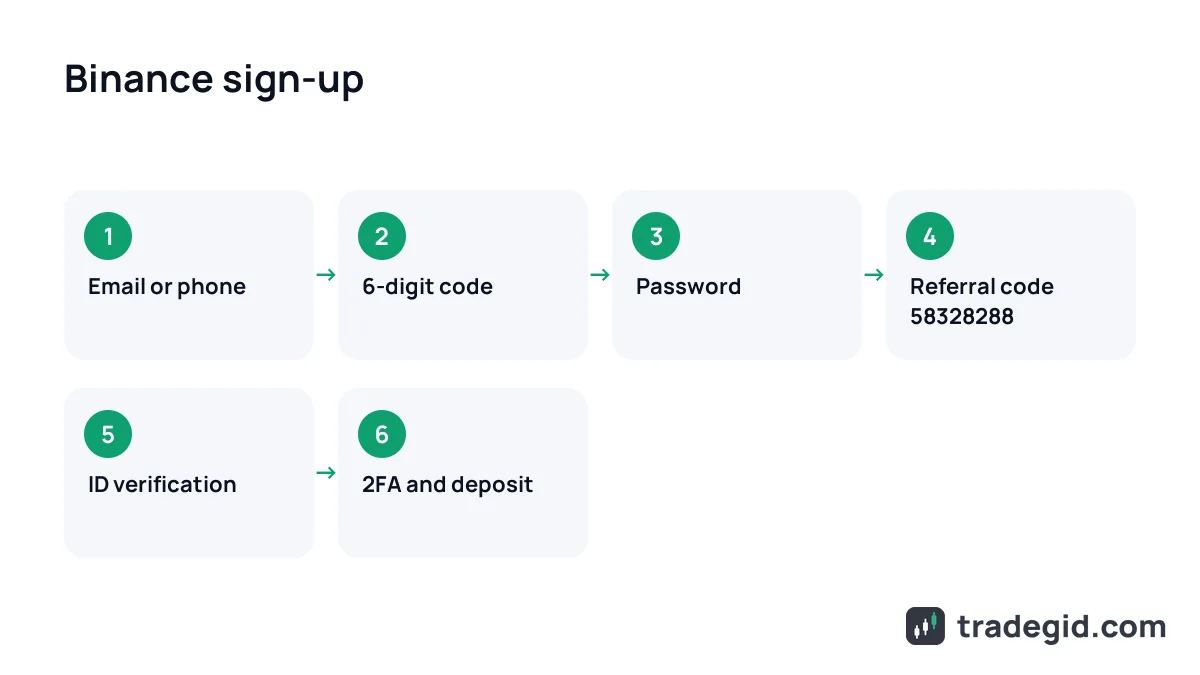
Where to enter a Binance referral code
In the Binance app the referral code field appears after the account is created – on the success screen, just before verification. That's the same whether you sign up with email, phone, Google, Apple or Telegram. If you opened sign-up from a referral link, the code is filled in automatically and shows as linked.
According to Binance's help article, a linked referral code can't be modified, and it doesn't promise that you can add one later if you tap Skip. So check the field before tapping Next. Our code is 58328288.
Is there a Binance sign-up bonus?
There's no guaranteed cash bonus just for registering. Binance runs its own promotions for new users from time to time – usually tasks like verifying and making a first trade – and the current terms are in the Rewards Hub in the app. They change often and depend on your country. Sites promising "free 100 USDT with this code" are usually retelling a promotion with conditions in the small print.
Binance verification (KYC)
Verification is mandatory: new users can't deposit or trade without it, and older unverified accounts are withdraw-only. Here's the flow in the app:
- Tap Verify Now on the home screen, or open Account → Identification.
- Choose your country of residence, the document's issuing country and the document type: passport, national ID or driver's licence.
- Upload both sides of the document, or scan it with your phone via QR code if you started on desktop.
- Do the liveness check: full face in frame, eyes open, no glasses, hats or filters, good light.
- Check your personal details and confirm – they can't be changed afterwards.
- Wait for the result email. Don't refresh the page or close the app during the process.
Most rejections come from glare on photos, glasses during the face check and typos in personal data. Five careful minutes save days of support tickets.
Which documents are accepted depends on your country, so go by the list Binance shows after you pick your country – don't upload a document type that isn't on it. Your verification level sets withdrawal limits, shown on the Identification page. For larger amounts Binance may also ask for proof of address or source of funds.
No account yet? Sign up on Binance through our link – code 58328288 is added automatically.
Sign up on Binance58328288The code can only be entered during sign-up.
Two-factor authentication (2FA) and security
Right after KYC, open Account → Security. An account with money and no 2FA is an easy target: passwords leak from any hacked site where you reused them.
- Authenticator app – safer than SMS, codes are generated on your phone and can't be intercepted through SIM swaps.
- Anti-phishing code – your own word that Binance inserts in every genuine email. An email without it is fake.
- Withdrawal address whitelist – withdrawals only go to addresses you saved in advance.
- Authenticator backup key – write it on paper and keep it away from your phone.
The minimum set is an authenticator, anti-phishing code and an address whitelist. Those three settings shut down almost every theft scenario.
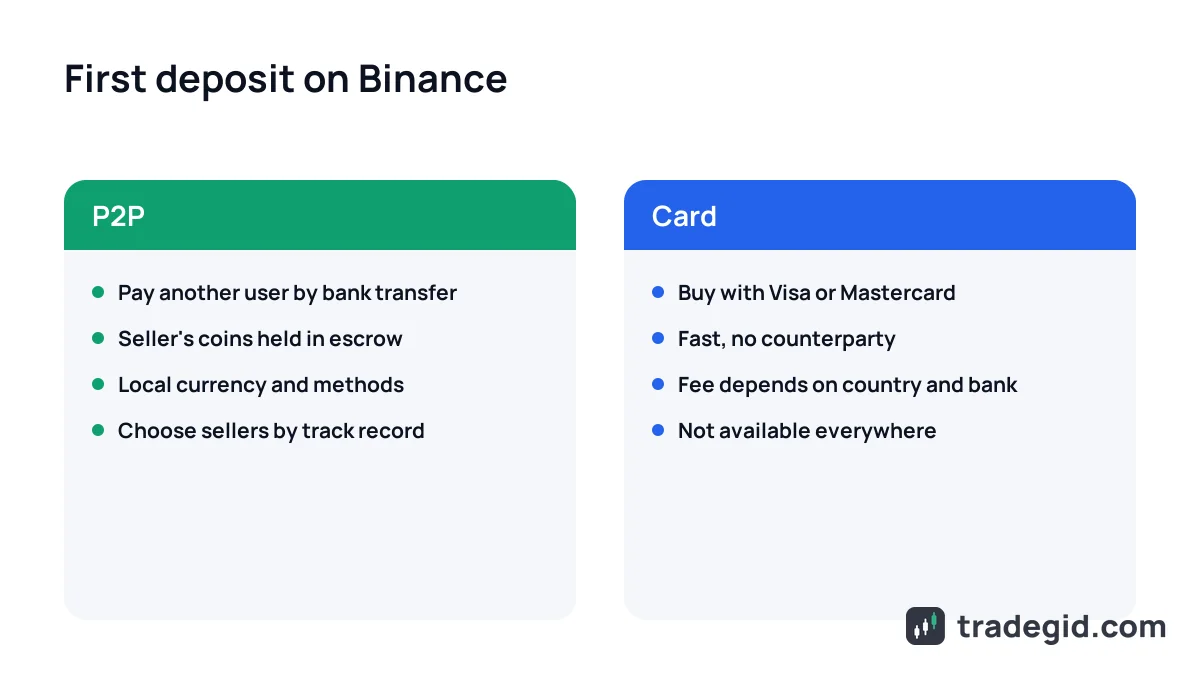
Your first deposit: P2P or card
Once verified, you need to get money in. There are two main routes, and which one works best depends on your country.
Via P2P
Go to Buy Crypto → P2P, choose USDT, your currency and a payment method. Pick a seller, send the money from an account in your own name to the details in the order, and tap Paid. While the trade is open the seller's coins are held in Binance escrow. The currencies and payment methods available depend on where you live.
With a card
Under Buy Crypto you can buy coins directly with a Visa or Mastercard card. Availability and fees depend on your country and bank, and Binance shows the final amount before you confirm. For small amounts P2P often works out cheaper.
Safe P2P rules and cashing out back to your bank are covered in withdraw USDT to card. Purchased USDT lands in your Spot or Funding wallet, ready to trade.
Common Binance verification problems
| Problem | Cause | Fix |
|---|---|---|
| Document photo rejected | Glare, cropped edges, blur | Shoot in daylight on a dark background with all four corners visible |
| Face check fails | Glasses, hat, poor light, camera filters | Remove glasses, face a window, turn filters off |
| Details don't match | Typo in name or date of birth | Contact support – you can't edit details after confirming |
| Your document isn't listed | Document type not supported for your country | Use a passport or national ID instead |
| Rejected by country | Country of residence is restricted (e.g. EU since July 2026) | Sign-up isn't available there – look at other exchanges |
| Process freezes | Page refreshed or app closed mid-way | Start again and keep the app open until the end |
As of October 2026, based on Binance's identity verification help article (updated 5 June 2026) and the author's experience.
What to do after signing up
Don't rush into futures. I'd spend the first few weeks on spot with a small amount: learn order types, fees and withdrawals. Products and fees are covered in our Binance review. If you plan to trade with leverage, read about leverage and liquidation first.