

How to buy stocks with crypto: step-by-step guide for USDT
Yes, you can buy stocks with crypto: on a crypto exchange you buy a stock token with USDT on the spot market, just like any coin. You need a verified account, USDT in your spot wallet and the right ticker, such as TSLAX on Bybit or TSLAB on Binance. The purchase itself takes a couple of minutes.
Contents
Can you buy stocks with crypto?
You can, but be clear about what you are buying. On a crypto exchange it is not a share on the company's register but a tokenized stock: an issuer token backed 1:1 by a real share. The price follows the stock and you can trade on weekends, but there are no voting rights and your claim is against the issuer.
The exception is Bitget Stock+, where USDC buys real shares through a licensed US broker. Those shares cannot be withdrawn to a crypto wallet and trade 24/5. For most beginners a regular spot token does the job.
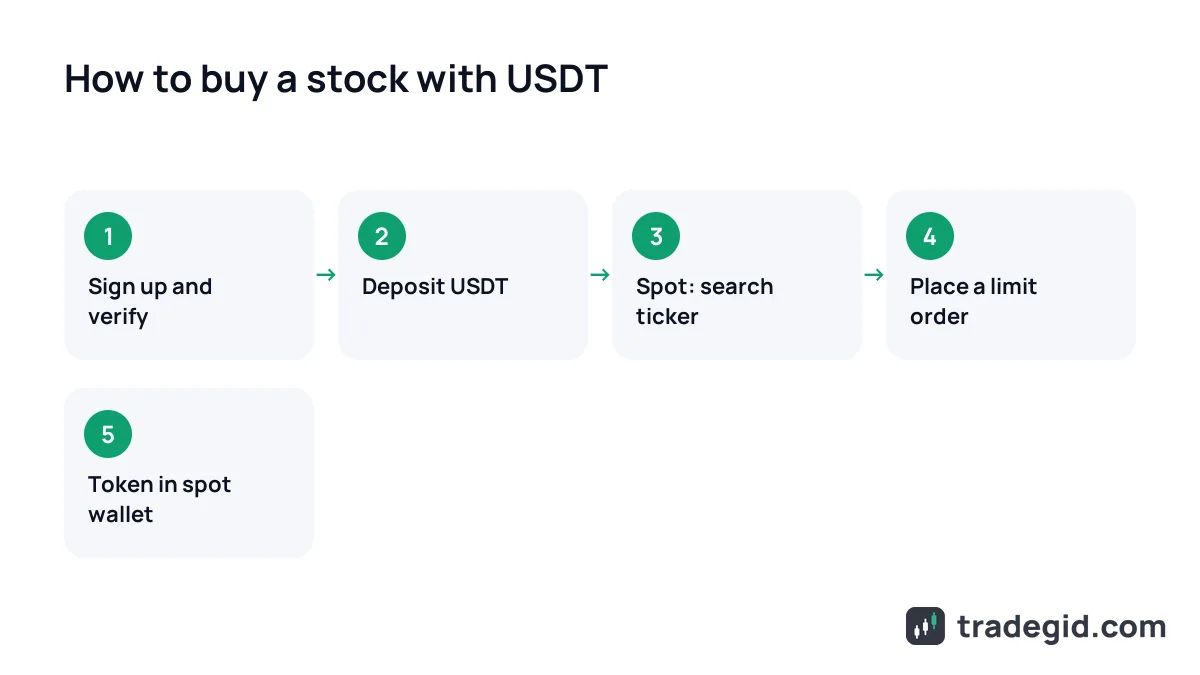
How to buy tokenized stocks: the general flow
The logic is the same on all five exchanges; only menu names and ticker formats differ. Click through the widget: this is the exact order I follow when I buy a first position on a new exchange.
Where to find stocks on each exchange
The table first, then short notes per exchange. Menu names come from each exchange's help pages and can change after app updates.
| Exchange | Where to find it | Product | Ticker example | Fee |
|---|---|---|---|---|
| Bybit | Trade → Spot, search by ticker; also Bybit Alpha | xStocks | TSLAX/USDT | Spot fee for your tier, see Bybit fee page |
| Binance | Spot, search ticker with B suffix | bStocks | TSLAB/USDT | 0% maker on initial pairs at launch (limited-time promo) |
| OKX | Order book vs USDT or Buy/Sell/Convert | xStocks in a unified market | XTSLA/USDT | OKX spot fee, see fee page |
| Bitget | Stocks menu: spot stocks, Stock+, stock futures | rTokens, Stock+ | rTSLA/USDT | rTokens 0.05% maker and taker at VIP 0 (promo); Stock+ from 0.1% |
| Gate | Stocks menu → Tokenized Stocks | xStocks | TSLAX/USDT | 0.2% maker and taker on spot |
As of October 2026. Bitget fees as of August 2026, Gate as of April 2026; promo rates are temporary, check the exchange's fee page for current numbers.
Bybit
In the top menu go to Trade → Spot, type the ticker, for example TSLAX, in the search box at the top left and open the pair. The order panel on the right has Buy, order type and quantity. The same xStocks are available in Bybit Alpha from your unified trading account, and you can run them in spot grid bots. More in the Bybit review.
Binance
bStocks trade as regular spot pairs against USDT: search for NVDAB, TSLAB and other tickers ending in B. Binance also sells real US shares through its ADGM broker, and those can be converted into bStocks 1:1 with no conversion fee. For a first purchase, spot is enough.
OKX
Since July 2026 OKX has run tokenized stocks as a unified market: one order book per stock against USDT, with xStocks underneath. Tickers carry an X in front: XAAPL, XNVDA, XSPY. You can buy through the order book or with the simple Buy, Sell and Convert buttons.
Bitget
The top menu has a Stocks item with sections for spot stocks (rTokens), Stock+ and stock futures. For tokens, search an r-prefixed ticker such as rAAPL. Stock+ needs a separate sub-account and USDC, and uses plain tickers like AAPL.
Gate
Under the Stocks menu choose Tokenized Stocks for xStocks against USDT. The same menu has Stock Futures if you want leveraged contracts. Gate's spot fee on xStocks is 0.2% for both maker and taker.
How to sell a tokenized stock
- Open the same spot pair, for example
TSLAX/USDT. - Switch the order panel to Sell and enter the number of tokens.
- Place a limit order just below the best bid, or a market order if the US session is open and the spread is tight.
- USDT lands in your spot account. Cash it out via P2P to your bank or keep it for the next trade.
Selling mirrors buying, but watch the spread at night and on weekends: on a thin order book a market order costs more.
Cashing out to rupees, naira or pesos is covered in how to withdraw USDT to a card.
Fees: what it costs to buy stocks with USDT
There are two direct costs: the exchange's trading fee and the spread. Example on Gate: buying $1,000 of xStocks at a 0.2% fee costs 2 USDT on entry and about 2 USDT more on exit. During US hours the spread is usually small; on weekends it can cost more than the fee.
- Trading fee – per the exchange's fee schedule, depending on VIP tier and promotions.
- Spread – the gap between bid and ask; wider at night, on weekends and in illiquid names.
- Getting USDT – the P2P merchant's markup or a deposit fee.
- Withdrawing the token – a network fee if you move it to a wallet.
For small amounts the spread, not the fee, is the main cost, so buy with limit orders during US market hours.
Risks to know before you buy
Another risk is weekend price drift. The share closes on Friday evening while the token keeps trading on news. On Monday the stock may open somewhere very different, and a limit order you placed on Saturday may fill worse than you expected.
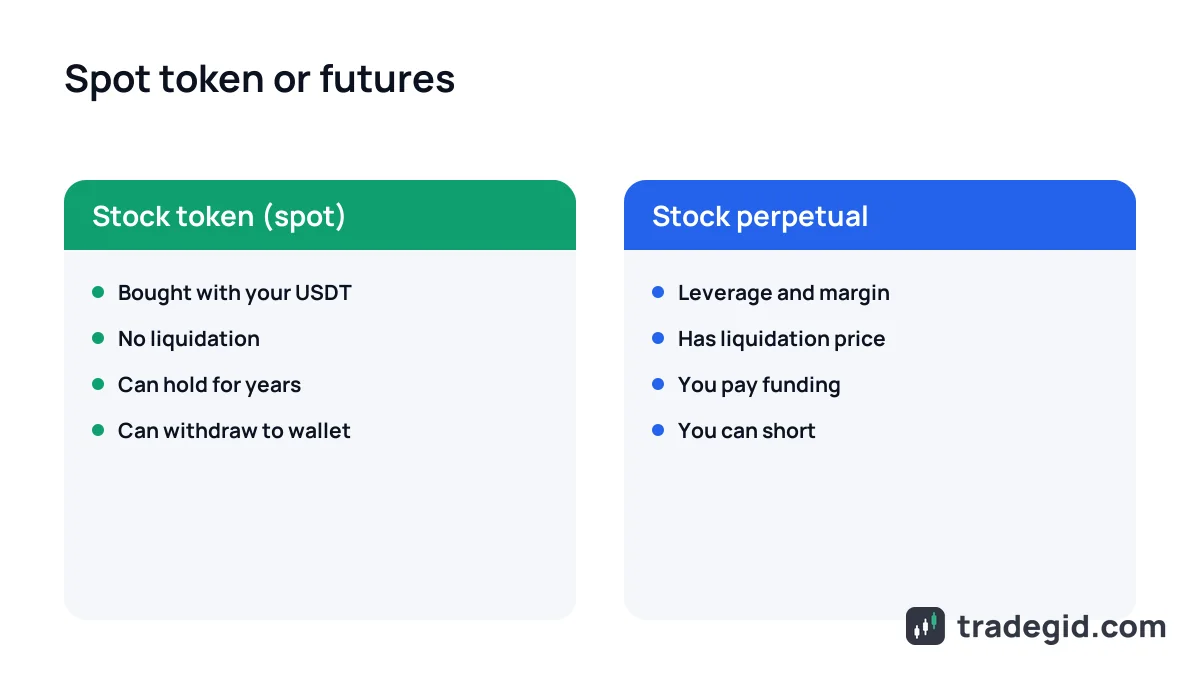
If you want to profit from a falling stock rather than buy it, that means leveraged futures. Read up on liquidation first and size the trade with the position size calculator.
Where to sign up
For xStocks Bybit is the most convenient: spot, bots and Alpha run from one account. For bStocks you need Binance. You can sign up via the links below; the referral code is shown on the card.
Sign up on Bybit via the link and find xStocks on spot.
Sign up on BybitJ8NKMGThe code can only be entered during sign-up.
Sign up on Binance via the link and find bStocks on spot.
Sign up on Binance58328288The code can only be entered during sign-up.