

OKX spot grid bot: step-by-step setup with the real button names
You create the OKX spot grid bot under Trade → Trading bots → Spot grid: pick a pair, choose Manual or an AI strategy, set the lower and upper limit, the grid count and the investment, then click Create. There is no separate bot fee, and spot trades cost 0.08% maker and 0.10% taker at the base tier. Below: the steps, parameters, a worked example and the mistakes beginners make.
Contents
- What the spot grid is and how it works on OKX
- Steps 1-3: sign-up, KYC and USDT in the trading account
- How to create the spot grid on OKX: web and app
- Grid bot parameters: what they do and what a beginner should set
- A worked example: range 90-110, 20 grids, 1,000 USDT
- OKX spot grid fees
- For new users
- Common beginner mistakes
- Other OKX bots and other exchanges
The spot grid needs an OKX account. Signing up through this link opens the form with the referral code filled in, and bots unlock after verification.
New accounts via the link are enrolled in the OKX New User Bonus program automatically.
Sign up on OKXK2FMEIJ3The code can only be entered during sign-up.
What the spot grid is and how it works on OKX
The bot splits the range between a lower and an upper price into grids and places limit orders: a buy at the lower level, a sell at the neighboring higher level. Every closed buy-sell pair earns a small profit. There is no liquidation: it is spot trading with no leverage.
The return per grid level is the gap between its upper and lower edge divided by the lower one: with a 1 USDT step on a coin at 100, that is about 1% before fees. Realized profit and the unrealized result on the coin are different numbers, so a bot can show a profit on trades and a loss on the position. The general idea of a grid is covered in the grid bot guide.
Steps 1-3: sign-up, KYC and USDT in the trading account
- Sign up through the referral linkSign up on OKX: on the first screen choose your country of residence, enter an email or phone number, check that the referral code is filled in, confirm the 6-digit code and set a password. More in the sign-up guide.
- Verification (KYC)In your profile open Verification → Individual account, enter your details, photograph your ID and pass the face check. OKX says it reviews applications within 24 hours. Use your real country, matching your documents. Then turn on 2FA under Security.
- Fund the trading account with USDTAssets → Deposit, pick USDT and the network. The network must be the same on the sending and receiving side. Send a small test transfer first. If your USDT sits in another account such as Funding, move it to the trading account with Transfer. The bot draws funds from the trading account.
You need an account, completed KYC and USDT in the trading account, or the button to create the bot stays inactive.
How to create the spot grid on OKX: web and app
On the website the path is Trade → Trading bots → Spot grid. In the app it is the same bots section and the steps match. Button names below follow OKX help articles; the interface may word them slightly differently depending on your language.
Grid bot parameters: what they do and what a beginner should set
| Parameter | What it does | What a beginner should set |
|---|---|---|
| Pair | The spot pair the bot trades | BTC/USDT or ETH/USDT |
| Lower and upper limit | The range where the bot trades | Edges of the last 2-3 weeks of sideways trading plus 3-5% |
| Grid count | Number of orders in the range, up to 1,000 | 10-30, step of at least 0.5-0.7% |
| Arithmetic grid | Equal gap in USDT | Narrow range, up to 15-20% |
| Geometric grid | Equal gap in percent | Wide range and volatile coins |
| Investment | Quote currency, base coin or a combination | USDT, 5-10% of your deposit |
| Trailing up/down | Moves the grid with the price | Off; trailing down needs extra funds |
| Smart Earn Allocation | Idle funds outside the zone go to Simple Earn | Optional, after your first run |
| Stop-loss (SL) | Sells the coin at market at that price | 3-5% below the lower limit |
| Take-profit (TP) | Sells the coin at market at that price | Your plan: where you are happy with the result |
Source: OKX help articles on the spot grid and manual setup (okx.com/help). The maximum is 1,000 grids. The beginner column is my own experience, not exchange rules. With trailing up on, the stop-loss moves with the grid and the take-profit does not.
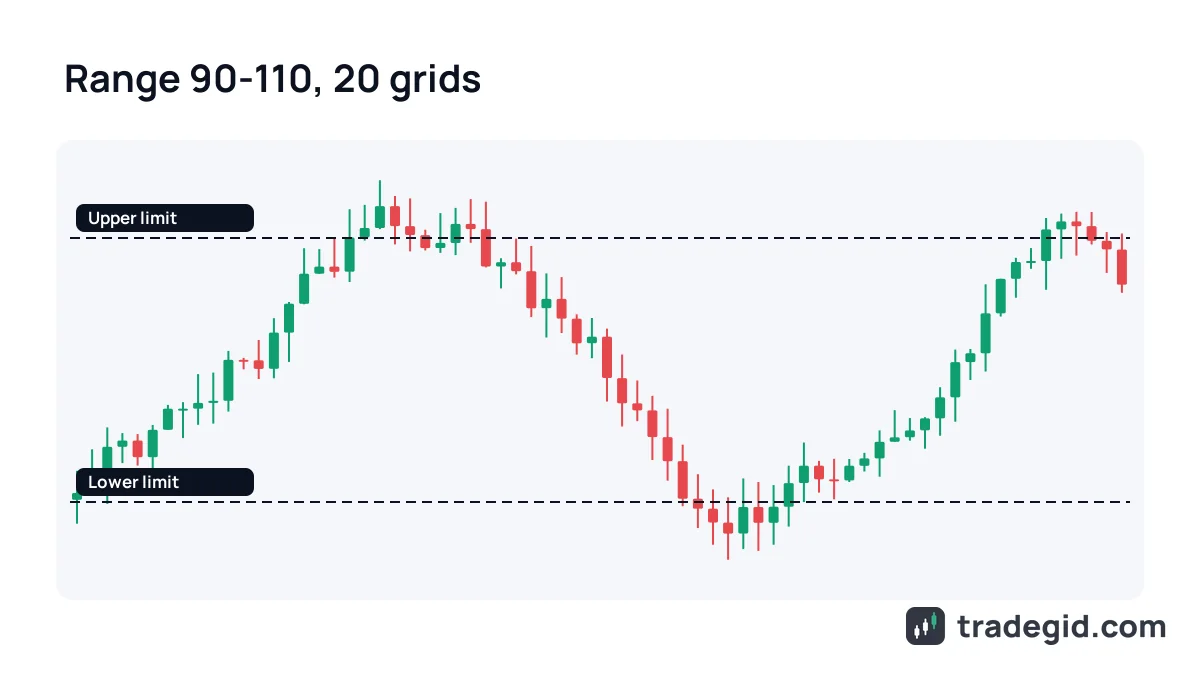
A worked example: range 90-110, 20 grids, 1,000 USDT
The coin trades at 100 USDT, with a range of 90-110, 20 arithmetic grids and 1,000 USDT. The step is 1 USDT, about 1%, and each order is 50 USDT. One buy-sell pair earns about 0.5 USDT before fees. After two maker fees of 0.08% (about 0.08 USDT per pair) you keep roughly 0.42 USDT.
If price falls below 90, the bot is left with coins bought at 90-100, a paper loss of roughly 7% of the amount before grid profit (a rough estimate). Above 110 everything sold earns about 3% and the rest of the rally passes you by. Run your own numbers in the calculator.
OKX spot grid fees
OKX charges no separate fee for bots: bot trades cost the same as manual ones. Grid orders are limit orders, so most fills happen at the maker rate. More grids means more trades and more fees.
| Item | Rate | Comment |
|---|---|---|
| Bot subscription | 0 | Free |
| Spot, maker | 0.08% | Grid limit orders |
| Spot, taker | 0.10% | If an order fills at market, for example on a stop-loss |
| One buy-sell pair | about 0.16% | Two maker fees, so the grid step must be clearly larger |
Data for November 2026, global okx.com, Regular user tier. Check your own rate in your account and on our OKX fees page. OKX Europe has different rates.
For new users
As the exchange itself puts it: rewards for all new users. OKX runs a new-user bonus program with tasks. Amounts and conditions depend on your country and change, so check them in your account after you sign in.
- New accounts that sign up through a referral link join the new-user rewards program: tasks such as a deposit and a first trade. Look under My rewards and the Campaign center.
- In the My vouchers tab of the trading bots section you will see vouchers if any were issued to you.
- For tasks, funding with a USDT transfer from another wallet or exchange is simplest: an external transfer counts, an internal one does not.
There is no fixed "everyone gets N dollars" bonus: the task list shows only in your own account. Do not take more risk than planned for a reward.
If you do not have an OKX account yet, open sign-up through this link, pass KYC and start with a small amount.
New accounts via the link are enrolled in the OKX New User Bonus program automatically.
Sign up on OKXK2FMEIJ3The code can only be entered during sign-up.
Common beginner mistakes
- Money not in the trading account. The bot cannot be created: move your USDT first.
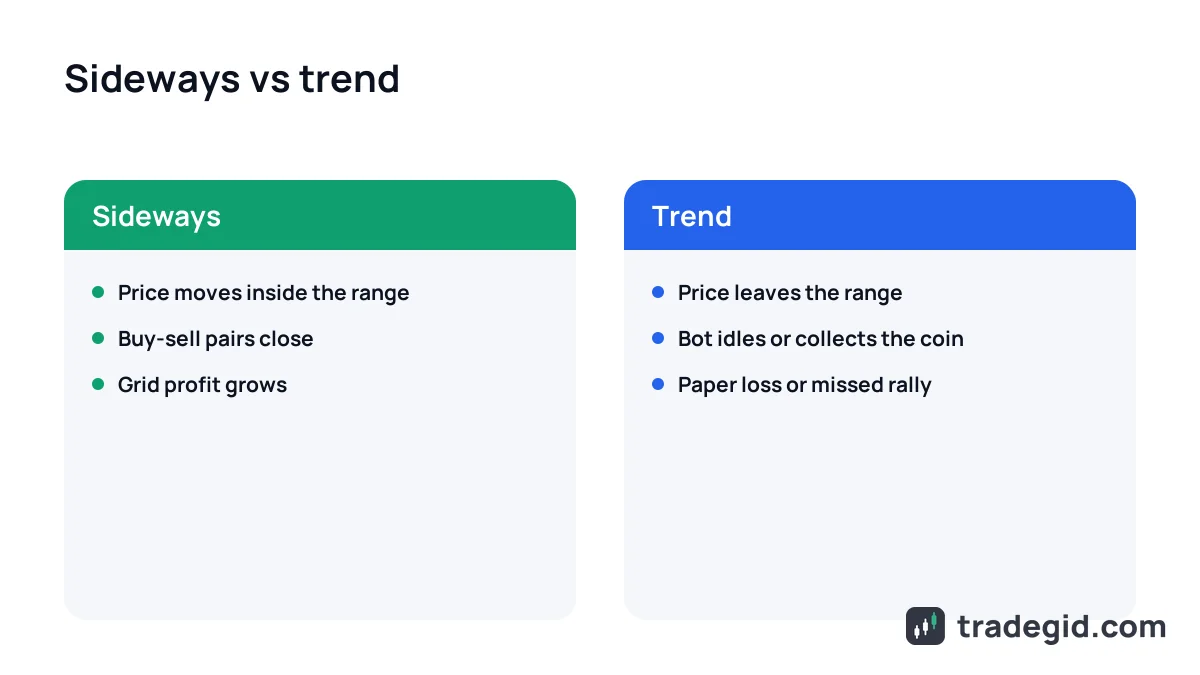
- Price left the range. The bot idles. Decide in advance whether to wait for a return or stop the bot and choose whether to sell the coin.
- Too many grids. Two fees of 0.08% eat a step smaller than 0.3%.
- Stopping in a drawdown and selling at market. That locks in the loss instead of cancelling it.
- Trailing up at the top. The grid starts buying higher.
- Waiting for green in a downtrend. Grid profit grows while the total result sinks.
The bot does not insure you against a trend. The range, the exit and the amount are on you.
Other OKX bots and other exchanges
All 13 OKX bots, their risks and the marketplace are on the OKX bots page. The wider overview is in the trading bots section. Guides for other exchanges: Bybit, Binance, Gate.
New accounts via the link are enrolled in the OKX New User Bonus program automatically.
Sign up on OKXK2FMEIJ3New accounts via the link: tasks worth up to 250 USDT; 25% off spot fees paid in MNT.
Sign up on BybitJ8NKMG