

Download the Bitget app: phone, desktop and web
Bitget works in the browser and in an app for phone and computer, and the download links sit on bitget.com/download. The order is: sign up through the referral link first, then download and log in to the same account. Do not install files from chats, mirrors or third-party catalogues.
Contents
Searches like "bitget download" return the official page and many copies. I checked the download page at bitget.com/download and looked at what the account looks like in a browser. My interface is in Ukrainian, so I give button names in English with the original label in brackets.
Sign up on Bitget through the link (if the exchange is available in your country), then download the app from the official site and log in.
20% off spot fees paid in BGB; new-user rewards in the Reward Center.
Sign up on BitgetBGGAPKEJThe code can only be entered during sign-up.
The order: sign up through the link, then install
On Bitget the referral code goes into the optional field on the first sign-up screen, and it generally cannot be added afterwards: there is no code field in the profile and the help centre does not describe attaching one later. So: sign up on Bitget, then install the app and log in to the same account. More on the Bitget referral code page.
If the account already exists without the link you can ask support, but do not count on a yes. A second account will not work: a document tied to another account is rejected at KYC.
What you will see: web and app
The quickest way to understand Bitget is to open the site after signing up. My top menu reads "Buy crypto", "Markets", "Trade", "Futures", TradFi, Earn and "Institutional account". On the home page there is a banner "Download the app to get exclusive rewards in the Rewards Center" ("Завантажте застосунок, щоб отримати ексклюзивні винагороди в Центрі винагород"). Which rewards and on what terms is shown in the Rewards Center itself, and it depends on your country.
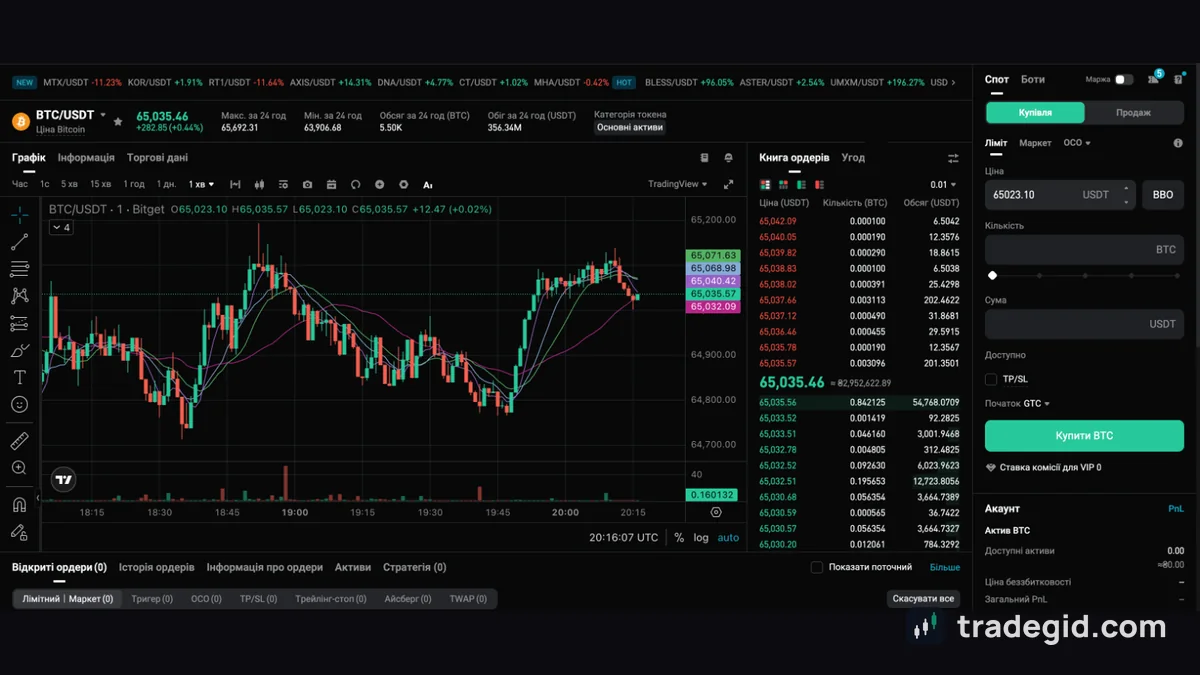
This is the web spot terminal. On the left is the TradingView chart with timeframes from "Time" to "1D", in the middle the "Order book" and a "Trades" tab, on the right the order form with a "Margin" switch. At the bottom are the tabs "Open orders", "Order history" and "Assets". If all you need is a swap or P2P, you can skip the terminal entirely.
P2P: buying USDT with local currency
For most new users the entry point is P2P. In the "Buy crypto" menu I pick USDT, a currency and payment methods. My example is in UAH because that is my account; for naira or another currency the screen looks the same. At the top the exchange shows a block "Listings suitable for beginners" ("Оголошення, що підходять для початківців"), below it a list of merchants with price, limits and banks.
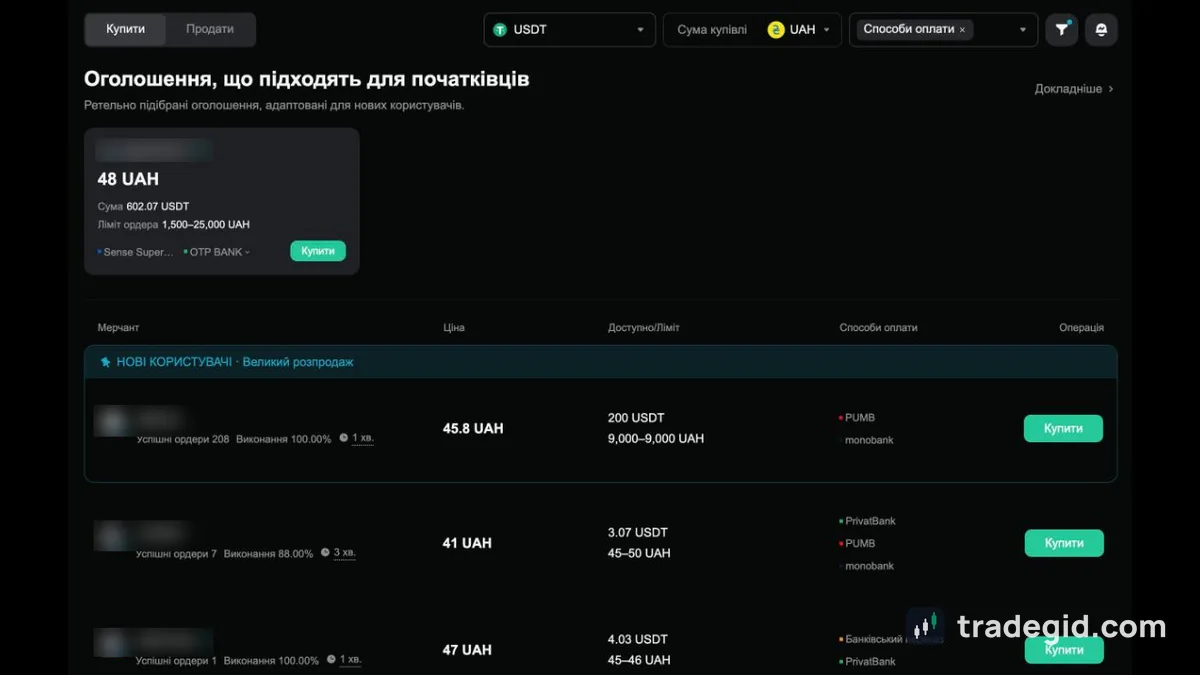
Look at the columns to the right of each merchant: "Price" (41-48 UAH per USDT on the screenshot), "Available / Limit" (amounts in USDT and in local currency) and "Payment methods" (PUMB, monobank, PrivatBank, OTP BANK). Under the nickname you see the number of successful orders and the completion rate. A "NEW USERS" banner is highlighted above the list. I blurred the nicknames. Pay only from your own account and only to the details in the order, and read the guide to P2P scams first.
Earn in the account
The Earn section opens with a "Recommended products" block: coin, APR, term and a "Subscribe" button. Rates move; as of November 2026 I saw a 5-10% range for USDT, 3.5-11% for USDC and 2-3% for the VIP products. The top rates are promo conditions for some users, and flexible products show the term "Flexible" ("Безстроково").
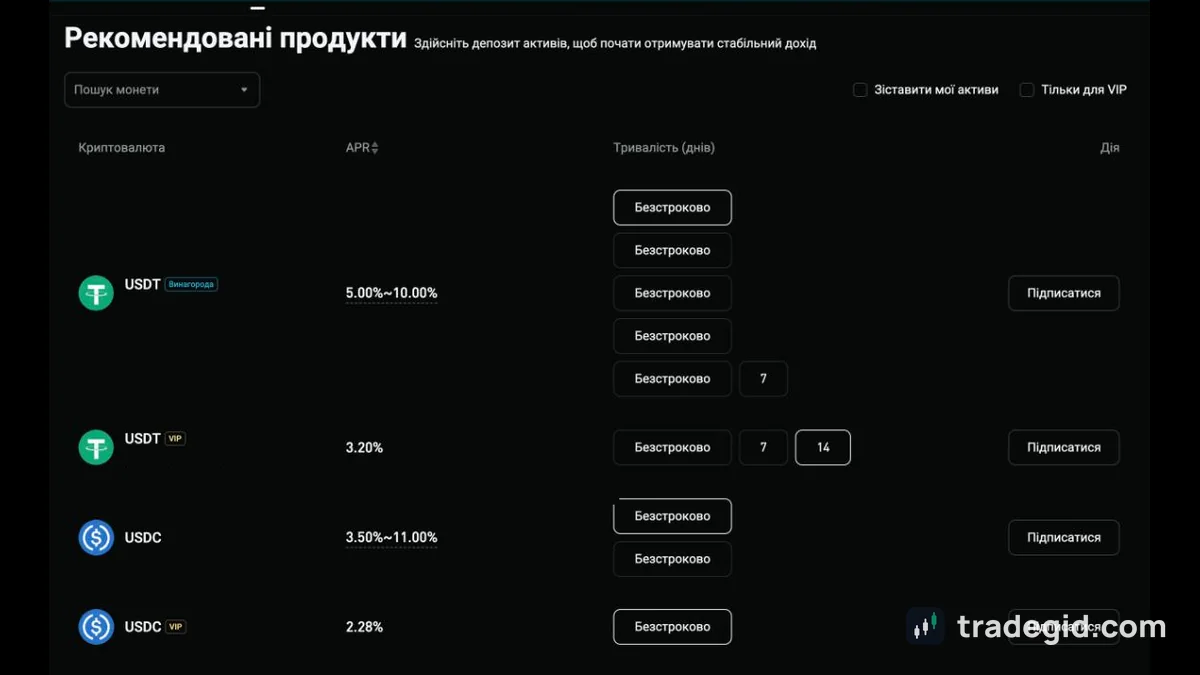
The "Reward" tag next to USDT and the "VIP" tag in the second row mean the rate depends on a promotion or a tier. For products and risks see the Bitget Earn overview. Returns are not guaranteed, and a product can be withdrawn from sale.
How to check that the app is official
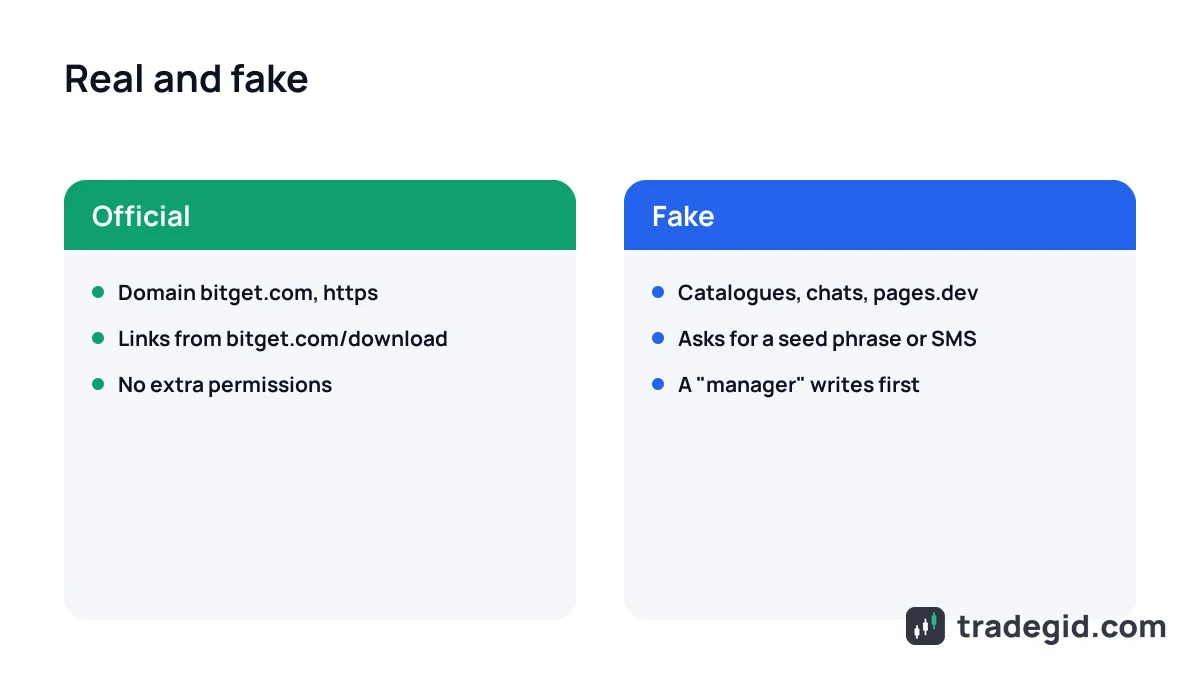
- Domain. bitget.com and https. Clones on pages.dev, daftpage and similar builders (there are "bitget wallet" and "login" pages) are phishing, and they sit next to the real one in search.
- Source. The buttons and QR code on bitget.com/download or the official store of your platform. Compare the developer name in the store with the listing the download page points to.
- Official channels. The Support menu on the site has Verify official channels and Anti-scam hub: check there before you believe a "manager" from a chat.
- Bitget Wallet is different. It is a separate wallet, not the exchange's trading app.
- Permissions. A trading app does not need access to your SMS or call log.
The domain, the source and a check through official channels weed out almost every fake. Never install files from chats, Telegram channels or catalogue sites: they cannot be verified.
What to do after installing
- Log in to the account you created through the link.
- Profile, settings, Security tab: turn on two-factor authentication with an authenticator app and keep the backup key on paper.
- Complete KYC: a document and a selfie. More in the sign-up guide.
- Start with a small amount so you go through the whole deposit path.
Do 2FA and KYC right away: without them the account is weakly protected, and deposits and withdrawals are unavailable.
For where to keep crypto on and off an exchange, see how to store crypto.
Availability by country
| Country or region | Status | What to keep in mind |
|---|---|---|
| Russia, Belarus, Kazakhstan | Prohibited | Restrictions from 18-21 October 2026, a VPN workaround breaks the rules |
| India | Sign-ups paused | New registrations paused since 6 February 2026 |
| Nigeria | Available | P2P in NGN is supported; NGN advertisers pay a 0.1% fee |
| Philippines | Check before signing up | The SEC named Bitget as unregistered in August 2025 |
| Ukraine | Available | Except Crimea, Donetsk, Luhansk, Kherson and Zaporizhzhia regions |
| Germany, France, Austria | Prohibited | No MiCA licence for Bitget in the rest of the EU as of mid-2026 either |
| US, Canada, Japan, Singapore, Hong Kong | Prohibited | Under Bitget's Terms of Use |
Sources: Bitget Terms of Use (updated 20 October 2026) and the Bitget review on TradeGid. App availability in a particular country's store was not checked separately.
More in the Bitget review. Stating a country of residence that is not yours is not allowed.
Sign up on Bitget through the link (not for Russia, Belarus and Kazakhstan), then take the app from the official site.
20% off spot fees paid in BGB; new-user rewards in the Reward Center.
Sign up on BitgetBGGAPKEJThe code can only be entered during sign-up.