

Download Bybit: Web Version, App and Protection From Fakes
Bybit works both in the browser and in the mobile app, and the account is shared. Register through the referral link first, because a referral code cannot be added once the account exists, and only then log in on web or in the app. Files from chats, mirrors and third-party app catalogs are not needed.
Contents
Searches like «bybit download» lead both to official pages and to a pile of copies. I work with Bybit in a desktop browser myself, so I show what the account looks like, and for the app I say only what I checked in the exchange's help center.
Sign up on Bybit through our link, and the code J8NKMG is filled in for you. Then log in from desktop or phone.
New accounts via the link: tasks worth up to 250 USDT; 25% off spot fees paid in MNT.
Sign up on BybitJ8NKMGThe code can only be entered during sign-up.
The order: register through the link first
Bybit is strict: the referral code goes into the registration form, and once the account exists it cannot be added, changed or deleted (help article «How to register an account»). So installing the app, signing up there and hunting for the code afterwards is a bad idea. Details on the Bybit referral code page.
The order that works: register on Bybit, check that the code field is filled, complete verification, and only then log in from your phone to the same account. It is easier to confirm on a big screen that everything is filled in correctly.
The web version: what the terminal looks like
The web version is all you need to start. Here is BTC/USDT spot in my browser. Along the top is the menu: Buy Crypto, Markets, Trade, TradFi, Tools, Banking, More, WSOT and Bybit AI. In the middle are the chart and order book, and on the right the «Трейдинг» (Trade) form.
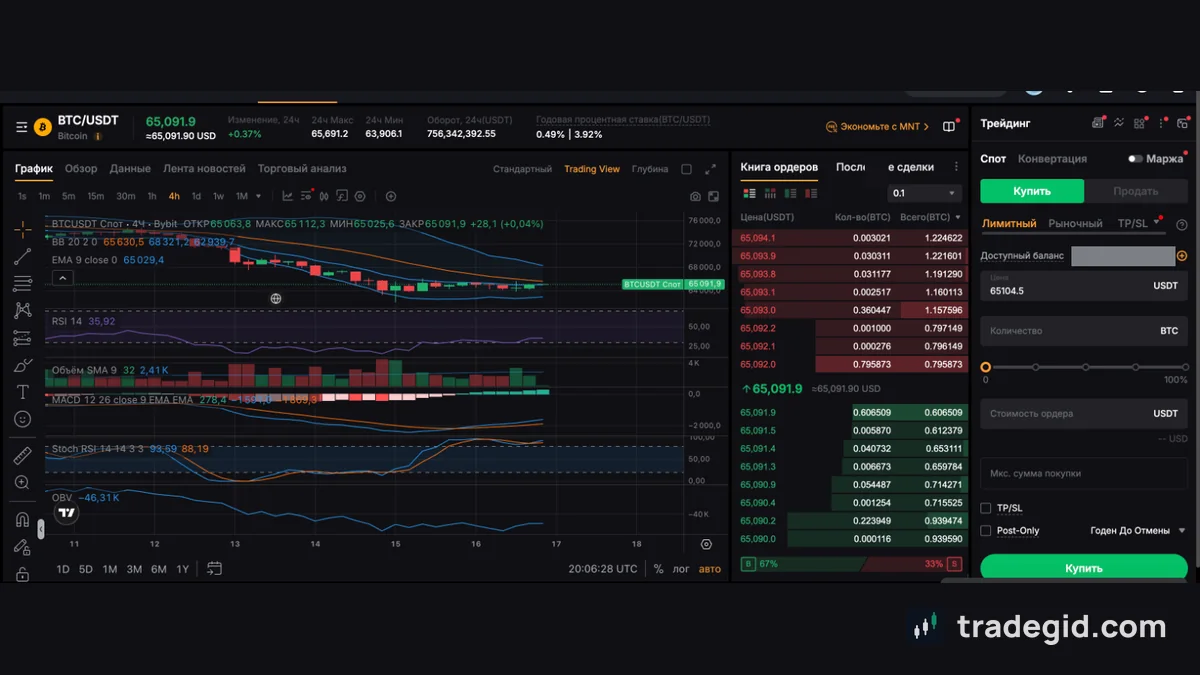
The layout is built for a bigger screen: chart, order book and form fit at once. In the phone app the same functions are split across tabs, which is handy for checking a position and quick orders, but I would still start from a computer when setting up security and sorting out complex orders. The interface language switches in settings; mine is Russian, so I write button names as they appear there.
What else is in the account
Let's look at Earn. In Easy Earn, on the «Все продукты» (All products) page on 17 November, I saw these rates: BTC 0.20-0.40% (flexible 0.40%, the 30-day VIP option was sold out), ETH 0.80%, USDT 2.00-7.11%, USDC 2.00-5.11%. Rates float, so check the current ones in your account. The section header has «Общий актив дохода» (total earning assets), yesterday's earnings, and the Auto-Earn and batch withdrawal buttons.
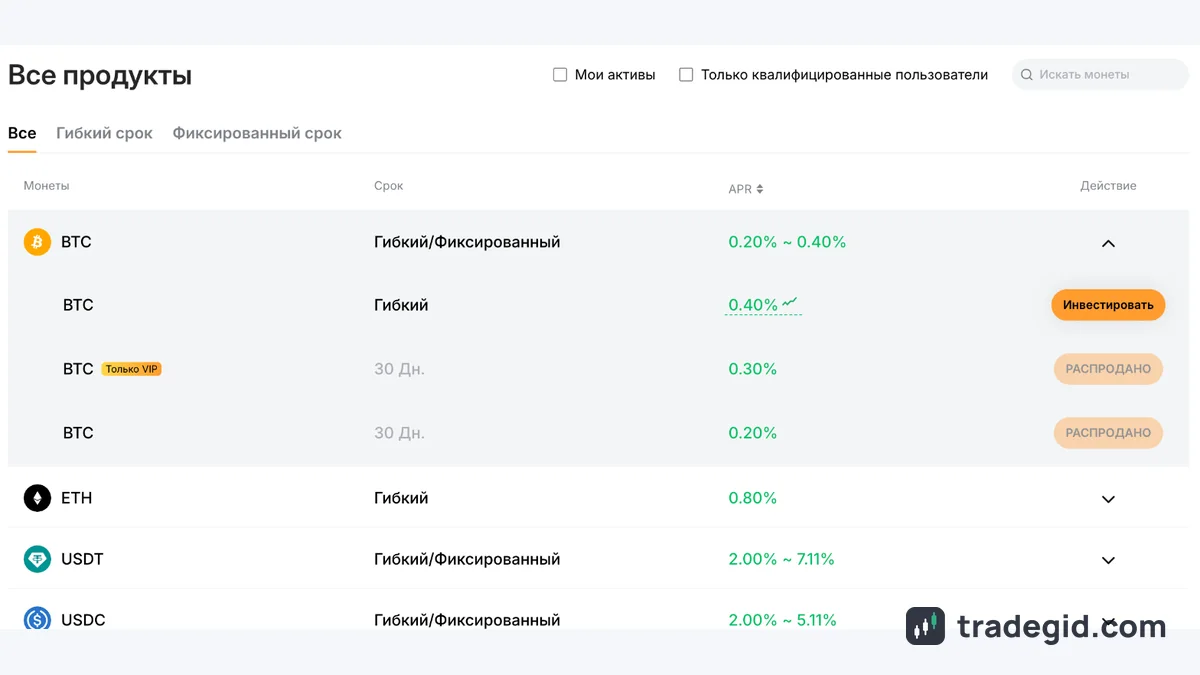
The top of the list has tabs for All, Flexible and Fixed term, plus filters «Мои активы» (My assets) and qualified users only. These figures are not a guarantee: the rate changes, and a yield in USDT is not a yield in dollars if you hold a volatile coin.
The second thing worth seeing before your first deposit is P2P. On first entry Bybit shows a «Начало работы с Bybit P2P» (Getting started with Bybit P2P) window with three steps: place an order, pay in local currency within the stated time, and receive crypto in your funding account once the seller confirms.
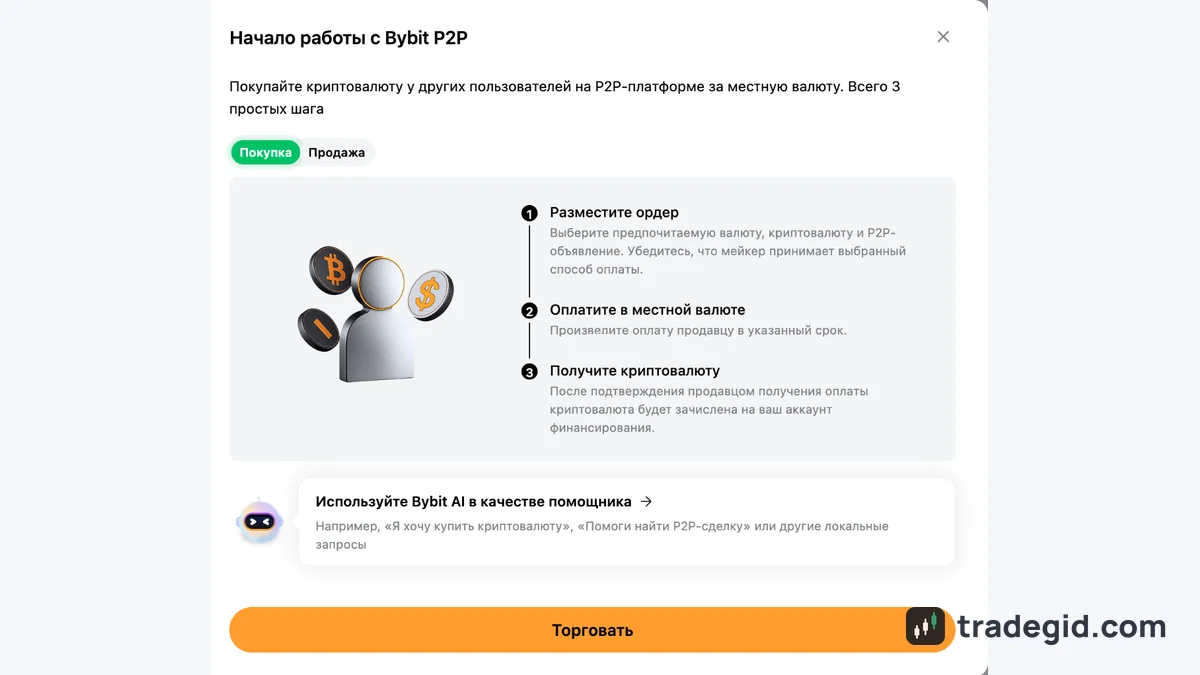
The Bybit AI hint is in the same window. The detail that matters here: the seller (maker) must accept your payment method, otherwise the trade will not go through. For trade safety see the article on P2P scams.
The app: what I can say honestly
A Bybit app exists for phones, and the official download links open from the exchange's site after you log in through the button on this page. I could not confirm a separate Windows or Mac client, as Bybit's guide has none, so on a computer use the browser at bybit.com. If the app is missing from your country's store, I will not advise changing your Apple ID region, using someone else's account or switching on a VPN: it breaks the rules and can end in a block.
Do not install files from Telegram, chats or catalogs like apkpure, apkmirror or uptodown, ever: nobody has verified the builds from there.
How to check the page is genuine
- Domain. bybit.com and https. Clones on pages.dev, daftpage and similar builders are phishing, and they show up in search next to the real page.
- Route. Enter the site through the button on this page or type the address by hand, not from links in messages.
- Permissions. A trading app does not need access to SMS or call logs.
- Anti-phishing code. Set it in your account: genuine Bybit emails will contain that code.
The domain, your route to the site, the permissions requested and the anti-phishing code rule out almost every fake.
What to do after logging in
- Log in to the account created through the link. In my dashboard a «verified» status appeared after verification.
- Account → Security: switch on Google Authenticator or another TOTP app and write the backup key on paper. Without 2FA withdrawals are closed.
- Set an anti-phishing code and a withdrawal address whitelist.
- Account → Identity Verification → Verify Now: a document and a selfie check. Usually about 15 minutes, sometimes up to 48 hours.
- Start with a small amount to walk the whole deposit path.
Do 2FA and KYC right away: without Google Authenticator withdrawals are closed, and without verification trading and fiat do not work.
On keeping crypto on and off an exchange, see how to store crypto.
Availability by country
| Country or region | Platform | Notes |
|---|---|---|
| India | bybit.com | Registered with FIU-IND; store access returned in September 2025 |
| Nigeria | bybit.com | Available; NGN P2P |
| Philippines | Blocked | SEC advisory in August 2025, new registrations halted in November 2025 |
| EEA | bybit.eu | Spot, margin up to 10x, Earn; no perpetual futures |
| US, Canada, Singapore, Hong Kong, mainland China, Uzbekistan and others | Not available | Official restricted list on Bybit's site |
From our Bybit review. The current list is on Bybit's Service Restricted Locations page. Screenshots in this article were taken on bybit.com.
More in the Bybit review and the registration guide. Do not enter a false country of residence.
Sign up on Bybit through our link, then log in from desktop or phone.
New accounts via the link: tasks worth up to 250 USDT; 25% off spot fees paid in MNT.
Sign up on BybitJ8NKMGThe code can only be entered during sign-up.