

Kraken Review: A Tour of the Account and How to Trade on Kraken Pro
Kraken is a US exchange founded in 2011, with an EU MiCA licence and regular Proof of Reserves. I opened an account and went through the screens, so below you can see what the web version, the Kraken Pro terminal, the Markets page, xStocks and Earn actually look like. There is also a step-by-step section on placing an order in Pro. There is no P2P, and in India xStocks and the IPO access are not available.
Contents
Who Kraken suits and who it does not
For leveraged futures I would pick Bybit or OKX: base fees are lower and P2P exists there. I keep Kraken for other reasons: regulated spot in euros and dollars, tokenized stocks (xStocks) and a quiet Earn section. If you live in the EEA, that is probably the main argument.
The downsides are real. There is no P2P at all, and no INR, NGN or PHP in the currency list. Money goes in by bank transfer, card or crypto from another exchange. Some products are closed in the US, UK and Canada (xStocks, derivatives, margin - it depends on the country).
If Kraken works in your country, sign up through the link. New users who join by invitation get a bonus in programme countries, with terms shown in the app.
Invited new users get a surprise reward of 5-200 $ after depositing and trading at least 200 $ (in eligible regions).
Sign up on Krakenkypj2dhkThe code can only be entered during sign-up.
A tour of the account
My account is in Russian, so the screenshots show Russian button labels, and in the text I give their translation. In your language the wording may differ a little. My account region is the EU, so prices and rates are in euros and dollars; your set may be different.
The web version and the buy widget
After logging in at kraken.com, a widget sits on the right of every page with the tabs Buy, Sell, Convert and Borrow. Under the amount field there are quick buttons for 20 $, 50 $, 100 $ and MAX, and below them a Repeat button that sets up a recurring buy.
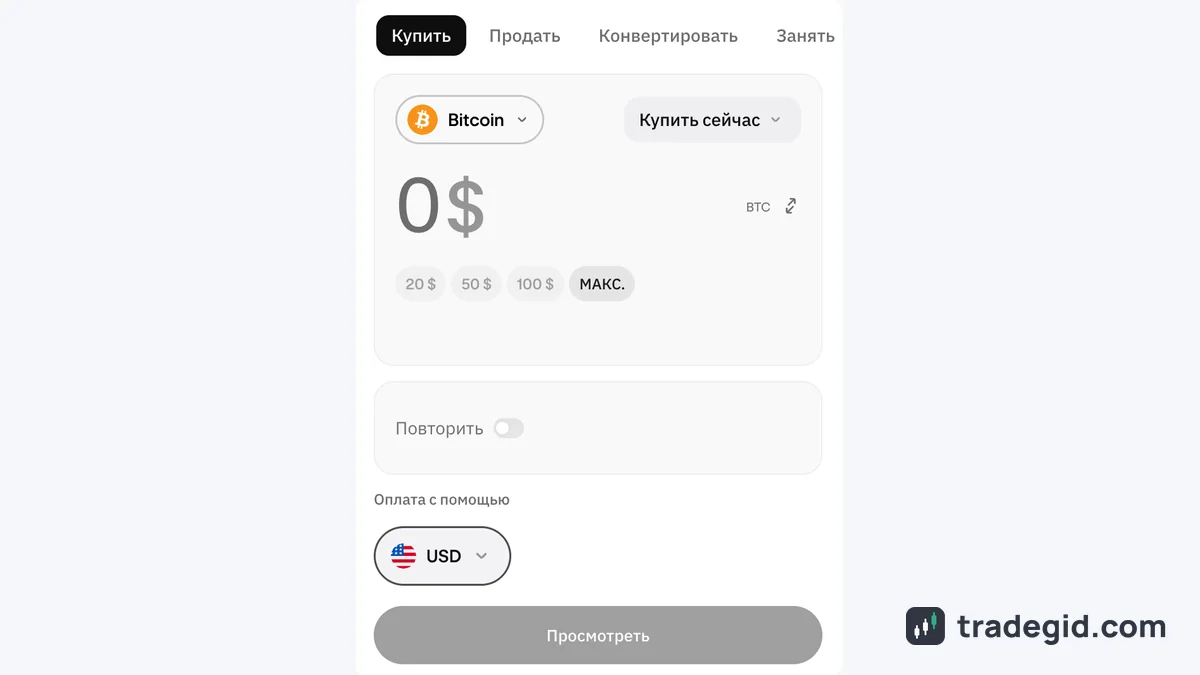
The screenshot shows why this is the easy route: type an amount, click, get the coin. You pay for the convenience, though: instant buy costs 1% plus spread. If you press Buy now and pick a delayed price (5%, 10% or 15% below market, or your own), it becomes a custom order with a 1.5% fee. For trades of a few hundred dollars and up, the terminal below is cheaper.
The Markets page
The top menu of Kraken Pro has Markets. It is a catalogue of everything you can trade: tabs for Favourites, Spot, Margin, Perpetuals, Futures, DEX and Options, with filters on top: All, New, Crypto, xStocks, IPO and FX. Pairs that allow leverage carry a 10x, 5x or 3x badge.
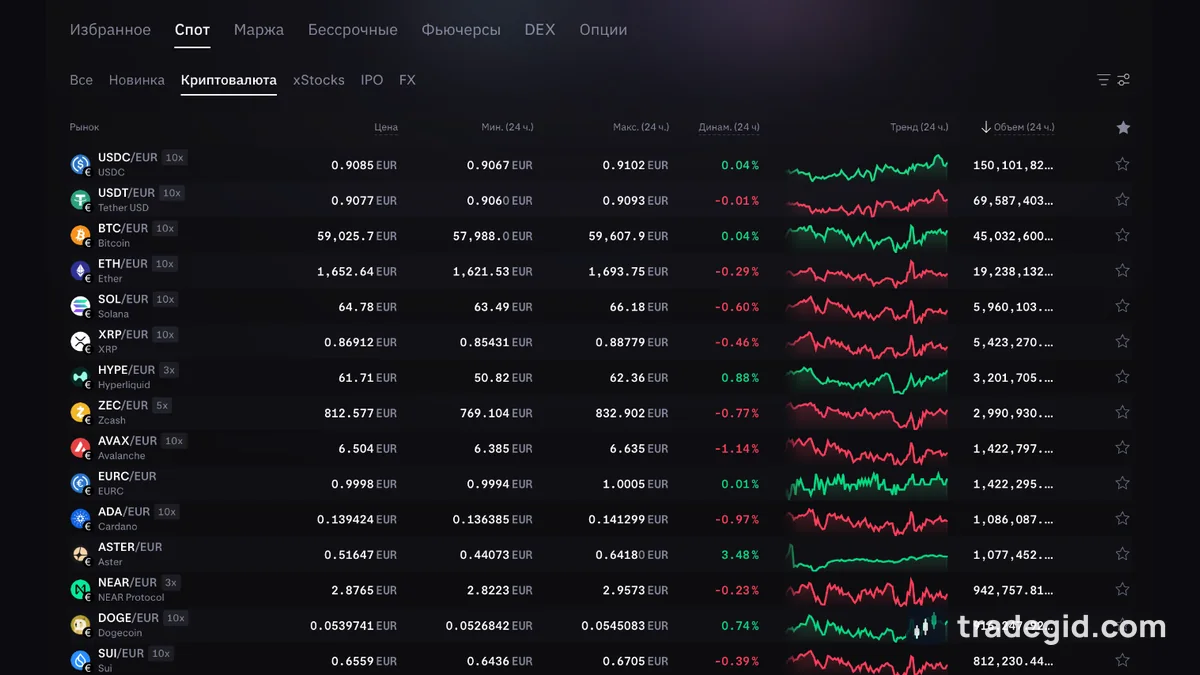
I come here when I need to check quickly whether an asset has margin or a perpetual. Pick a tab, find the pair in search, click, and the terminal opens on that pair. The xStocks filter narrows the list to tokenized stocks straight away.
xStocks, Earn and the IPO
xStocks are tokens of US stocks and ETFs, backed 1:1. The page of any of them (I looked at NVIDIA, ticker NVDAx) reads like a stock card: a Market open status, a chart, a Buy button, a corporate events block and key statistics. The minimum amount is 1 $. At the bottom is a disclaimer: this is not direct ownership and carries no voting rights. The issuer is Backed Assets (JE) Limited, and Payward Digital Solutions Ltd offers the tokens. More in the xStocks overview.
The Earn section shows All assets with APY rates. In November 2026 mine looked like this: BTC about 1-2%, ETH 2-3%, dollars and major stablecoins 5-6%, euro 3-4%, SOL and AVAX 5-6%, and small tokens such as ATOM, KSM and FLOW reached 15-19%. Rates float and yours may differ. Double-digit rates on small tokens are usually wiped out by a drop in the coin itself, so BTC and stablecoins pay little but predictably. You can estimate the amount in the staking section.
The Anthropic IPO through the ANTx token is a separate story: Kraken takes orders until 18 November, 17:00 UTC. How it looks from the inside and what the risks are is on the Anthropic IPO page. It is not available in the US, UK, Canada, Australia or India.
How to trade on Kraken Pro: step by step
Kraken Pro is a separate terminal at pro.kraken.com; you log in with the same details as on the main site. On my first login it asked me to choose a layout: Simple or Advanced. A short tour of hints followed: widgets, charts, multi-market mode (up to 8 charts), position management and TP/SL. I picked Advanced, and the walkthrough is built on it.
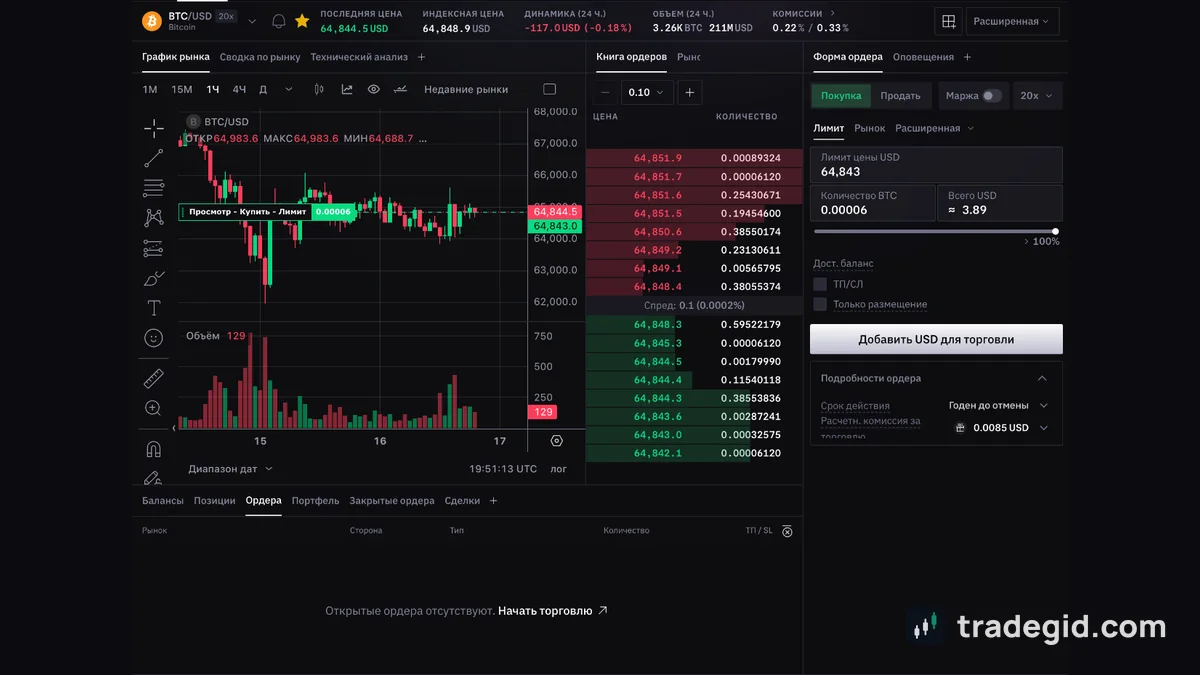
The screen splits into zones. On the left is the chart with 1m, 15m, 1h, 4h and D timeframes, drawing tools and volume; above it are the tabs Market chart, Market summary and Technical analysis. In the middle is the Order book: bids and asks, the price step, and the spread in dollars and percent. On the right are the Order form and Alerts. Along the bottom are the tabs Balances, Positions, Orders, Portfolio, Closed orders and Trades.
The pair header shows the last and index price, the 24-hour change and volume, and a Fees link. On my account it says 0.22% maker and 0.33% taker: your tier depends on 30-day volume, and the first tier is 0.40% and 0.80%. Now the trade itself.
- Open the pair you wantIn the top left of the terminal click the pair name (BTC/USD by default) and search for another, or jump in from Markets. A leverage badge such as 20x may sit next to the pair. For spot it means nothing until you switch on Margin.
- Choose Buy or SellThe top of the order form has two buttons. For spot they mean exactly that: buying or selling the asset. If you turn on the Margin switch they become Long and Short, more on that below.
- Pick the type: Limit or MarketMarket fills at once at the best price in the book, but you pay the taker fee (0.80% on the first tier). Limit waits for your price, and when it rests in the book you pay the maker fee of 0.40%. As a beginner I would start with limit: the price is under control and the fee is half.
- Enter price and sizeIn the fields Limit price USD, Amount BTC and Total USD you only need to fill two, and the third is calculated. You can also drag the percentage slider, which takes a share of Available balance. A handy way to set the price is to click a row in the order book.
- Decide whether you need Post only and TP/SLThe Post only box (post-only) guarantees the order rests in the book as a maker instead of filling at once at a taker fee. If the price is such that it would fill immediately, Kraken rejects it. TP/SL attaches a take-profit and a stop-loss to the trade in one go.
- Check Order detailsExpand this block under the form. It holds Time in force (Good till cancelled by default) and the line Estimated trading fee. On a limit order of about 3.9 $ mine showed 0.0085 $, and on a market order of 5 $ it showed 0.0165 $. Look there before pressing the button, not after.
- Press the button and find the order belowOnce confirmed, a limit order appears on the Orders tab under the chart: price, size, status. You can cancel it from there. Filled trades sit on Closed orders and Trades, and your balance on Balances.
The whole path is seven moves: pair, side, type, price and size, limiters, fee check, button. The cheapest combination for a beginner is a limit order with Post only ticked.
Stop orders and other types from the Advanced tab
Next to Limit and Market the form has an Advanced tab. Open it and you get a list: Stop-loss, Stop-loss-limit, Take-profit, Take-profit-limit, Iceberg, Trailing-stop, Trailing-stop-limit, OCO and TWAP.
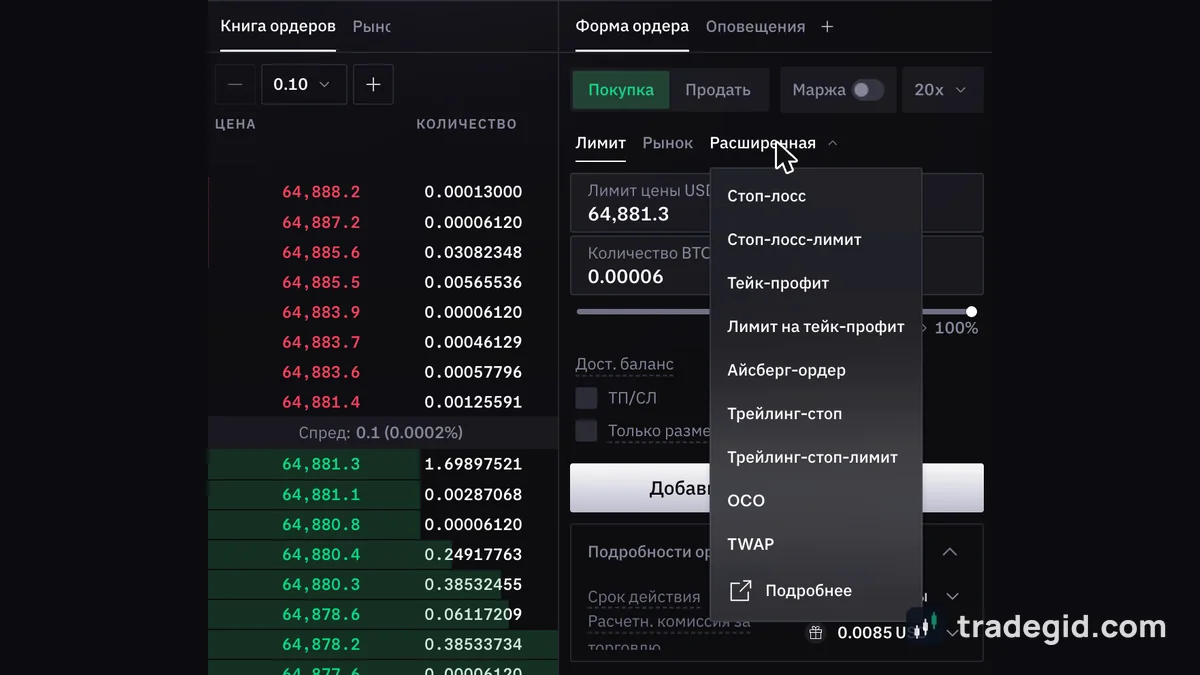
The screenshot shows the list opening over the form. Three of them come up most. Stop-loss closes the position at market when the price reaches your level; Stop-loss-limit does the same but places a limit order, which may not fill if the price gaps. OCO links two orders: when one triggers, the other is cancelled. The rest (iceberg, TWAP) are for sizes so large that they must be split up, and a beginner rarely needs them.
Margin: what changes in the form
Above the order form there is a Margin switch. Turn it on and Buy and Sell become Long and Short, a leverage selector appears (up to 20x for BTC/USD on mine), plus a Reduce only checkbox and a Required margin block.
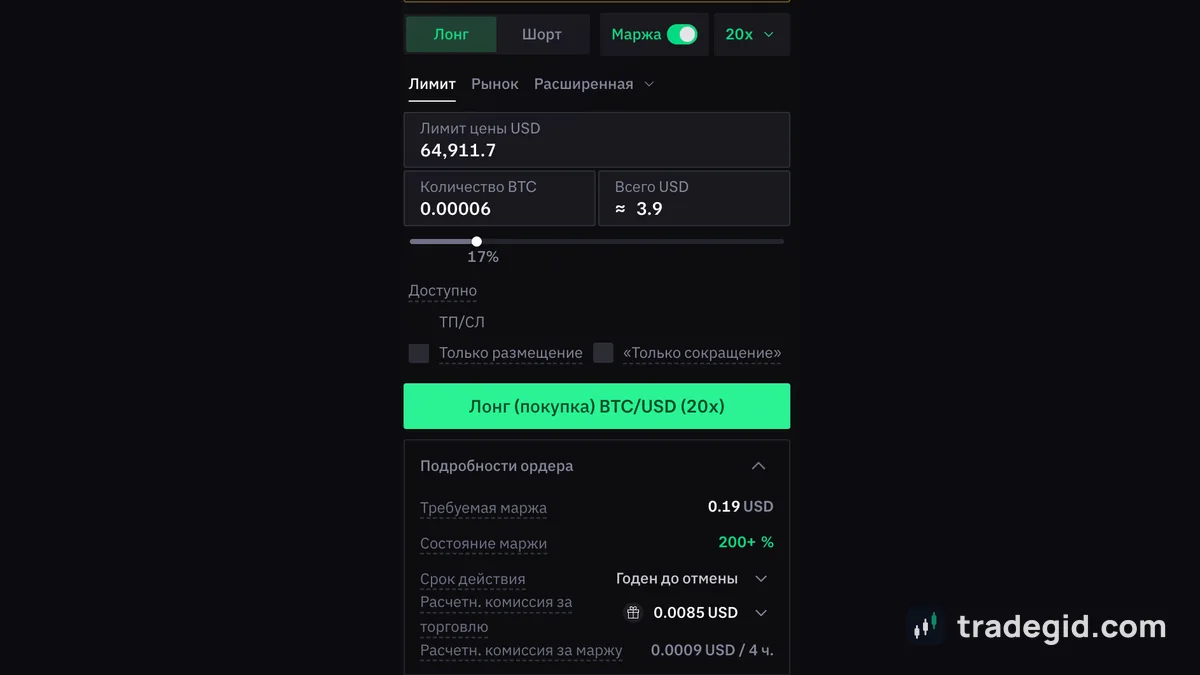
Look at three lines on this screenshot: Required margin (how much of your capital goes in as collateral), Margin state, and Estimated margin fee ... / 4 h. The last one is the price of borrowed funds, charged every four hours while the position is open. Reduce only lets the order shrink a position and nothing else, a good safeguard against flipping the position by accident when you close. A banner on the form reminds you that instead of your balance you see the amount available for trading.
Perpetual futures
The Derivatives menu, then Perpetuals, opens contracts without an expiry date. The Pro menu says up to 50x, while BTC Perp on my account carries a 100x badge: the maximum depends on the contract and the country. Derivatives availability also depends on the country; they are not offered to UK retail clients or in Canada.
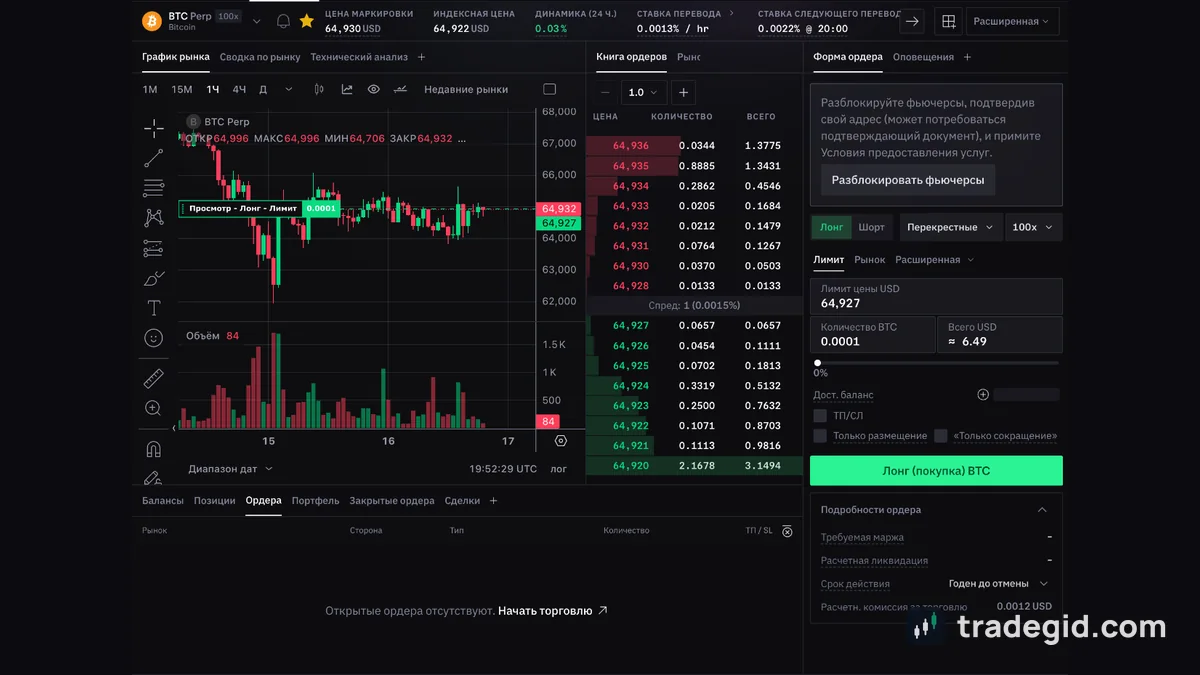
What is new compared with spot. Cross mode means your whole free balance serves as collateral for all positions, so one losing trade can drag the others down (cross vs isolated margin). The funding rate is shown per hour: mine read 0.0013% per hour, with the next value 0.0022% at 20:00. There are also Mark price and Estimated liquidation, which you should read before entering, not after.
You cannot trade right away: first press Unlock futures, confirm your address (a document may be needed) and accept the terms. Perpetual fees in Pro are 0.02% maker and 0.05% taker. How funding works is covered in the material on funding rates.
To walk this path yourself, start by signing up through the link. Kraken Pro opens with the same login.
Invited new users get a surprise reward of 5-200 $ after depositing and trading at least 200 $ (in eligible regions).
Sign up on Krakenkypj2dhkThe code can only be entered during sign-up.
Who owns Kraken and what licences it holds
| Item | Detail |
|---|---|
| Founded | July 2011, San Francisco; public launch in September 2013 |
| Founder | Jesse Powell (with Thanh Luu and Michael Gronager) |
| Owner | Payward, Inc. - a private company; last known private valuation 20 bn $ |
| Management | Co-CEOs Arjun Sethi and Dave Ripley (since October 2024) |
| EU licence (MiCA) | Payward Europe Solutions Limited, Central Bank of Ireland, since 25 June 2025; passported across the EEA, including Spain |
| Derivatives in the EEA | Payward Europe Digital Solutions (CY) Ltd, Cyprus, MiFID II (launched May 2025) |
| US | Kraken Financial - a special purpose depository institution (SPDI) in Wyoming since September 2020 |
| Proof of Reserves | Independent accountant, regular checks; as of 30 Sep 2026 BTC 103.2%, ETH 100.7% |
Data as of November 2026: Wikipedia), CASP Tracker (cross-check with the ESMA register), Kraken Proof of Reserves.
In the EU, Kraken operates through Payward Europe Solutions Limited. The Central Bank of Ireland granted its MiCA CASP licence on 25 June 2025, and it is passported across 30 EEA countries, including Spain. Derivatives for EEA clients run through a separate Cypriot MiFID II firm.
In the US, Kraken has a Wyoming bank charter. In February 2023 it paid the SEC 30 m $ over its staking programme and closed staking for US clients; a separate SEC lawsuit filed in November 2023 was dismissed in March 2025. The Australian entity Bit Trade was fined 8 m Australian dollars in August 2024 over margin lending issues. The record is not spotless, but it is not a reason to walk away either.
Proof of Reserves and security
An independent accountant checks client balances against reserves. In the snapshot of 30 September 2026 the ratios were 103.2% for BTC and 100.7% for ETH, and above 105% for the main stablecoins. Kraken itself warns that the figures can move noticeably between reports.
The most visible case was June 2024: a bug in the deposit system let someone pull about 3 m $ out of Kraken wallets. CertiK researchers said they had found the flaw and returned the funds, and Kraken confirmed the return on 20 June 2024. Client funds were not reported lost. Personally I would lean on 2FA and a withdrawal address whitelist more than on reports.
About Kraken's own IPO: on 19 November 2025 Payward announced a confidential draft S-1 filing with the SEC. Media reports, unconfirmed by the company, say the listing has slipped to the second quarter of 2027 at the earliest. There are no Kraken shares on the market yet, and this is not the same as the Anthropic IPO, which runs through Kraken.
Fees in brief
| Where | Fee |
|---|---|
| Kraken Pro, spot, tier 1 | 0.40% maker / 0.80% taker |
| Kraken Pro, spot, from 10,000 $ over 30 days | 0.22% / 0.38% |
| Kraken Pro, spot, from 10 m $ | 0% / 0.10% |
| Stablecoin and FX pairs | from 0.20% |
| USDG pairs | 0% / 0.01% |
| Pro futures and perpetuals | 0.02% / 0.05% |
| Instant buy in the app | 1% (up to 2 $ on small trades) + spread |
| Custom orders in the app | 1.5% |
| Dust conversion | 3% |
| Kraken+ | 0 fees up to 10,000 $ a month on major coins, spread remains |
| xStocks | No trading fee when paying with USDG or USD |
Data as of November 2026, from the fee schedule and Kraken Pro Fees. Your tier depends on 30-day volume.
In practice the gap looks like this: a limit order in Pro on the first tier costs 0.40%, while instant buy in the app costs 1% plus spread. On 1,000 $ that is 4 $ against 10 $, a difference of about 6 $ before the spread. A closer look at where to find the fee in the interface is on the fees page.
Deposits and withdrawals
Currencies first: Kraken supports USD, EUR, GBP, CAD, AUD, CHF, ARS, BRL and MXN. There is no INR, NGN or PHP. Kraken's card page does not list India, Nigeria or the Philippines among card-purchase regions, so check your account before relying on a card. Card purchases start at 10 EUR or 10 USD, and the card must be in your name with 3D Secure.
With dollars, read carefully. Before a USD deposit Kraken warns that the name on your bank account must match the name in your Kraken account data. USD goes via SWIFT, from 100 USD, free, 1-3 business days. Crypto deposits have no limit. A verified individual has fiat limits of 100,000 $ a day and 500,000 $ over 30 days.
The practical route from outside the EU is to buy USDT or BTC on an exchange with P2P and send it to Kraken, or to fund by SWIFT in USD. See P2P on Bybit for the first step, and the registration guide for the rest.
What is restricted in your region
Data as of November 2026. Whatever the table says, check product availability in your own account: it is tied to the country of residence in your profile.
Invited new users get a surprise reward of 5-200 $ after depositing and trading at least 200 $ (in eligible regions).
Sign up on Krakenkypj2dhkNew accounts via the link: tasks worth up to 250 USDT; 25% off spot fees paid in MNT.
Sign up on BybitJ8NKMGNew accounts via the link are enrolled in the OKX New User Bonus program automatically.
Sign up on OKXK2FMEIJ3Sign up for Kraken through the link if the exchange is available in your country. In programme countries, the invitation bonus for new users is shown in the app.
Invited new users get a surprise reward of 5-200 $ after depositing and trading at least 200 $ (in eligible regions).
Sign up on Krakenkypj2dhkThe code can only be entered during sign-up.