

Download Kraken: the Web Version, the App and Kraken Pro
Kraken has three ways in: the website with its Buy widget, the simple Kraken app and the Kraken Pro terminal with an order book, margin and derivatives; for PCs there is also Kraken Desktop. Register through the referral link first (or enter the code kypj2dhk), then install the app and check the seller: Payward, Inc. Kraken is unavailable to residents of Russia and Belarus.
Contents
You can use Kraken three ways: in the browser, in the simple mobile app, and in Kraken Pro. It is one account with different screens. I went through the web version and Pro; my account is in Russian, so the screenshots carry Russian labels and in the text I give their English meaning.
Register on Kraken through the link first (or enter the code kypj2dhk at sign-up), then install the app and log in to the same account.
Invited new users get a surprise reward of 5-200 $ after depositing and trading at least 200 $ (in eligible regions).
Sign up on Krakenkypj2dhkThe code can only be entered during sign-up.
The web version: the Buy widget
If you have installed nothing, everything is already on the website. On the right of any page in your account there is a widget with the tabs "Buy", "Sell", "Convert" and "Borrow". It is the same thing you get in the Kraken mobile app, which is built for people who want to buy a coin without studying an order book.
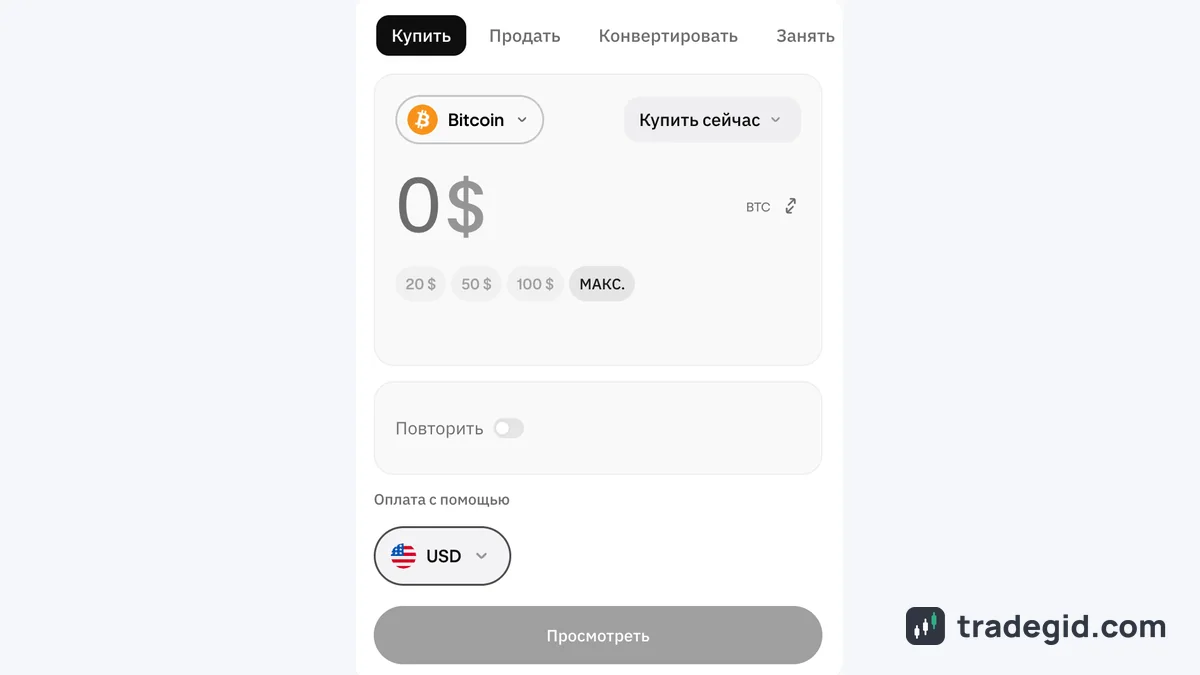
What is on screen. Top left is the asset (Bitcoin here), top right the "Buy now" button ("Купить сейчас"), and under the amount the quick buttons $20, $50, $100 and "MAX". The "Repeat" switch ("Повторить") turns the purchase into a recurring one. Below, "Pay with" (USD for me) and a grey "Review" button ("Просмотреть") that comes alive once you type an amount. It all fits one screen, which is the strength: a purchase takes half a minute.
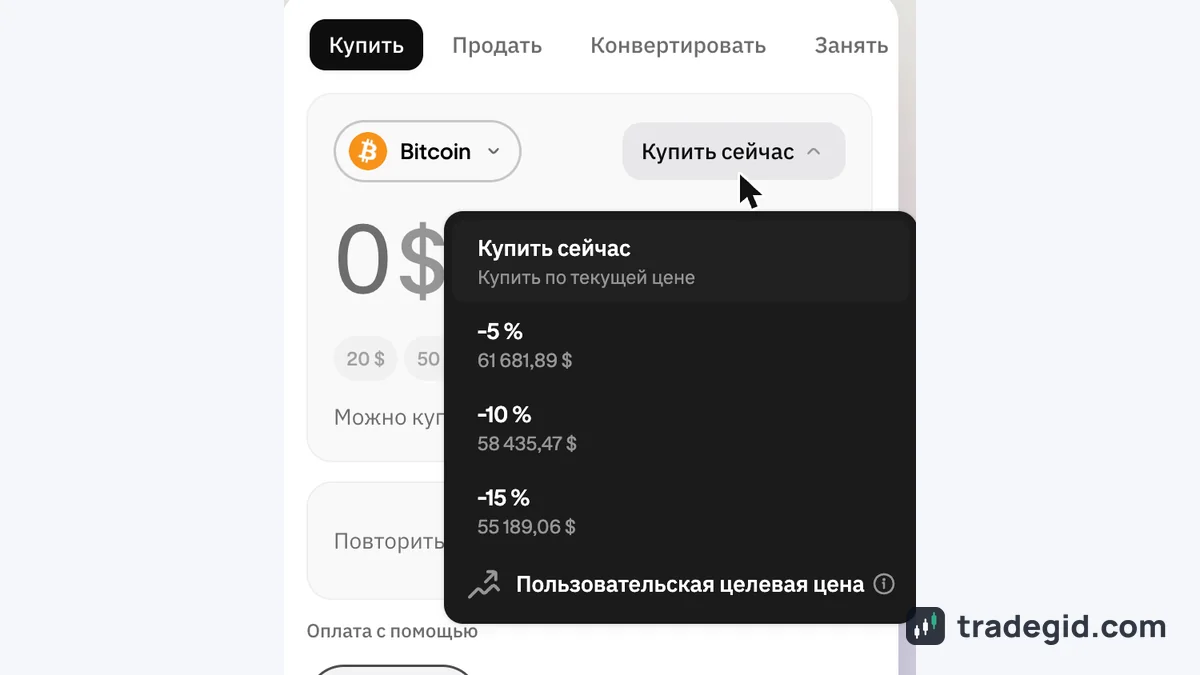
Click "Buy now" and you get the second screenshot: buy immediately, or place a deferred order at -5%, -10% or -15% of the current price, or set a "Custom target price". It looks convenient, but you pay more for it: an instant buy is 1% plus spread, a target order 1.5%. What that means in money is worked out in Kraken fees.
Kraken Pro: what you see on first login
Pro opens at pro.kraken.com or in a separate mobile app, with the same login. The first thing the terminal asks is the layout, and it is not a formality: your choice decides what ends up on screen.
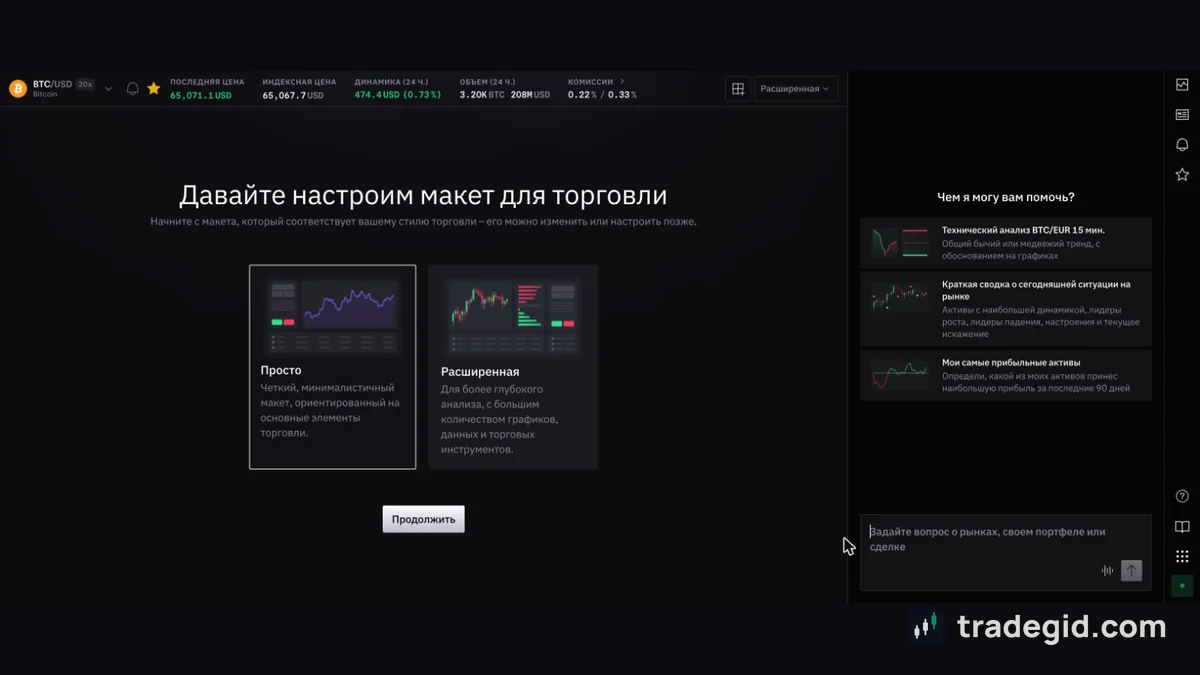
"Simple" ("Просто") is a minimal screen with a chart and buy and sell buttons. "Advanced" ("Расширенная") adds the order book, advanced order types and tabs for positions and trades. You can change the layout later, in the top right of the header. On the right of the same shot is the Kraken AI panel: the assistant offers technical analysis of the pair, a market summary and a count of your most profitable assets. I used it as a reference, and I would not trade on its hints.
After the layout Kraken runs a short tour of tips about widgets, charts, multi-market mode (up to 8 charts) and switching the order form.
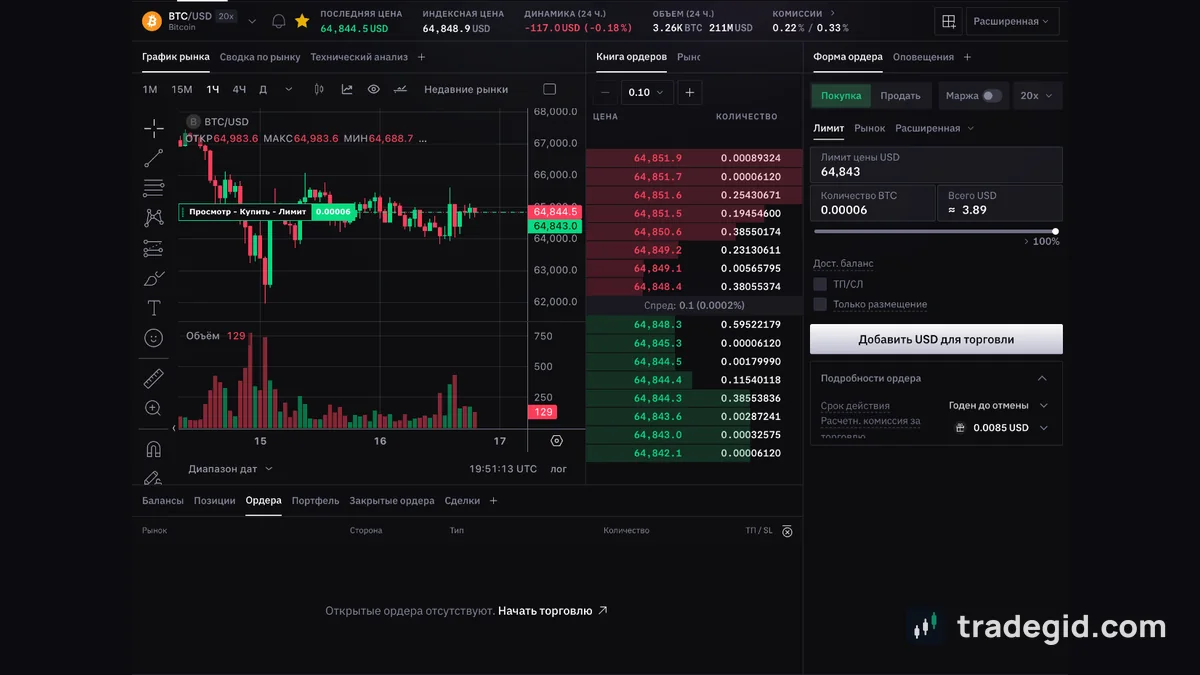
"Advanced" splits into four zones. On the left, the chart with 1M, 15M, 1H, 4H and D timeframes and a drawing toolbar. In the centre, the "Order book". On the right, the "Order form" and "Alerts". Along the bottom, the tabs "Balances", "Positions", "Orders", "Portfolio", "Closed orders" and "Trades". How to trade with it step by step is in the Kraken overview.
How they differ in practice
| Name | What it is for | Where it runs |
|---|---|---|
| Kraken | Buying, selling, converting, Earn, xStocks; a beginner interface | Mobile app and kraken.com |
| Kraken Pro | Order-book trading, advanced orders, margin, derivatives | Mobile app and pro.kraken.com |
| Kraken Desktop | Customisable trading boards, part of the Pro ecosystem | Windows, macOS, Linux |
| Krak | P2P app for sending money and crypto by Kraktag | Mobile app |
| Kraken Wallet | Non-custodial wallet | Mobile app |
Sources: Kraken help pages "Which Kraken platform is best for me?" and "Kraken's official mobile apps". Krak is unavailable in Australia.
My takeaway is simple. If you want to buy bitcoin or an xStock in an evening and forget about it, regular Kraken is enough. If you want limit orders, stops, margin and a cheap 0.40/0.80% fee instead of 1%, you need Pro. Pro also has Earn, DEX and OTC quote requests, while derivatives depend on your country. The Kraken+ subscription works in the app and on the website, not in Pro.
The order: register through the link first, then the app
The bonus "for new users who join by invitation" is attached at sign-up, so the order matters. Register on Kraken through the link on this page (you can also enter the invitation code kypj2dhk in the form), pass verification and only then install the app. Bonus terms and the country list are on the Kraken referral link page.
Step-by-step sign-up is in the Kraken registration guide.
How to avoid a fake app
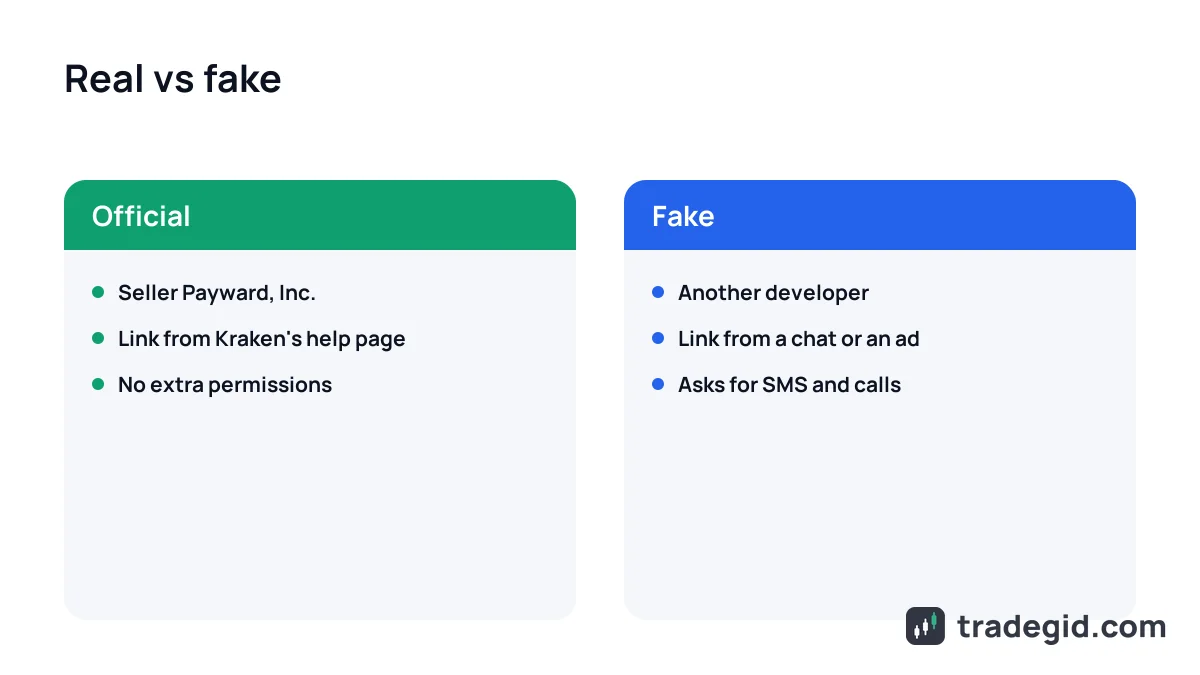
Kraken itself warns that apps using its name or logo are unofficial and that you use them at your own risk, up to losing funds. So install only what the official help page lists.
- In the app listing the seller must be Payward, Inc. (Kraken is a Payward trademark). Any other name is a reason to stop.
- The real apps are called Kraken, Kraken Pro, Krak and Kraken Wallet. Copies with similar names and "bonuses" are fakes.
- Take store links only from Kraken's help page, not from search, messengers or ads.
- I don't install setup files from chats or directories: on the official page I found only app stores.
- An exchange app has no need for your SMS or calls.
The real app has Payward, Inc. as seller and comes from a store link on Kraken's official help page.
Device requirements
| App | Android | iOS |
|---|---|---|
| Kraken | 8.0 or newer (9.0+ recommended) | 13 or newer |
| Kraken Pro | 8.0 or newer | 13 or newer |
| Kraken Wallet | 9.0 or newer | 14 or newer |
Kraken help page "Kraken's official mobile apps". The iPhone store listing currently says iOS 16.4 or newer: if the versions differ, go by the store listing. The Kraken and Kraken Pro apps are available in Russian and Ukrainian.
Tablets, PCs and Macs are not in the help page list, apart from Kraken Desktop (Windows, macOS, Linux). On a computer without Desktop the browser is enough: kraken.com or pro.kraken.com. Whether an app shows up in a store depends on your store account's country, not on your Kraken account. During verification, give your real country of residence, or Kraken will block the account.
Invited new users get a surprise reward of 5-200 $ after depositing and trading at least 200 $ (in eligible regions).
Sign up on Krakenkypj2dhkNew accounts via the link: tasks worth up to 250 USDT; 25% off spot fees paid in MNT.
Sign up on BybitJ8NKMGNew accounts via the link are enrolled in the OKX New User Bonus program automatically.
Sign up on OKXK2FMEIJ3