

Gate Futures Grid Bot: Step-by-Step Setup, Leverage and Liquidation
A Gate futures grid starts from Bots → Futures Grid: pick a pair, a Long, Short or Neutral mode, the price limits, 2 to 50 grids, leverage and an amount. Gate allows up to 50x, but 2–3x is plenty for a beginner: at 20x the bot is liquidated inside its own range. Check your country before you register.
Contents
- What a futures grid is and how it differs from a spot grid
- Steps 1–3: sign-up, KYC and USDT in the futures account
- How to create a futures grid on Gate: buttons and order
- Futures grid parameters: what a beginner should set
- Liquidation in a grid bot: price, a worked example and 2–3x leverage
- Calculator: grid step and profit per pair
- Futures fees on Gate
- For new users
- Common beginner mistakes
- Other exchanges and bots
You need a verified Gate account for a futures grid. Signing up through the link opens the form with the referral code filled in, and the bot is available after KYC.
New accounts: a welcome package worth up to 135 USDT for tasks; lower fees paid in GT.
Sign up on GateUVRGV1FXThe code can only be entered during sign-up.
What a futures grid is and how it differs from a spot grid
A futures grid is a bot with a ladder of orders inside a range that trades perpetual contracts with leverage. In Long mode it buys dips and sells rises, in Short it does the reverse, and Neutral keeps grids on both sides. Each closed cycle inside the range brings profit.
Leverage enlarges the position for the same margin, so profit per grid and risk grow together. Two things appear that spot does not have: a liquidation price and funding. If price moves far against the mode, the exchange closes the position by force and the bot's margin is gone. The numbers are below.
Steps 1–3: sign-up, KYC and USDT in the futures account
- Sign up with the referral linkRegister through the link: the form opens with the referral code filled in. Confirm your email or phone, set a password and turn on 2FA. More in the Gate registration guide.
- Verification (KYC)Complete identity verification in your profile: a document and a face check. The country must be your real one, or the account can be frozen together with the bot.
- USDT in the futures accountBuy USDT on P2P or send it from another wallet, then move it to the futures account through the transfer between accounts (Transfer). The bot takes its margin from there.
Sign-up, KYC and USDT in the futures account are the whole preparation. Start with an amount whose loss will not change your life.
How to create a futures grid on Gate: buttons and order
The web path from Gate's guide is Bots → Bot Pool → Create a Bot → Recommend → Futures Grids → Create a Bot. In the app it is Trade → Bots → Futures Grid, then Use (Ultra AI mode), Copy (a ready setup) or Customize (manual). The names come from the official guide, and the interface may have changed.
Futures grid parameters: what a beginner should set
| Parameter | What it does | What a beginner sets |
|---|---|---|
| Trading pair | The bot's contract | BTC/USDT, ETH/USDT |
| Long / Short / Neutral | Grid direction | Long or Neutral |
| Lower / Upper price | Trading limits | Last 2–3 weeks of range + 3–5% |
| Number of grids | Grid count, 2–50 | 10–20 |
| Arithmetic / Geometric | Equal price step or equal percentage step | Arithmetic for narrow, Geometric for wide ranges |
| Leverage | Leverage, up to 50x | 2–3x |
| Estimated Liquidation Price | Calculation if all long grid orders fill | Check before launch and after edits |
| Trigger Price | The grid runs only while price is at or below it | Empty or just below the market |
| Auto stop-loss ratio | Closes the position if price moves from the average entry by more than this ratio | Turn on, with a level above the liquidation price |
| Contracts increasing | Larger size on further grids, off by default | Do not use on the first runs |
| Clear all | Resets the entered parameters | When you get tangled |
Source: Gate's official Futures Grid guide. The guide does not describe take-profit, margin mode or the minimum amount, and the bot form shows them.
Liquidation in a grid bot: price, a worked example and 2–3x leverage
The liquidation price is the level where the exchange closes the position by force because margin has run out. The Gate bot shows an Estimated Liquidation Price: a calculation that assumes all long grid orders fill, so for the maximum position. The real number depends on the pair, the risk level and the position built up.
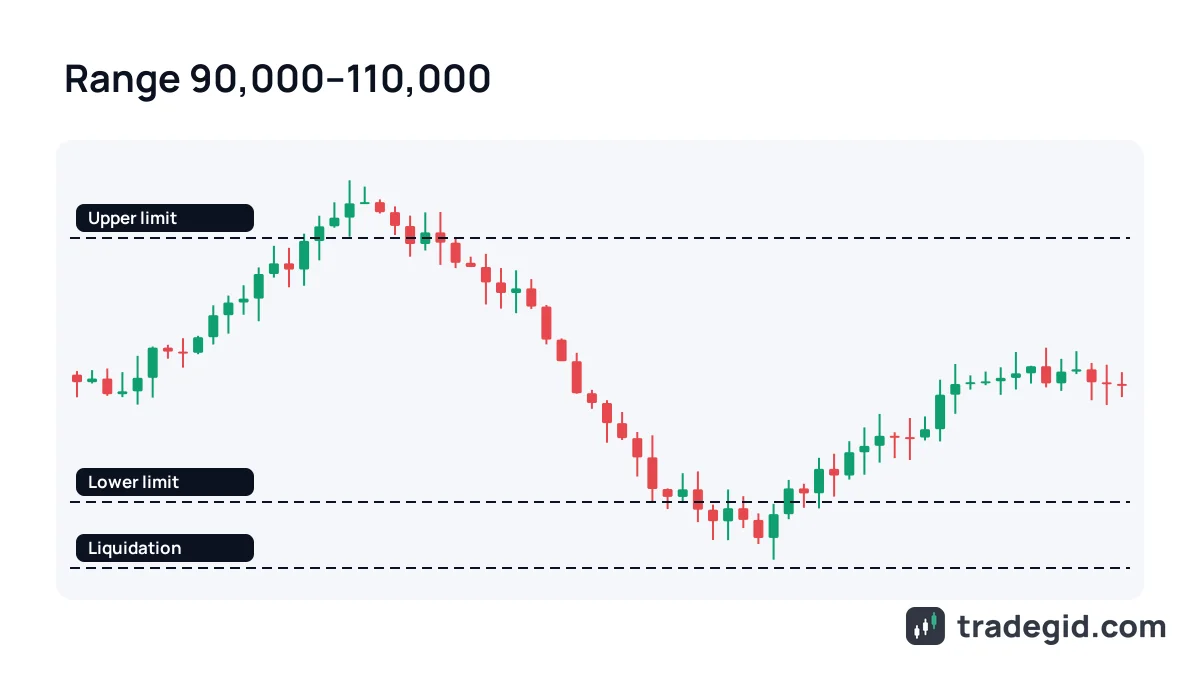
Example. BTC trades at 100,000 USDT. You start a long grid: range 90,000–110,000, 20 grids, 1,000 USDT of margin. Price drops, the bot buys down the ladder and the average entry becomes about 95,000. Here is where the liquidation price lands at different leverage.
| Leverage | Liquidation price (estimate) | From price 100,000 | Where it sits vs the 90,000–110,000 range |
|---|---|---|---|
| 2x | 48,000 | -52% | Far below the range |
| 3x | 63,800 | -36% | Far below the range |
| 5x | 76,500 | -24% | Below the range |
| 10x | 86,000 | -14% | About 4,000 under the lower limit |
| 20x | 90,700 | -9% | Inside the range: the bot is liquidated before price reaches the bottom |
Rough estimate for a long grid in isolated margin: average entry 95,000, maintenance margin assumed at 0.5%, no fees or funding. Formula: entry × (1 − 1/leverage + 0.005). The exchange shows the real number in the bot form.
What the table says. At 3x BTC has to fall about a third. At 20x a 9% drop is enough, and that is inside the range: the bot still counts as running, yet the position is already closed. Liquidation takes the bot's margin, 1,000 USDT here. That is why a beginner should stay at 2–3x at most, even though Gate allows 50x.
- Leverage 2–3x leaves a cushion of tens of percent between the lower limit and the liquidation price.
- An Auto stop-loss ratio with a threshold above the liquidation price makes the bot stop with a controlled loss.
- Spare USDT in the futures account for a possible margin top-up.
- Check the Estimated Liquidation Price before Create and after every edit.
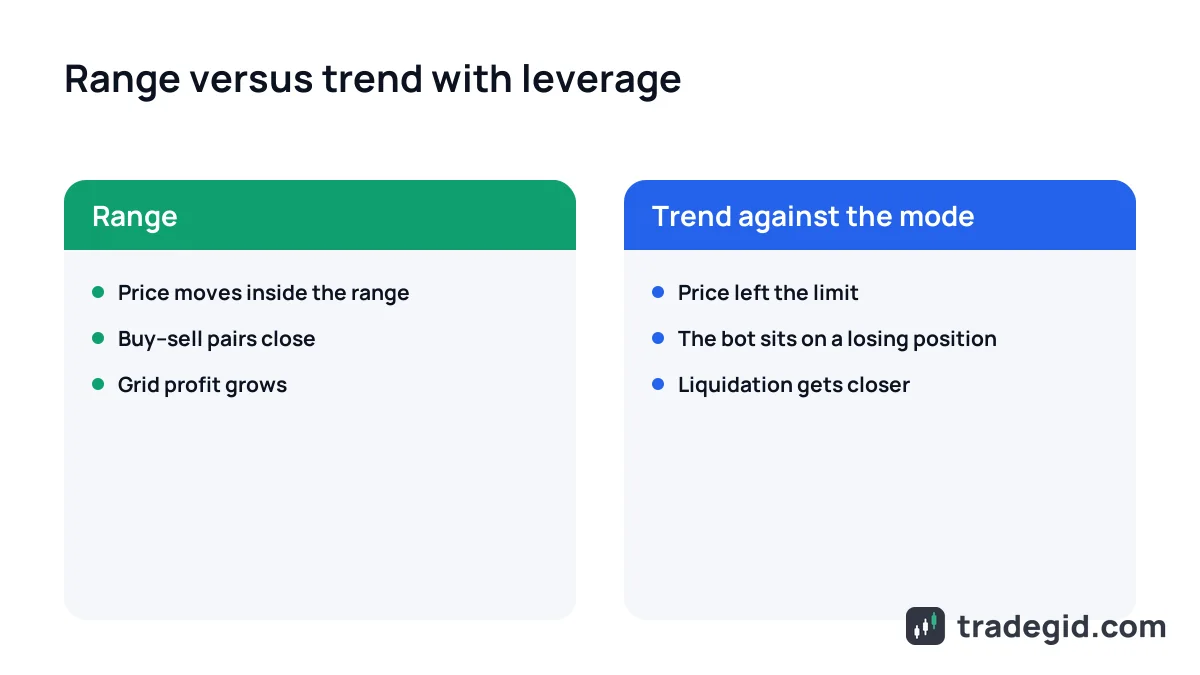
- Do not launch Long in a falling market or Short in a rising one: a trend against the mode leads to liquidation fast.
Leverage 2–3x, an automatic stop-loss and spare margin make liquidation a rare scenario. Plug your numbers into the liquidation calculator and read about liquidation in futures.
Calculator: grid step and profit per pair
These are the numbers from the liquidation example. The calculator shows the main trade-off: more grids mean a smaller step, and fees eat a bigger share of each pair's profit.
Futures fees on Gate
Gate's guide shows no separate charge for the bot, and trades go at ordinary futures rates. On perpetual contracts that is 0.02% maker and 0.05% taker at the base level. Grid orders are limit orders, so they are mostly maker, while a stop-loss exit goes at market. On top comes funding, a payment between longs and shorts, usually every 8 hours (check the contract card for its interval). More in the funding rate guide.
| Item | Rate | Comment |
|---|---|---|
| Bot subscription | 0 | Not found |
| Perpetual futures, maker / taker | 0.02% / 0.05% | Base level |
| Funding | Per contract | Longs or shorts pay depending on the sign of the rate |
| Copying a bot | 5% of profit to the author | Paid by the copier after the copy ends |
Sources: Gate fees, Gate bot help. I did not verify whether the GT payment discount applies to bot orders.
For new users
As the exchange puts it: welcome tasks for all new users. The current list is in Rewards Hub after you register.
- A welcome package of up to 135 USDT for tasks in Rewards Hub. These are task rewards, not withdrawable cash.
- Gate runs bot campaigns from time to time (for example, Bot Trial Fund for grid bots): check the announcements and the Campaigns section. Read each campaign's terms and country exclusions.
- Gate sometimes gives new accounts a higher Earn rate for a short term, so look for the banner in Simple Earn after you register.
Bot funds usually work only for grid bots and give a limited amount. Read the terms before launching.
If you do not have a Gate account yet, open the registration link, pass KYC and start with a small amount and 2–3x leverage.
New accounts: a welcome package worth up to 135 USDT for tasks; lower fees paid in GT.
Sign up on GateUVRGV1FXThe code can only be entered during sign-up.
Common beginner mistakes
- Leverage of 10x and up. The liquidation price sits next to the range, and at 20x inside it.
- A mode against the trend. A Long grid in a fall piles up a losing position, and a Short grid in a rise does the same.
- No auto stop-loss. Without it the bot holds on until liquidation.
- Forgetting funding. Over a long run it visibly eats grid profit.
- A country from the restricted list. The account gets frozen together with the bot.
- A narrow step. A step smaller than the entry plus exit fees loses money on every pair.
High leverage and no stop-loss cost more than any unlucky grid setup.
Other exchanges and bots
The grid principle and range selection are covered in the grid bot guide, and all bots are in the Bots section. The same bot on other exchanges: Binance, Bybit, OKX, Bitget. Without leverage, the spot grid on Gate is simpler.
New accounts: a welcome package worth up to 135 USDT for tasks; lower fees paid in GT.
Sign up on GateUVRGV1FXNew accounts via the link: tasks worth up to 250 USDT; 25% off spot fees paid in MNT.
Sign up on BybitJ8NKMG