

Gate Copy Trading: Step by Step, Fees and How to Choose a Trader
Gate copy trading sits under Trade → Copy and is mostly futures: a follower's leverage is capped at 20x and the minimum amount is set by each lead trader, usually from 10 USDT. Profit share is calculated every 7 days and deducted when copying ends. Gate is closed to residents of India, the Philippines, Russia and a long list of other countries.
Contents
- Where to find copy trading on Gate and who can use it
- How copying works on Gate: futures and spot
- What copy trading costs on Gate: profit share and fees
- How to copy a trader on Gate: step by step
- How to choose a lead trader
- How to stop copying and withdraw your money
- Common mistakes and risks
- Gate or other exchanges for copy trading
Gate's copy trading is less promoted than Bitget's or Binance's, but the follower's settings are quite detailed. I have traded since 2020 and went through this section using Gate's help center and trader cards. Below is what the official pages confirm and what Gate does not disclose.
Where to find copy trading on Gate and who can use it
On the website: Trade → Copy (the gate.com/copytrading page), then trader lists by category: Star Traders, Most Profitable, Largest AUM, Rising Talents by 7-day ROI and Prudent Trader, which balances Sharpe Ratio and ROI. In the app, type Copy Trading into search.
KYC is mandatory and access depends on your country of residence. EU residents are served by Gate EU, which is spot-only, so there is no futures copy trading there. Check the list before you register, because a referral link will not override it.
Sign up for Gate with our link – the referral code is applied automatically. Only if your country is not restricted.
New accounts: a welcome package worth up to 135 USDT for tasks; lower fees paid in GT.
Sign up on GateUVRGV1FXThe code can only be entered during sign-up.
How copying works on Gate: futures and spot
Gate's help center describes contract (futures) copying in detail. Money moves from your spot account to a separate copy sub-account and stays there until copying ends. Spot lead traders appear in the section, but I could not find detailed spot copying rules in the help center, so check the terms on the trader's card.
| Parameter | What it says |
|---|---|
| Minimum amount | Set by the lead trader, usually from 10 USDT; some require 50, 100 or 300 USDT |
| Modes | By total asset ratio (default in smart mode) or fixed multiplier from 0.01 to 100 (advanced mode) |
| Follower leverage | Up to 20x |
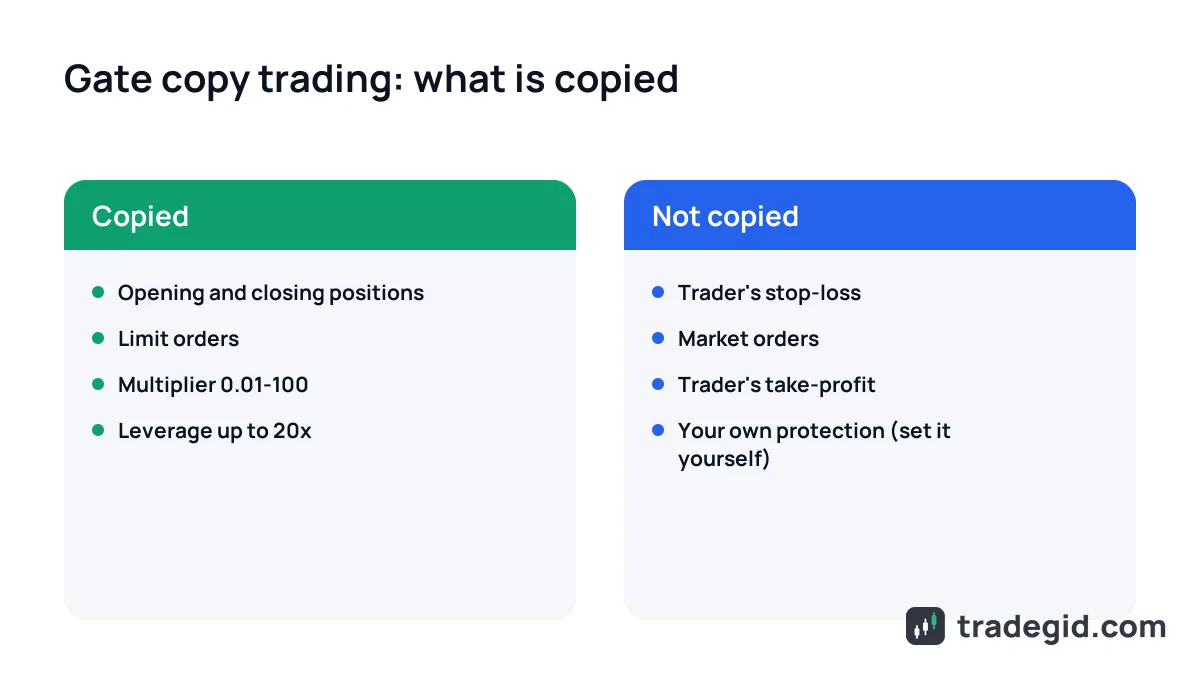
| Order types | Only limit orders are copied; if an order does not fill, the copy fails |
| Stop-loss | Not copied: you set your own take-profit and stop-loss |
| Slippage | Maximum from 0.1% to 3% |
| Trader's share | Percentage is not published as a range, it shows on the trader's profile. Calculated every 7 days and when copying stops |
| If the trader's assets fall below 200 USDT | New signals pause and resume at 300 USDT or more |
Rules as of November 2026, from Gate's help articles for copiers and lead traders. They change, so check the conditions on the trader's page.
The table points to two things. A trader's stop-loss will not appear on your account, so you must place your own. And copies use limit orders only: if price runs away and the trader's order does not fill for you, you miss part of the move. Gate's grid bots have their own logic and a 5% author share when copied; see our Gate grid bot guide.
What copy trading costs on Gate: profit share and fees
There is no subscription. You pay normal trading fees on every copied trade and a share of profit to the lead trader. For fee rates, see the Gate fee breakdown.
Gate does not publish a profit share range: the trader sets the percentage and it shows on their profile. By default it is calculated every 7 days and when copying stops, and it is deducted from profit together with trading fees. The payout to the trader arrives within 24 hours. If you have open positions, pending orders or a negative balance, settlement waits and rechecks every 10 minutes.
An example. You copy a trader with 500 USDT and a 10% share, and the copy grows by 100 USDT. After settlement 10 USDT goes to the trader and 90 USDT stays with you. If the copy is down, no share is taken, but trading fees are already charged. Gate's help counts it as historical profit minus fees on current positions minus the trader's share.
How to copy a trader on Gate: step by step
How to choose a lead trader
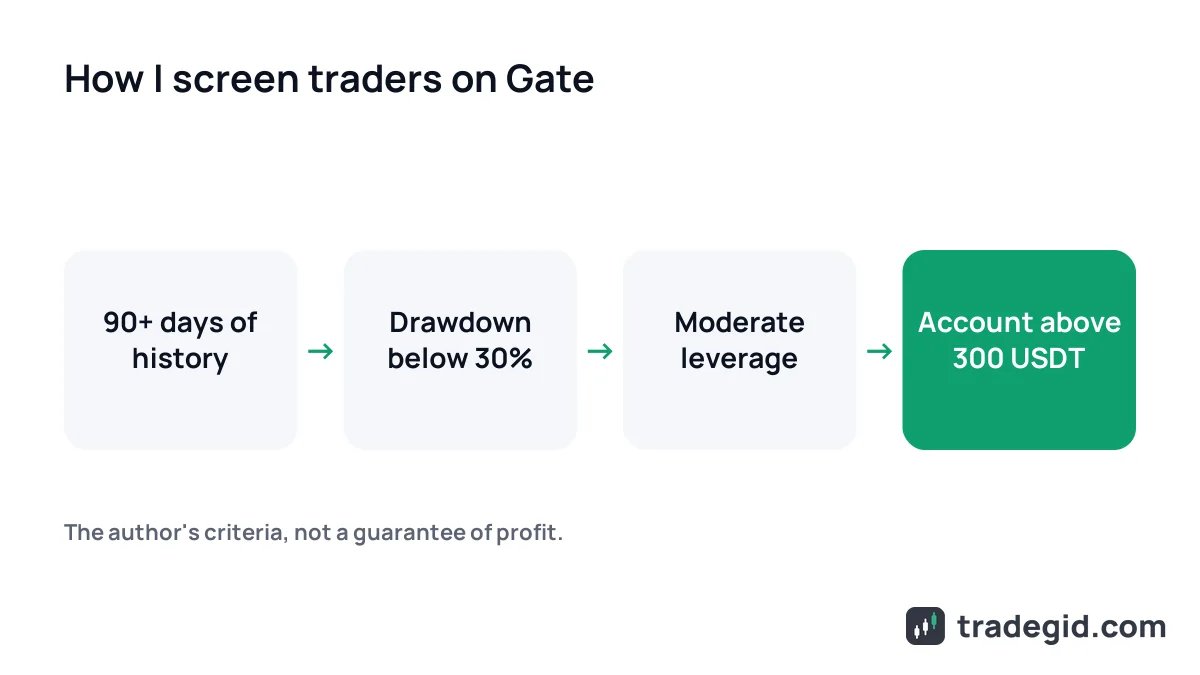
- Track record of 90+ days. One good month is luck; six months starts to look like a system.
- Maximum drawdown. A trader who already lost half the account will do it again with your money. I skip anyone above 30%.
- Leverage and style. High leverage makes a nice chart until the first sharp move. Check how long they hold losing positions.
- Size of the trader's account. If assets drop below 200 USDT, Gate pauses new signals. A very small account is unstable.
- AUM and number of copiers. A large portfolio on small coins suffers slippage and your entries come out worse.
- Profit share and minimum. 10% and 20% on the same return is a different amount over a year.
A good trader to copy looks boring: moderate ROI, shallow drawdown, long history. A great 7-day chart in Rising Talents is a reason to check whether it is just leverage.
How to stop copying and withdraw your money
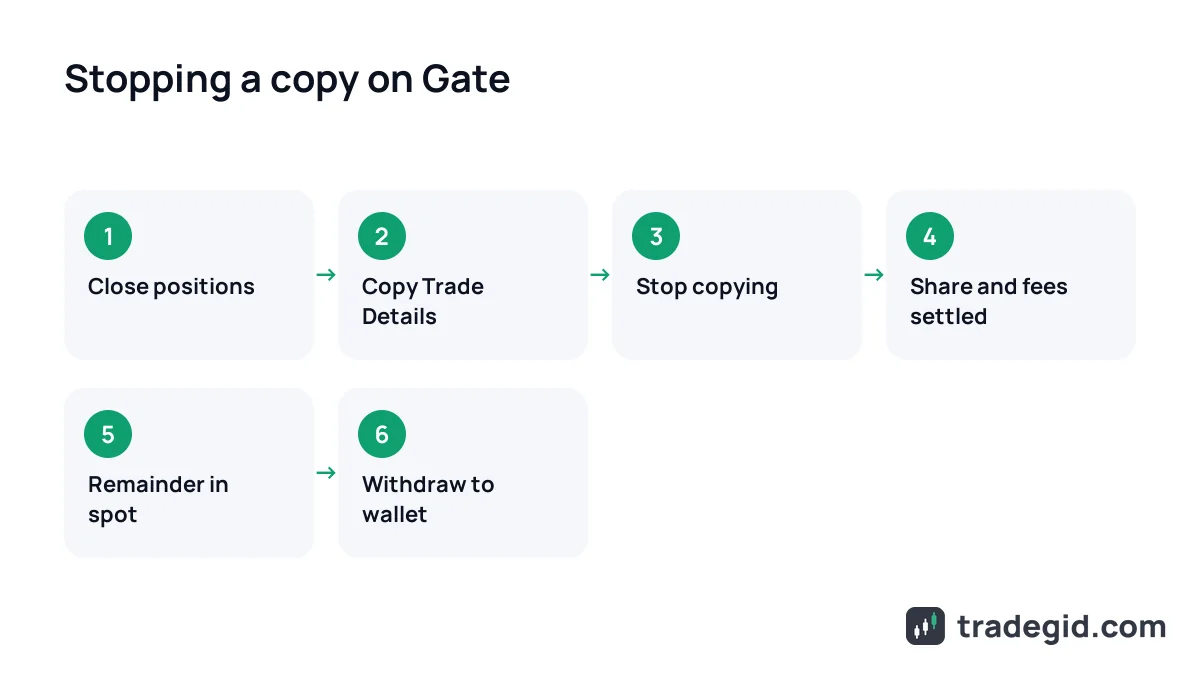
Only you can stop copying, and stopping ends the whole relationship with the trader, not a single trade. Open Copy Trade Details, press stop and confirm. The system then calculates the profit share and trading fees, and the remainder returns to your spot account.
- Before stopping. I close positions manually: Gate's help does not describe what happens to open positions on stop, so check the confirmation window.
- Settlement. The trader's share is calculated on stop; while positions or orders are open, settlement waits and rechecks every 10 minutes.
- Withdrawal. Money returns to your spot account after settlement. After that, withdrawal to an external wallet works as usual; check the address twice.
- Trial funds. If you copied with trial funds, they are reclaimed when you stop, and profit moves to spot once the trial ends.
Stopping a copy triggers a settlement, not an instant refund. Close positions yourself before stopping and check the final amount on your spot account.
Common mistakes and risks
- Copying the top 7-day ROI. It is almost always leverage in a lucky week.
- Skipping your own stop-loss. It is not copied, and a trader can hold a losing position for weeks.
- Putting the whole deposit on one trader. I split across at least three portfolios and never give copy trading more than 20% of my capital.
- Choosing a trader with a tiny account. Signals pause when assets fall below 200 USDT.
- Ignoring limit orders. If price runs away, your entry may not happen and your result will differ from the trader's.
Your main protection on Gate is your own stop-loss and a limited amount. A trader's bright chart replaces neither.
Gate or other exchanges for copy trading
Gate has strengths: a wide altcoin list and detailed follower settings. The downsides are no published profit share range and thin spot documentation. If you want the biggest copy trading section, look at Bitget, Binance, Bybit or OKX. General principles are in the copy trading guide.
Open a Gate account with our link – the referral code is applied automatically.
New accounts: a welcome package worth up to 135 USDT for tasks; lower fees paid in GT.
Sign up on GateUVRGV1FXThe code can only be entered during sign-up.
New accounts: a welcome package worth up to 135 USDT for tasks; lower fees paid in GT.
Sign up on GateUVRGV1FX20% off spot fees paid in BGB; new-user rewards in the Reward Center.
Sign up on BitgetBGGAPKEJNew accounts via the link: tasks worth up to 250 USDT; 25% off spot fees paid in MNT.
Sign up on BybitJ8NKMGNew accounts via the link are enrolled in the OKX New User Bonus program automatically.
Sign up on OKXK2FMEIJ3