

OKX Copy Trading: Step-by-Step Guide, Fees and How to Choose a Lead Trader
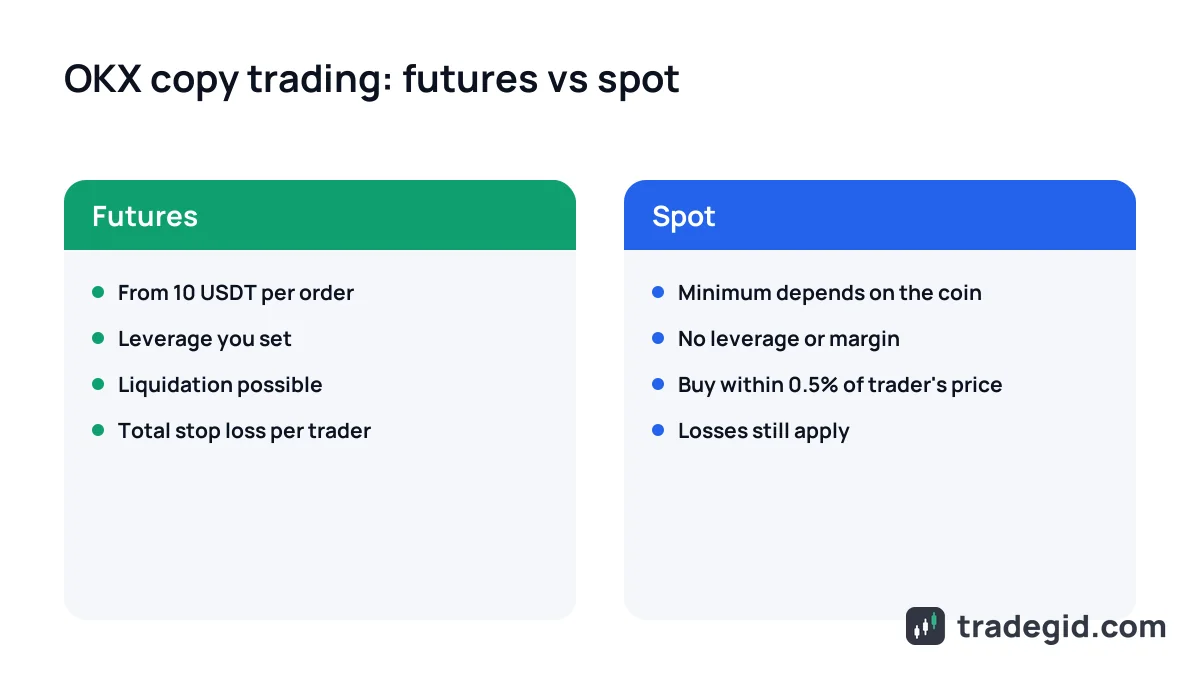
OKX copy trading sits under Trade → Bots & Copy → Copy trading and comes in two kinds: futures and spot. The minimum per OKX help is 10 USDT per order, the lead trader takes up to 30% of net profit (the exact figure depends on their level), and you pay normal trading fees. Your money stays on your own account, and so do the losses.
Contents
Below is the path from sign-up to stopping a copy, based on OKX's help pages and on how I would set it up myself: a small amount, my own stop loss and no heavy leverage.
Where to find OKX copy trading and who can use it
On the website the path is Trade → Bots & Copy → Copy trading. In the app you can also go through Explore → Copy trading, which lists lead traders. Menu names may differ slightly in your interface language.
Lead traders come as futures, spot and bot traders. Futures and spot traders can only be copied in their own format, while bot traders can be copied for both. If you do not see the section, copy trading is not available in your jurisdiction: OKX says outright that the feature is not supported in every market.
| Country | Status | What to check |
|---|---|---|
| India | Restricted | OKX is on the restricted list for India; verification will not pass, so use a platform registered in your country |
| Nigeria | Reported back | Nigerian media reported P2P and full access returning in 2026; confirm copy trading in the app after verification |
| Philippines | Regulatory risk | Not on OKX's restricted list, but the SEC has flagged OKX as unregistered and local access has been blocked |
| EU / EEA | OKX Europe | Separate entity with a narrower product set; check whether the copy trading tab appears |
From our OKX review; OKX publishes its country list in the Risk and Compliance Disclosure. Using a country that does not match your documents gets accounts frozen.
Sign up for OKX through the link – the referral code is filled in automatically.
New accounts via the link are enrolled in the OKX New User Bonus program automatically.
Sign up on OKXK2FMEIJ3The code can only be entered during sign-up.
What copy trading costs on OKX
| Item | What the OKX help pages say |
|---|---|
| What you can copy | Futures and spot; you can switch both on |
| Minimum | 10 USDT per order; on spot the minimum depends on the coin, shown in the form |
| Lead trader's share | Up to 30% of net profit, depending on the trader's level. Traders can change their ratio up to 3 times a month |
| How the share is calculated | After trading fees; gains and losses within the week offset each other |
| When it is charged | Weekly, calculated on Monday at 00:00 (UTC+8). If you still hold copied positions, settlement moves to a later period |
| Trading fees | Normal, by your OKX fee tier, see OKX fees |
| Leverage | On futures you set it yourself up to the coin's maximum; there is no leverage on spot |
| Price tolerance on spot | Your buy price cannot differ from the trader's by more than 0.5% |
Data as of November 2026 from OKX help: profit sharing rules, copy trading guidebook, spot copy trading. A specific trader's ratio is shown on their profile.
A simple example. You allocate 1,000 USDT to a trader with a 15% share. The week closes with 100 USDT net profit after fees, so the trader gets 15 USDT and you keep 85. If the week is negative, the trader gets nothing and does not cover the loss. The numbers are illustrative, not a forecast.
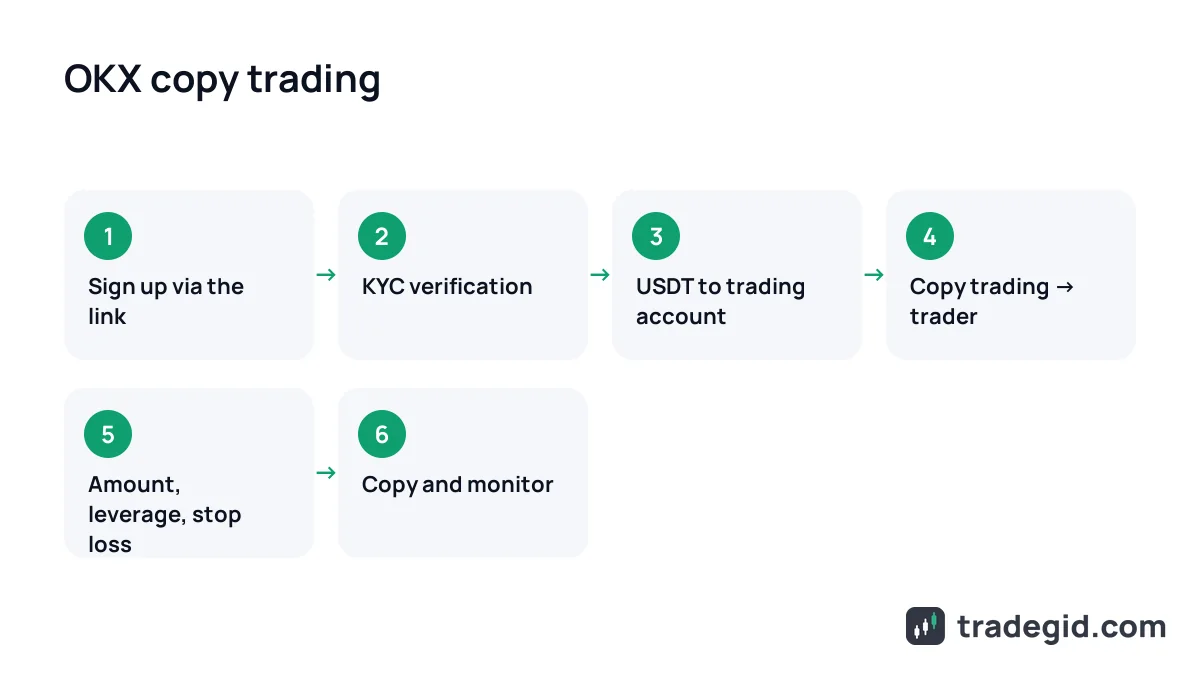
OKX copy trading step by step
- Sign up for OKXOpen OKX sign-up through the referral link, choose your real country of residence and confirm your email or phone. The referral code is filled in automatically.
- Complete verification (KYC)Profile → Verification → Individual account: personal details, ID photo and a selfie. Review usually takes up to a day. Turn on 2FA under Security straight away. More in the OKX sign-up guide.
- Fund your trading accountCopying uses USDT in your trading account. Deposit USDT to OKX (P2P or a transfer from another exchange) and move it from the funding account to the trading account.
- Open Copy tradingTrade → Bots & Copy → Copy trading (in the app also Explore → Copy trading). Pick the futures or spot format.
- Pick a traderFilter by track record, drawdown, leverage and AUM rather than return; the criteria are below. Open the profile and tap Copy.
- Set the parametersAmount type, amount per order, maximum total amount, margin mode, leverage and a total stop loss for the trader. The next section explains each field.
- Confirm the copyTap Copy, review the order summary and tap Copy again. Only new trades from the trader are copied.
- Monitor the resultTrade → Bots & Copy → My copies. Once a week compare your result with the trader's chart and reconsider.
The first two steps are sign-up and verification; without them the copy trading section will not open. The rest takes a few minutes, so do not rush the settings.
Copy settings: what each field means
How to choose a lead trader on OKX
It is easy to fixate on seven-day returns in the lead trader list. I look at other fields of the profile:
- Track record. You want months of trades, ideally six or more, so the trader has lived through both a rally and a correction.
- Maximum drawdown. Ask yourself whether you could watch the same drawdown on your own account.
- Leverage and liquidations. If the average position runs at ×30 or more, your account will be liquidated before the trader's.
- AUM and number of copiers. On OKX, AUM is the total investment of copiers; AUM and trader levels are recalculated weekly, and the level sets the maximum share.
- Profit share. It runs from 0 to 30% by level: with the same return, a trader with a lower share leaves you more.
- Trader type. Futures, spot or bot traders carry different risks; do not mix them in one decision.
Look for a boring chart: long history, modest drawdown, moderate leverage. Flashy weekly results more often come from people risking other people's money.
If you want automation without someone else's trader, OKX has its own tools: OKX trading bots. It is a different product, but the leverage and drawdown risks are the same.
How to stop copying and withdraw
- Open Trade → Bots & Copy → My copies.
- Next to the trader, tap Manage to change settings for new positions, or the Stop copying icon to end the copy.
- Check what happens to open positions: on spot, unsold coins stay with you until you sell them; on futures it is cleaner to close positions manually on the copy management page first.
- After stopping, move USDT back to your funding account and withdraw as usual: crypto to another exchange or wallet, or sell through P2P.
Stopping and withdrawing are two separate actions: Stop copying first, then transfer the funds. The trader's share is still settled under the weekly period rules.
Common mistakes when copying on OKX
| Mistake | What happens | What to do |
|---|---|---|
| Picking by last week's return | You copy a lucky trader just before a big drawdown | Check track record, drawdown and leverage |
| No total stop loss | Loss on that trader has no limit | Set a maximum loss in the copy form |
| High leverage in the settings | Liquidation before the trader's | Start at 3–5x with isolated margin |
| Everything on one trader | One bad stretch eats all the capital | Small amount, one or two traders |
| No free USDT left | Orders are not copied for lack of margin | Keep a buffer in the trading account |
| Not selecting all contracts | Part of the trader's trades is skipped | Select all available contracts or limit them on purpose |
| Set it and forget it | The trader changed style and you missed it | Check My copies once a week |
Risks of OKX copy trading
- Liquidation. Your account can be liquidated before the trader's if your margin or leverage differ.
- Slippage. You enter later at a worse price; on spot a buy is not copied at all if the price moved more than 0.5%.
- Limits and blocks. A copy can fail if the trader stopped leading, hit a daily limit or triggered risk control.
- Past results. The return on a profile is a past result, not a promise. Next month can look different.
- Country access. OKX changes rules and country lists. Do not enter a different country at sign-up: the account gets frozen with the balance when documents are checked.
OKX copy trading does not protect you from losses: trader choice, leverage and stop loss stay with you. Allocate only money whose loss will not hurt your budget.
Open an OKX account through the link and start with the minimum amount.
New accounts via the link are enrolled in the OKX New User Bonus program automatically.
Sign up on OKXK2FMEIJ3The code can only be entered during sign-up.