

Signal bot: what it is and how to connect TradingView to an exchange
A signal bot is a bot that places orders when it receives a signal: most often an alert from TradingView that arrives at the exchange as a webhook (an HTTP request with a short message). The exchange reads the message, opens or closes a position and you do not have to sit at the screen. Webhooks need a paid TradingView plan, and the bot only executes: a bad strategy keeps losing, just without emotion.
Contents
I started wiring TradingView alerts to an exchange because I kept missing entries: the RSI crossed, I was away from the phone, and the move was over. A signal bot fixes exactly that and nothing more. It does not know whether the signal is any good. It receives text, checks it, and sends an order.
What a signal bot is and what it is not
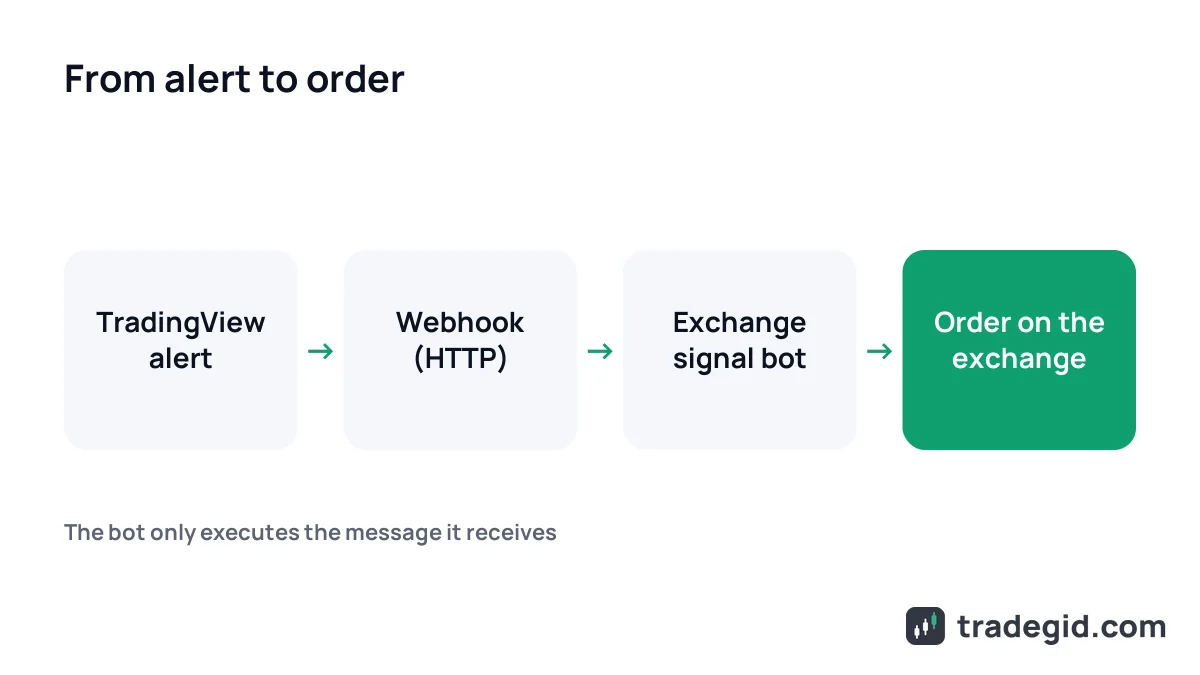
The chain has four parts. A condition on a chart (an indicator cross, a price level, a Pine Script strategy fill) triggers a TradingView alert. The alert sends a message to a webhook URL. The exchange receives it, checks the secret token and the age of the message, and places an order in the pair you set up. That is the whole idea.
A signal bot is not a money printer and not a strategy. If your indicator is wrong half the time, the bot will be wrong half the time, faster and at 3 a.m. Treat it as a way to execute rules you have already tested by hand. Indicators such as RSI, MACD and moving averages are the usual sources of signals.
OKX has a built-in Signal Bot that accepts TradingView webhooks. If your country is supported and you have no account yet, sign up through this link: the referral code is filled in for you and bots unlock after verification.
New accounts via the link are enrolled in the OKX New User Bonus program automatically.
Sign up on OKXK2FMEIJ3The code can only be entered during sign-up.
How TradingView connects to an exchange
| Piece | Where it lives | What it does |
|---|---|---|
| Alert | TradingView, on the chart | Fires when your condition or strategy order happens |
| Message | The alert's Message field | Text (JSON) that says what to do: action, pair, size |
| Webhook URL | Alert, Notifications tab | The address the message is sent to; the exchange gives it to you |
| Signal token | Inside the message | A secret that proves the message is yours |
| Signal bot | The exchange, Trading bots | Validates the message and places the order with your leverage and margin |
Based on the OKX help article on the signal bot with TradingView. Other exchanges name the pieces differently.
Which exchanges have this built in
On OKX the signal bot is a ready-made product: you create a signal in the marketplace, copy the webhook URL and the message template, and paste them into TradingView. I verified this flow in OKX's own help. For Binance, Bybit, Bitget and Gate I did not find a comparable button "paste a TradingView webhook here" in their official help, so I do not claim it exists.
On those exchanges people usually connect TradingView through their own small server or a third-party service that holds an API key. That is a different risk level: you hand a trading key to someone else's code. If you do it, create the key with trading permission only, never withdrawal, and restrict it by IP where the exchange allows it.
Set up the OKX Signal Bot step by step
Two details cost people time. First, the signal bot trades perpetual swap contracts, so leverage and liquidation apply even at 1x thinking. Second, a contract on TradingView and a contract on OKX can have different sizes, so a quantity copied from a strategy may not mean what you expect. Check the pair's contract size before the first live signal.
What the alert message contains
The message is JSON. OKX generates the template, so do not type it from memory. In the strategy template the fields include action, instrument, signalToken, timestamp, maxLag, investmentType and amount. A simplified custom message looks like this: {"action":"ENTER_LONG","instrument":"BTC-USDT-SWAP","signalToken":"your-token","timestamp":"{{timenow}}","maxLag":"60","investmentType":"percentage_balance","amount":"10"}. This is an illustration, always copy the real template from the signal page.
| Field | Meaning | Example |
|---|---|---|
| action | What to do | ENTER_LONG, EXIT_LONG, ENTER_SHORT, EXIT_SHORT |
| instrument | Contract to trade | BTC-USDT-SWAP |
| signalToken | Your secret from the signal page | set by OKX |
| timestamp | When TradingView sent it | {{timenow}} |
| maxLag | How old a message may be before it is ignored, in seconds | 60 |
| investmentType | How to read amount: base, percentage_balance, percentage_position | percentage_balance |
| amount | Size of the order | 10 |
For Pine Script strategies OKX advises setting investmentType to base and amount to the strategy's order contracts, and sizing in USDT or contracts rather than percent of equity, because backtests and live trading can differ.
- ENTER_LONG / ENTER_SHORT open a position in that direction.
- EXIT_LONG / EXIT_SHORT close it.
- percentage_balance is a share of free balance, used for entries.
- percentage_position is a share of the open position, used for exits.
Four actions and three ways to measure size are enough for most setups. Take profit and stop loss are set in the bot itself, not in the alert.
Which TradingView plan you need
Webhook notifications are not available on the free plan. You need a paid one, and the cheapest paid plan, Essential, already includes webhook alerts. Prices and limits change, so check the current figures on the TradingView pricing page. Our plans comparison and the Essential vs Plus vs Premium guide show what else each tier gives. The number of alerts per plan is also a limit: one signal strategy on many pairs eats alerts quickly.
Risks of automated signal trading
- False signals. Indicators fire in noise. A backtest on a chart is not a promise of live results.
- Delay. The path alert, webhook, exchange takes seconds. In a fast market the fill price differs from the chart.
- Leverage. The bot trades derivatives. A chain of losing signals with high leverage ends in liquidation.
- Duplicate or missed alerts. A TradingView outage or an expired alert means a position is not opened or not closed.
- A leaked token. Anyone with your webhook URL and token can send orders to your bot. Keep them private.
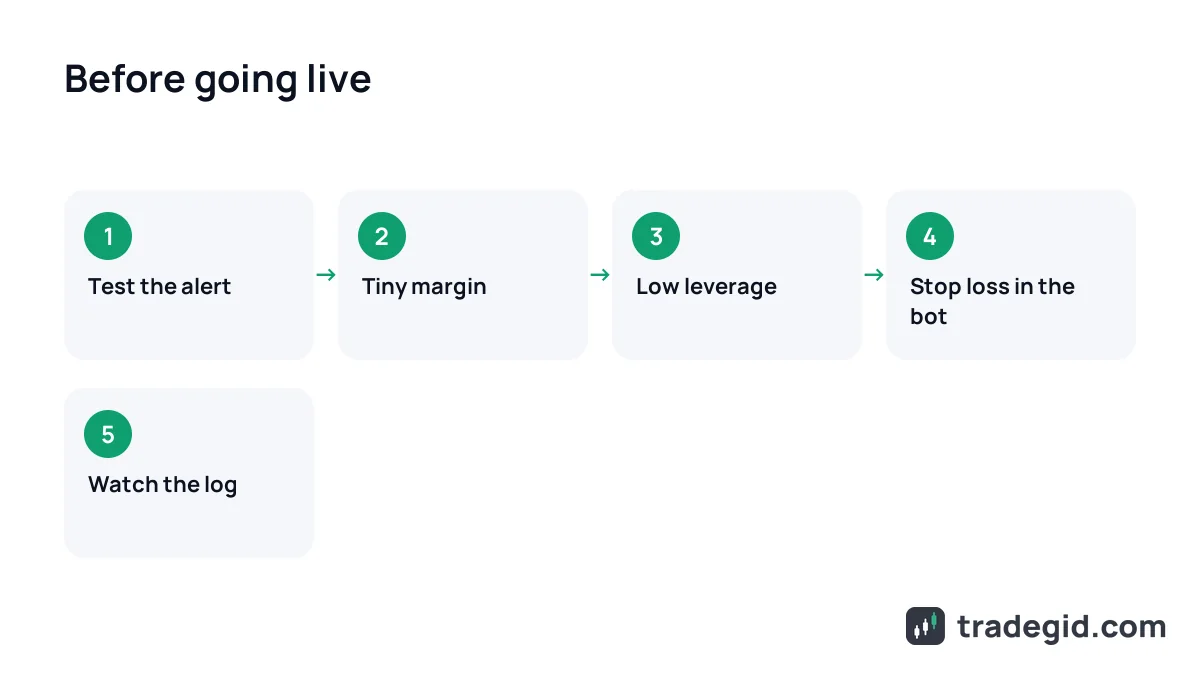
Most losses with signal bots come from the strategy and the leverage, not from the technology. Start with small margin and low leverage, and watch the first weeks manually.
If you are not sure you need automation at all, start with something simpler: the spot grid bot works without signals, and the overview of all OKX bots is in the OKX bots guide. Execution tools for large orders are covered in TWAP and iceberg orders.
New accounts via the link are enrolled in the OKX New User Bonus program automatically.
Sign up on OKXK2FMEIJ3New accounts via the link: tasks worth up to 250 USDT; 25% off spot fees paid in MNT.
Sign up on BybitJ8NKMG