

Bybit Futures Grid Bot: Setup, Leverage and Liquidation Explained
You create a Bybit futures grid at Tools > Trading Bot > Futures Grid: press Create, choose Manual or AI Strategy, set the pair, the direction (Neutral, Long or Short), Price Range, Grids, leverage and Total Investment, then press Confirm. There is no separate bot fee, and the maximum loss equals the amount invested. Below are the steps, the liquidation math and why 2-3x leverage is enough for a beginner.
Contents
- How a futures grid works and why it is riskier than a spot grid
- Steps 1-3: sign-up, KYC and USDT in the futures wallet
- How to create a futures grid on Bybit: web and app
- Long, short or neutral: which mode to pick
- Grid parameters: what they do and what a beginner should set
- Liquidation: why 2-3x leverage is enough for a beginner
- Profit per grid: a worked example
- Bybit futures grid fees and funding
- For new users
- Common beginner mistakes
- Other exchanges and bots
You need a Bybit account first. Signing up through the link opens the form with the referral code filled in, and the bots are available after verification.
New accounts via the link: tasks worth up to 250 USDT; 25% off spot fees paid in MNT.
Sign up on BybitJ8NKMGThe code can only be entered during sign-up.
How a futures grid works and why it is riskier than a spot grid
A futures grid splits the range between a lower and an upper price into grid levels and places limit orders on a perpetual contract. In long mode the bot buys dips and sells bounces, in short mode it does the opposite. The money works with leverage, so each trade pair earns more than on spot, but you get something spot does not have: a liquidation price.
On spot, a price below the range gives you a paper loss on a coin you can simply hold. On futures the position sits on margin: if the price moves far enough against it, the exchange closes the position by force and the bot's margin is gone. The worst case is losing the whole amount you put into the bot. The general idea of the grid is in the grid bot guide for beginners.
Steps 1-3: sign-up, KYC and USDT in the futures wallet
- Sign up through the referral linkSign up on Bybit: the form opens with the referral code filled in. Confirm your email or phone, set a password and turn on 2FA. Details: Bybit registration.
- Verification (KYC)Bots need KYC at Standard level (Lv.1): the document and face check in the profile verification section. Enter your real country.
- Move USDT to the Funding AccountTotal Investment comes from the Funding Account. Buy USDT on P2P or send it from another wallet to Funding (the Deposit and Transfer buttons). If your USDT sits in another account, move it in the assets section.
You need an account, a finished KYC and USDT in the wallet the bot takes margin from, otherwise the create button will not work.
How to create a futures grid on Bybit: web and app
The web path is Tools > Trading Bot > Futures Grid, or on the futures trading page Tools > Futures Grid in the order panel, then the Create button. The app has the same Trading Bot section. Field names come from the Bybit article "How to Get Started with Futures Grid Bot".
Long, short or neutral: which mode to pick
| Mode | What the bot does | When it fits | Main risk |
|---|---|---|---|
| Long | Buys below the current price, sells above; holds only long positions | Sideways market or slow rise | A drop below the range: paper loss and liquidation |
| Short | Sells above the price, buys back below; holds only short positions | Sideways market or slow decline | A rise above the range: the short gets liquidated |
| Neutral | Orders both above and below the current price; the bot can hold both long and short | A clear range with no direction | A sharp move either way, plus funding |
Mode names and logic follow the exchange help pages. The columns "When it fits" and "Main risk" are my own notes, not exchange rules.
A beginner is better off starting with a long grid on BTC or ETH: there is one danger, a drop, and you can see it on the chart. Neutral mode looks universal, but it can be liquidated on both sides, and positions in opposite directions pay and receive funding. More on directions: long and short, and on funding: the funding rate.
Grid parameters: what they do and what a beginner should set
| Parameter | What it does | What a beginner should set |
|---|---|---|
| Pair | The bot's futures pair | BTCUSDT or ETHUSDT |
| Order Direction | Neutral (default), Long or Short | Long for the first runs |
| Price Range | Lower and upper trading limits; Smart Fill fills them in | Sideways range of the last 2-3 weeks with a 3-5% buffer |
| Grids | Number of grids, up to 400 per the help data | 10-30 |
| Arithmetic / Geometric | Equal step in USDT or in percent (Arithmetic by default) | Arithmetic for a narrow range |
| Leverage | Leverage, each pair has its own maximum | 2-3x |
| Total Investment | The amount from the Funding Account | 5-10% of the deposit |
| Entry Price | Start price, 30-100% of the market | Leave empty |
| Stop-Loss | Below the entry price and the lower limit, up to 100% | Just below the range and above the liquidation price |
| Take-Profit | Above the entry price and the upper limit, up to 500% | By plan: where you are happy with the result |
| Trailing Stop | Exit on a pullback from peak equity | Turn on if you cannot take a deep drawdown |
| Trailing Up / Down | Shifts the grid with the price | Turn off |
Source: the Bybit article "How to Get Started with Futures Grid Bot" and the FAQ. The column "What a beginner should set" is my own experience, not exchange rules. Each pair has its own maximum leverage, shown on the bar in the form.
Liquidation: why 2-3x leverage is enough for a beginner
The liquidation price is the level where the position's margin stops covering the loss and the exchange closes the position by force. The higher the leverage, the closer that price sits to your entry. A rough estimate for a long: entry price minus margin divided by position size in coins. The real price is a bit closer to entry, because the exchange takes maintenance margin, fees and funding into account.
Take a coin at 100 USDT, a long grid of 90-110 and 1,000 USDT of margin. We count the worst case: the grid has already bought the whole position around 100. Here is what different leverage does:
| Leverage | Position size | Price drop to liquidation | Liquidation price (rough) |
|---|---|---|---|
| 2x | 2,000 USDT | about 50% | about 50 |
| 3x | 3,000 USDT | about 33% | about 67 |
| 5x | 5,000 USDT | about 20% | about 80 |
| 10x | 10,000 USDT | about 10% | about 90 |
| 20x | 20,000 USDT | about 5% | about 95 |
A teaching estimate without maintenance margin, fees and funding: on the exchange, liquidation comes a little earlier. Check your own price in the bot form and in the liquidation calculator.
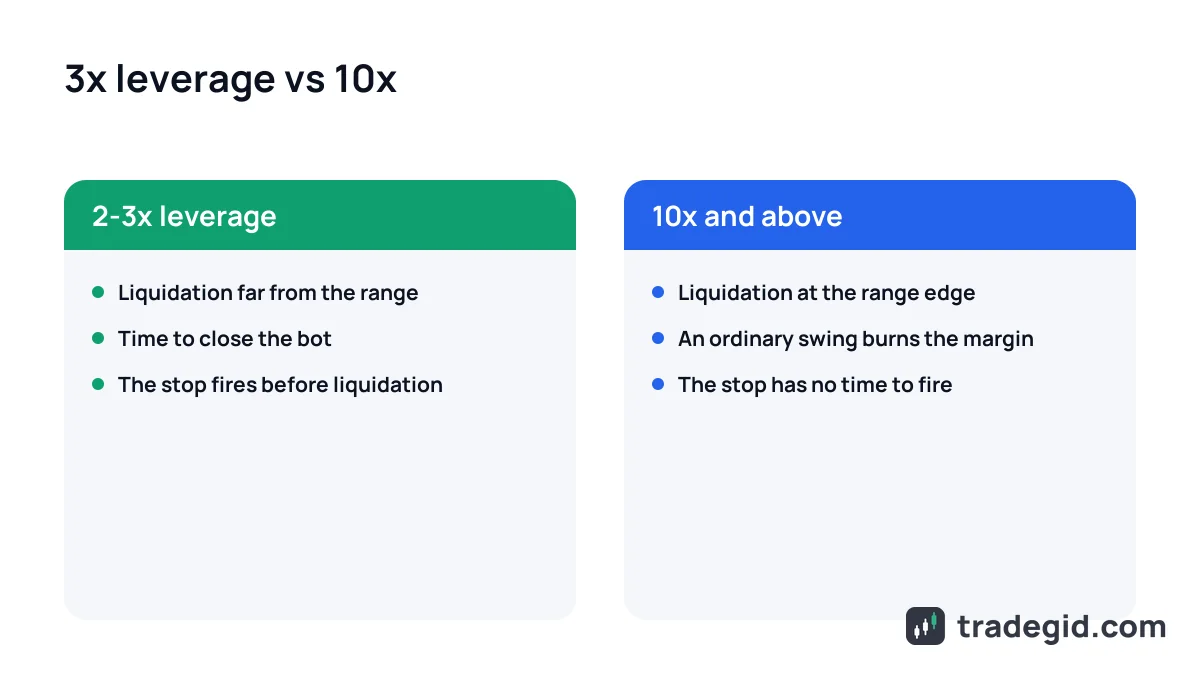
At 10x, liquidation sits at the lower edge of the 90 range: a move out of the grid downward burns the bot almost at once. At 20x it is inside the range, and the bot will not even live to its own stop-loss. At 3x the price has to fall by a third, so you have time to close the bot by hand. The general principles are in the guides on liquidation and leverage.
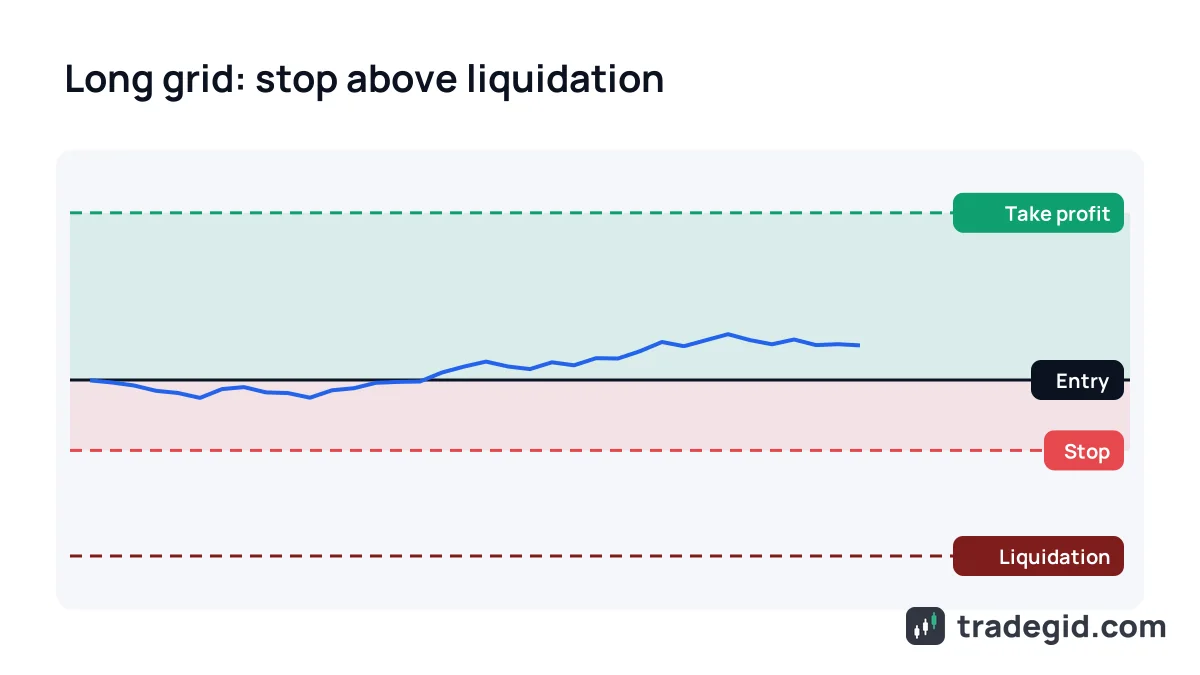
A worked example: 3x leverage, a position of up to 3,000 USDT, margin of 1,000 USDT. The price falls from 100 to 90, that is 10%: a paper loss of about 300 USDT, or 30% of margin. A stop-loss at 88 closes the bot with a loss of about 360 USDT (36% of margin): painful, but 640 USDT is left. Without a stop, and with a fall to around 67, the bot gets liquidated and you lose about 1,000 USDT.
Per the Bybit help data, liquidation happens at a Maintenance Margin Rate of 100% or more, and the bot's maximum loss equals the amount invested in it: the loss does not spill onto the rest of the account. The bot stops automatically on TP, SL, liquidation or Trailing Stop.
- Use 2-3x leverage: liquidation needs a drop of a third or more, while at 10x and above the liquidation price is at the lower edge of the range.
- Put the stop-loss just below the range and always above the liquidation price, so the stop fires before the forced close.
- Put no more than 5-10% of your deposit into one bot: even a total loss of its margin does not wreck the account.
- Re-check the liquidation price after every change of leverage, range or margin, not only at creation.
- Do not add margin to a falling bot "to push liquidation away": that grows the loss instead of saving the position.
My order: 2-3x leverage, stop above liquidation, a small share of the deposit. If the liquidation price sits at the edge of the range, the leverage is too high.
Profit per grid: a worked example
Range 90-110, 20 grids, 1,000 USDT of margin and 3x leverage: the bot holds up to 3,000 USDT of position. The step is 1 USDT, about 1%, and each order is 150 USDT of position. A buy-sell pair earns about 1.5 USDT before fees.
The bot's limit orders pay a maker fee of 0.02% on each side, about 0.06 USDT per pair. That leaves about 1.4 USDT per grid while the price moves inside the range. If a stop hits at market, the fee is a taker fee, and funding is added or subtracted separately. Change the numbers in the calculator.
Bybit futures grid fees and funding
Bybit charges no separate fee for the bot: USDT perpetual rates and funding apply. The grid's limit orders go at the maker rate.
| Item | Rate | Comment |
|---|---|---|
| Bot subscription | 0 | Free |
| USDT perpetual, maker | 0.02% | The grid's limit orders |
| USDT perpetual, taker | 0.055% | If an order fills at market, for example on a stop |
| MNT discount (-10% on futures) | Does not apply to bots | Per the Bybit help data |
| Funding | Floating | You pay or receive, most visible in Neutral |
| Bot limit | Up to 50 of each type | Futures Grid is counted separately |
Sources: Bybit fees, the Futures Grid help article. Check your own rate under My Fee Rate after verification.
For new users
As the exchange puts it: bonuses and tasks for all new users. The conditions are below, and the current list is in Rewards Hub after you register.
- Referral tasks for new accounts with rewards of up to 250 USDT.
- Earn for newcomers: Bybit has offered new accounts a newcomer product with a very high rate for 2-3 days and a capped amount, so check the Earn section after you register.
- The Loss Cover Voucher covers the loss when a bot stops (Spot Grid, Futures Grid, DCA) if settlement is in USDT or USDC. Claim it at Rewards Hub > My Rewards > Claim. Check Rewards Hub for live bot promos.
Tasks and vouchers come in waves. Do not take more risk than you planned just to chase them.
If you do not have a Bybit account yet, sign up through the link, finish KYC and start with a small amount and 2-3x leverage.
New accounts via the link: tasks worth up to 250 USDT; 25% off spot fees paid in MNT.
Sign up on BybitJ8NKMGThe code can only be entered during sign-up.
Common beginner mistakes
- 10x or more leverage "to go faster". Liquidation lands at the edge of the range, and an ordinary swing burns the bot.
- No stop-loss. Without one the bot keeps piling up a losing position until liquidation.
- A range that is too narrow. The price leaves it in a couple of days, the bot stops and the position stays open.
- A long in a clear downtrend, a short in an uptrend. A grid earns on swings, not on a move against you.
- Too many grids on a small margin. The order falls below the exchange minimum or the step is smaller than the fee: the bot does not start or earns nothing.
- Forgetting funding. In a long with a positive rate you pay every few hours, and a week adds up to a noticeable sum.
- Launching and not looking. The bot does not move its own range: check it at least once a day.
Almost all losses on a futures grid come from leverage, a missing stop and a forgotten bot, not from a "bad strategy".
Other exchanges and bots
The grid principle and the risks are covered in the general guide: grid bot for beginners. The spot version with no liquidation is in the Bybit spot grid manual, and for other exchanges there are Binance and OKX. The full list of bots is in the /bots/ section.
New accounts via the link: tasks worth up to 250 USDT; 25% off spot fees paid in MNT.
Sign up on BybitJ8NKMGNew accounts get up to 100 USD in trading-fee vouchers after KYC.
Sign up on Binance58328288New accounts via the link are enrolled in the OKX New User Bonus program automatically.
Sign up on OKXK2FMEIJ3